


On a Thursday evening, a teacher posts a clarification in a graded discussion that closes the next day. However, half the class never gets the email, because of a Moodle 4.5 forum notification lock timeout.
By Friday morning, the teacher faces a wave of extension requests and frustrated parent emails. The post itself is present and correct within Moodle. Yet, the notification, the vital link to students and families, failed.
The background job that sends notifications collided with itself in the database and gave up. In other words, it is a quiet technical fault with real academic consequences for a private school.
I recently migrated my site to Mindfield from another host, and the experience couldn’t have been better. Mindfield kept working until they were certain that my site was operating as well as it was before, and they even helped clean up a few issues to improve my site’s performance – issues my prior host never mentioned. I also found Mindfield’s communication to be excellent. Before the migration, they prepared me for what to expect, and during the migration they kept me well-informed.
Jim Benedek
review Source: Google Reviews
Outline
- What a Delayed Forum Notification Costs a School
- Why a Moodle 4.5 Forum Notification Lock Timeout Only Shows Up at School Scale, and the Warning Signs
- How the Database and Server Setup Decide Whether Notifications Stall
- Tune the Moodle 4.5 Site or Plan the Move to 5.X to Address Lock Timeouts
- Who Owns Notification Health After the Fix
- How Mindfield Helps Schools Keep Moodle Notifications On Time
- Frequently Asked Questions (FAQs)
What a Delayed Forum Notification Costs a School

When forum notifications are delayed or missed, the impact on a school’s operations and academic integrity can be substantial. These are not minor technical glitches. Instead, they directly affect student learning, teacher workload, and parent communication. Consequently, the consequences ripple through the entire school community.
The Ripple Effect of Missed Timelines
A forum post at a private school often carries significant weight. For example, it can be a teacher’s instruction, a student’s graded submission, or a critical announcement. Therefore, a delay in notification can derail academic progress. Additionally, it generates extra work for teachers and administrative staff.
The table below illustrates the specific costs associated with late forum notifications:
| Forum post | Who is waiting for it | What a late notification costs |
|---|---|---|
| A teacher’s clarification on a graded discussion | Students working to the due date | Wrong or late submissions, extension requests, grade disputes. |
| A reply to a student’s question in a graded forum | The student | The student waits or guesses; the teacher looks unresponsive. |
| An announcement (schedule change, closure, exam room) | Students and families | People show up at the wrong place or time; the front office takes the calls. |
| Peer replies a grade depends on | Students whose grade needs a reply from a classmate | Students cannot finish before the cut-off date. |
| Feedback on forum work | Students and families | Feedback arrives after it could change anything. |
Since Moodle 3.8, forums have supported whole-forum grading, complete with a due date and a cut-off date. This functionality means that a notification failure is no longer just an information technology (IT) annoyance. For a school, it becomes a direct academic problem, impacting grades and learning outcomes.
At a school, a forum post is coursework, so a late notification is a late assignment.
Why a Moodle 4.5 Forum Notification Lock Timeout Only Shows Up at School Scale, and the Warning Signs

Moodle does not send forum notifications instantly when a post is saved. Instead, it queues them for later delivery by background ad hoc tasks. One task is generated for each recipient.
This design works efficiently on smaller sites. However, on larger Moodle 4.5 installations, particularly those in private schools, this system can hit a bottleneck: a Moodle 4.5 forum notification lock timeout.
The Mechanism of Lock Timeouts in Busy Environments
Several background workers can operate simultaneously to process the notification queue. In a school environment, entire grades might be subscribed to the same busy discussions. Furthermore, the forum tables hold years of history.
Therefore, these workers can attempt to update the same discussion’s queue rows concurrently. When this happens, they often wait on each other’s database locks. If one task waits too long, it times out and fails.
A recent report in the Moodle community forums from October 2026 describes exactly this. A Moodle 4.5 site, running MariaDB with approximately 285,000 forum posts, experienced its forum notification task running for about 35 seconds before failing due to a “Lock wait timeout exceeded” error. The post existed, but the notification never went out.
Schools are especially exposed, for two reasons:
- Everyone posts at once: term start and exam season put every class in the forums in the same week.
- History piles up: schools keep forum history year after year, so each task has more to read.
The post is saved. The notification is what fails, and nobody sees it fail.
Ruling Out Common Notification Issues First
Before treating this as a lock timeout, rule out the simpler causes. Each has its own article:
- Cron: if background tasks are not running at all, start with the common symptoms, causes and fixes when Moodle cron is not running.
- A stuck queue: notifications can be held for reasons that have nothing to do with locks, and there are standard ways to clear stuck Moodle forum notifications.
- Nothing sending: when no notifications leave the site at all, see Moodle notifications not sending and how to fix it.
After that, this article covers what is left when all three check out.
Warning Signs of a Moodle 4.5 Forum Notification Lock Timeout
Administrators and academic staff can spot several indicators that point to a potential forum notification lock timeout. These warning signs often appear before students or parents explicitly report missing emails:
- Notifications arriving in bursts: Emails appear minutes or even hours after a post, rather than within the expected timeframe.
- Failed task alerts: Moodle emails administrators when an ad hoc task fails; here is why Moodle sends failed ad hoc task emails. Watch for alerts that name the forum notification task.
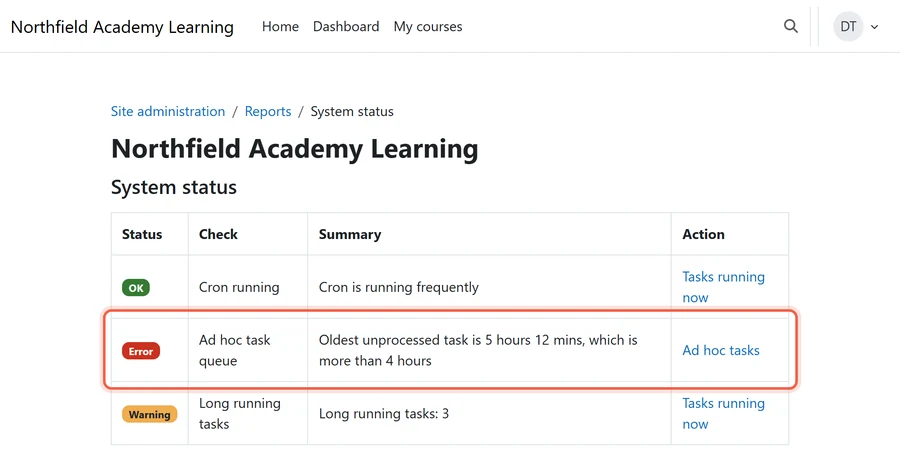
- Growing ad hoc task queue: The queue grows through the school day and does not clear overnight. Moodle’s System status report marks the ad hoc task queue as a warning once the oldest waiting task is more than 10 minutes old, and as an error after 4 hours.
- Teachers using “send now” without success: Teachers attempt to bypass delays by sending posts immediately, but the notifications still do not go out promptly.
- Problems clustering: Notification issues are more frequent in the busiest courses and during peak times, such as the start of a new term or during exam periods.
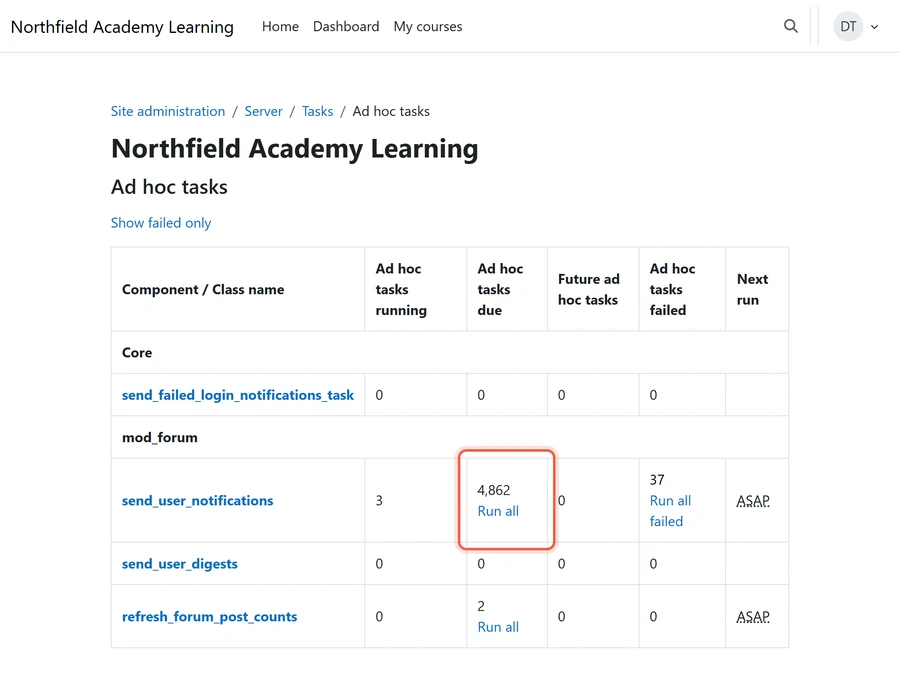
The default 30-minute delay before a forum notification goes out is normal: it is the editing window. Instead, the warning sign is delay well beyond it.
How the Database and Server Setup Decide Whether Notifications Stall

Several underlying database and server configurations significantly influence whether forum notifications stall due to lock timeouts. Understanding these factors at a strategic level allows schools to engage effectively with their hosting providers or internal IT teams. The key is to know what each factor controls and what questions to ask.
Six Settings Behind a Moodle 4.5 Forum Notification Lock Timeout
Six factors decide whether notification tasks collide:
| Setting or factor | What it controls | What to ask your host or IT |
|---|---|---|
| How many background workers run at once (Moodle’s ad hoc task concurrency limit, default 3) | How many notification tasks can collide | Whether more workers are being added to clear a backlog, which can make lock collisions worse, not better. |
| How long the database waits on a lock before giving up (on MariaDB the default is 50 seconds) | Whether a slow task fails or finishes | What the current value is and whether long transactions are being logged. |
| Indexes on the forum queue and post tables | How quickly a task finds its rows and how long it holds locks | Whether the queries behind the failing task have been reviewed on this site’s real data, not just a test copy. |
| Forum table size and history | How much each task has to read | Whether old years’ forums are archived or kept live, a question the school’s Moodle data retention strategies for private schools should already answer. |
| Cron schedule and where it runs | Whether tasks pile up and then all run at once | Whether cron runs every minute and on a server sized for term-start peaks, and who owns that under the school’s Moodle cron job management arrangement. |
| Database server resources and version | Headroom when every class is posting | Whether the database version is the one Moodle 4.5 supports and how close the server runs to its limits in busy weeks. |
Measuring the Impact of Configuration Changes
It is crucial to change one factor at a time and measure the impact on a copy of the school’s real data. The seemingly obvious fix, such as adding more background workers, can inadvertently exacerbate lock collisions. The most effective index or concurrency adjustments depend heavily on the specific site’s data patterns and query logs.
There is no single universal setting. The evidence lives in the site’s own query logs, which is why it pays to detect and anticipate Moodle performance issues before the busy weeks rather than during them. (Defaults in the table last verified October 2026.)
Tune the Moodle 4.5 Site or Plan the Move to 5.X to Address Lock Timeouts

Moodle 4.5 is a long-term support (LTS) release. However, its general bug-fix support concluded in October 2025. It will continue to receive security fixes until October 2027.
Therefore, a 4.5 point release is unlikely to fix a performance problem like a Moodle 4.5 forum notification lock timeout. Schools must either optimize their existing 4.5 installation or plan a strategic upgrade.
Weighing Immediate Tuning Against Future Upgrades
The decision to tune the current Moodle 4.5 site or to initiate an upgrade to Moodle 5.x involves considering immediate needs versus long-term strategic goals. It is important to note that upgrading to Moodle 5.x does not inherently resolve lock timeout issues.
| Tune the 4.5 site | Plan the move to 5.x | |
|---|---|---|
| What it buys | Notifications back on time this term | A supported version past October 2027 and current fixes. |
| What it costs | Diagnosis on real data, settings and index review, re-testing | A full upgrade project: new server requirements, plugin compatibility checks, testing, teacher communication. |
| Risk | Low if each change is measured | Higher; an upgrade during term is a risk on its own. |
| Fixes the lock timeout? | Yes, if the cause is found on this site’s data | Not on its own; the same tuning questions follow the site to 5.x. |
| Best timing | Now, before the next exam season | A summer break window. |
Balancing Immediate Needs with Long-Term Planning
- The call: tune the Moodle 4.5 site now so notifications are reliable this school year, and move to 5.x in a summer break well before security support ends in October 2027.
- The trap: treating the upgrade as the fix and living with late notifications until then.
- The backstop: a dated decision, made by the end of this school year, on which summer the upgrade happens.
Ultimately, the head of technology owns that decision. Two reads shape it: the Moodle 4.5 LTS review for what the school has on 4.5 today, and the pros and cons of latest Moodle vs Moodle LTS for which version to move to. Once a summer is chosen, the considerations to upgrade Moodle from 4.x to 5.3 LTS set the scope of the work.
Who Owns Notification Health After the Fix

A forum notification failure is often silent until students and parents voice complaints. This inherent invisibility means that resolving the issue is only half the battle. Ongoing notification health requires a designated owner and a weekly monitoring routine, rather than a one-time fix and a hope for the best.
Roles and Responsibilities in Maintaining Notification Reliability
Effective ownership of Moodle notification health involves understanding the strengths and gaps of different roles within and outside the school. This ensures that all aspects, from server performance to academic timing, are considered.
| Owner | Good at | Gap |
|---|---|---|
| The hosting provider | Server, database and backups | Usually does not watch Moodle’s task queue or know when a graded forum is due. |
| The school’s own IT | Knows the school calendar, staff and families | Often has no Moodle or database depth for lock and query problems. |
| A Moodle specialist on retainer | Moodle task queue, plugins, upgrades, performance on real data | Needs the school’s calendar and a named contact. |
A School’s Proactive Checklist for Notification Health
To ensure consistent and timely notifications, private schools should implement a clear, actionable checklist. This proactive approach minimizes disruptions and reinforces academic integrity:
- One named owner by role: Designate a specific individual, by their role, to conduct a weekly review of the ad hoc task queue and any failed task alerts.
- Calendar of peak weeks: Share a calendar of peak periods, such as term start, exam season, and report card distribution, with whoever manages the server. This allows capacity and monitoring checks to align with critical times.
- Test before each peak: Conduct a simple test before each peak academic period. Post a message to a busy forum and accurately time how long it takes for the notification to arrive.
- Rule for time-critical posts: Establish a clear rule for teachers: if a graded-forum post is time-critical, also announce it in class. This dual communication method should remain in place until notification checks have been consistently clean for a full term.
Implementing a robust Moodle maintenance strategy is essential. It provides the framework for these checks and ensures that Moodle remains a reliable platform for academic communication.
How Mindfield Helps Schools Keep Moodle Notifications On Time

Mindfield works with private schools on the whole path from a missed notification to a reliable routine:
- Diagnosis on real data: the failing task traced on a copy of the school’s own site, not a test copy.
- Settings with the host: concurrency, database and index settings reviewed together with the hosting provider, one change at a time.
- Checks before peak weeks: a task queue routine timed to term start, exam season and report cards.
- The move off 4.5: the 4.5 to 5.x upgrade planned for a summer window, well before October 2027.
Get Help With Moodle 4.5 Forum Notification Lock Timeouts
Mindfield finds out why your school’s forum notifications stall, working on a copy of your own data. We work with your host on the settings that fix it and set up the checks your team runs before every peak week. Then we plan your move off Moodle 4.5 for a summer, so the upgrade never lands in the middle of term. Talk to us before the next graded discussion closes.
Frequently Asked Questions (FAQs)
This article may contain conceptual illustrations to help support the article content.
