


A department head opens the spring planning meeting with three years of topics, assignments and assessments in Blackbaud’s learning management system. The school has decided to teach in Moodle from September. The first question is always the same: can we just export it all? A school that sets out to migrate Blackbaud LMS to Moodle has to answer that early. The wrong answer means lost coursework, a report card with no source for its grades in September, and teachers rebuilding courses in August.
This is not a move away from Blackbaud. The Student Information System (SIS), admissions, billing, the parent portal and fundraising all stay. Only the teaching layer moves, and that changes three things: what gets rebuilt, where report card numbers come from, and when the school can safely switch.
I recently migrated my site to Mindfield from another host, and the experience couldn’t have been better. Mindfield kept working until they were certain that my site was operating as well as it was before, and they even helped clean up a few issues to improve my site’s performance – issues my prior host never mentioned. I also found Mindfield’s communication to be excellent. Before the migration, they prepared me for what to expect, and during the migration they kept me well-informed.
Jim Benedek
review Source: Google Reviews
Outline
- Before You Migrate Blackbaud LMS to Moodle: What Moves, What Stays and What Gets Archived
- Course Content: No One-Click Export, So Choose What to Rebuild
- Three Ways to Migrate Blackbaud LMS to Moodle
- Grades: Where Report Card Numbers Come From After the Move
- When to Migrate Blackbaud LMS to Moodle: A Cutover Calendar Built Around the School Year
- Teachers, Students and Parents on Day One
- How Mindfield Helps Private Schools Migrate Blackbaud LMS to Moodle
- Frequently Asked Questions (FAQs)
Before You Migrate Blackbaud LMS to Moodle: What Moves, What Stays and What Gets Archived

Start by sorting everything in Blackbaud’s learning management system into three piles: what moves to Moodle, what stays in Blackbaud, and what is archived.
| What the school has today | Where it ends up | How |
|---|---|---|
| Students, families, schedules and sections | Stays in Blackbaud’s SIS | Flows into Moodle through an SIS integration |
| Report card grades, comments and transcripts | Stays in Blackbaud’s SIS | Moodle supplies the number each marking period |
| Topics and class pages | Moodle courses | Rebuilt, not converted |
| Assignments and assessments | Moodle activities and question bank | Rebuilt for the courses that are reused |
| Assignment-level gradebook history | Archive | Kept for the school’s retention period, not migrated |
| Bulletin boards and announcements | Left behind | Not migrated |
| Outside tools such as Turnitin | Moodle | Reconnected one by one |
| Parent and student portal | Stays in Blackbaud | Moodle parent access is a separate decision |
The rule: move what teachers will teach from again; archive what the school must keep; leave the rest.
Two rows need a closer look. Bulletin boards and announcements are tied to the week they were posted, so nothing in them is worth rebuilding. Teachers start the year with a fresh course announcement instead. Outside tools are the opposite. Each was set up inside Blackbaud’s learning management system, so each needs its own connection in Moodle. A missing one shows up as a broken link on the first day.
A migration is a chance to leave things behind, not a duty to carry everything.
Course Content: No One-Click Export, So Choose What to Rebuild

Blackbaud topics hold text, links, downloads, photos, audio, video, embeds and assignments, and teachers can copy them between Blackbaud classes and school years. Blackbaud’s help documentation describes no export of topics to another system, though. The Assignment Center exports its list to a comma-separated values (CSV) file, which carries the list of assignments, not the materials (last verified October 2026). So courses are rebuilt one way or another, and the first decision is which ones. The three routes for doing it are compared in the next section.
What to Rebuild First
- Inventory first. List the courses on next year’s timetable, not every class from past years.
- One template course per department. Built first and approved by the department head, so every course in the department has the same shape.
- Files and media. Download the files teachers will reuse; links and embeds are pasted in again. Video-heavy departments should plan for large Moodle storage in schools before the files arrive.
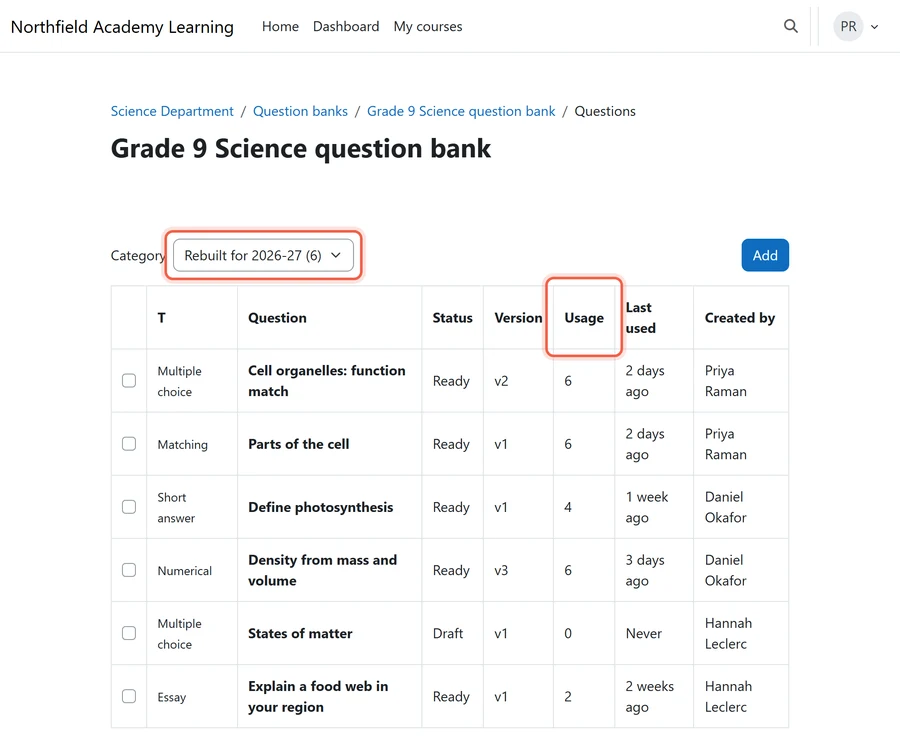
- Assessments. Rebuild the questions teachers reuse into a shared department question bank, so each question is written once and every section draws from it.
What a Department Template Holds
A template is only useful if teachers can fill it without making design decisions. Agree these five parts with each department head before anyone rebuilds a course:
- A course outline at the top. The same place in every course for the syllabus, contact details and marking policy.
- One section per unit. Units, not weeks, so the course survives a timetable change.
- Grading categories named as in Blackbaud. The same names and weights the report card uses, so section 3 below has nothing to reconcile.
- A link to the department question bank. Quizzes draw from shared questions instead of each teacher’s copy.
- A standard first-week activity. One place where students confirm they can log in and submit, before anything is graded.
Who Decides What Gets Rebuilt
The trap: copying every topic from every year “just in case”, which fills Moodle with courses no one teaches. The rule: if no one will teach from it next year, it is archived, not rebuilt. The owner: department heads choose, and the technology team runs the rebuild.
An approved template is copied into each new course every year, so course copy has to work reliably. When it fails, the usual reasons are covered in Moodle course copy, backup or restore not working.
Three Ways to Migrate Blackbaud LMS to Moodle
Once the school knows which courses move, there are three ways to move the content itself. Each still needs the decisions in the rest of this article: the department templates, the grade source and the cutover date. Instead, what changes is who does the copying and how much a teacher checks by hand afterwards.
Route 1: A Custom Migration Built for Your School
- What it covers: Blackbaud’s application programming interface (API), called SKY API, returns assignment data for each class section. A developer writes a one-off migration that reads it and creates matching courses and activities through Moodle web services, attaching the files teachers download in the same pass.
- Where it falls short: However, Blackbaud documents no export of topic pages, so those are still copied by hand. Assessment questions need reshaping for Moodle’s question bank.
- Who supports it: Whoever writes it, usually a contractor or the school’s own developer.
- Upkeep: Low, because it runs once. Still, test it on one department before the summer rebuild.
Route 2: Existing Migration Software and Moodle’s Own Import Tools
- What it covers: Moodle’s built-in tools handle anything that arrives as a file: course shells from a CSV file, and questions imported from text files in Moodle question formats. As a result, these are supported as part of Moodle itself.
- Where it falls short: However, none of them read Blackbaud directly, so someone first turns Blackbaud content into those files. Commercial course converters list Blackboard, Canvas and Moodle as sources. Blackboard is a different product from Blackbaud, so check that a tool names Blackbaud’s learning management system before paying for it (last verified October 2026).
- Who supports it: Moodle’s tools come with the site. A converter is supported by its vendor.
- Upkeep: None after the move.
Route 3: Mindfield’s Proposed Tool to Migrate Blackbaud LMS to Moodle
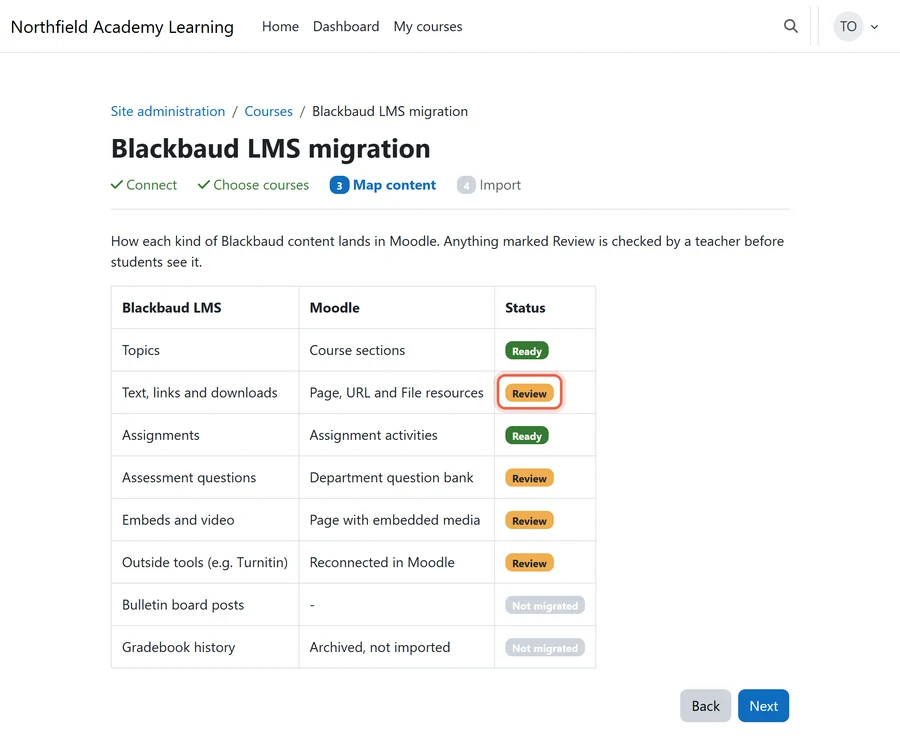
Mindfield is developing a migration wizard for this exact move. The concept has four steps: connect to the school’s Blackbaud account, choose the courses on next year’s timetable, map each kind of content onto the department template, then import. Anything that cannot convert cleanly goes on a review list for the teacher.

- What it covers: The same reading as a custom migration, packaged as a repeatable wizard with the department templates and the review list built in.
- Where it falls short: It is proposed, not released. Also, it can only move what Blackbaud makes available, so topic pages and questions still land on the review list.
- Who supports it: Mindfield.
- Upkeep: Handled by Mindfield. The school runs it one department at a time.
Which Route Fits Your School
- Fewer than a dozen courses moving. Rebuild them on the department templates, using Moodle’s import tools for files and questions.
- Many courses and a developer on staff. A custom migration, tested on one department first.
- Many courses and no developer. Talk to us about the migration tool, or about running a custom migration for you.
The trap: assuming any tool removes the review step. The rule: whatever the route, a teacher checks every course before students see it. The owner: department heads sign off each course.
Grades: Where Report Card Numbers Come From After the Move

Today, report card grade entry in Blackbaud’s SIS can calculate straight from the Blackbaud LMS gradebook: marking-period cumulatives, year cumulatives or individual assignments. Once teaching moves to Moodle, that source is gone. The school has to decide where the number comes from before the first marking period, not during it.
Four Grade Decisions to Make Before September
- The grade of record stays in Blackbaud. Past report cards and transcripts do not move.
- The new source. Moodle’s gradebook supplies each marking period’s number, either through an SIS integration or entered by teachers. Pick one before September.
- Categories and weights. Rebuild the Blackbaud grading categories in Moodle with the same weights, or the number the report card receives changes.
- Assignment-level history. Export what the school must keep and archive it under its retention rule. Moodle data retention strategies for private schools set out how long to keep it and where.
Rosters and the marking-period number then travel through an SIS integration between Blackbaud and Moodle. Which data syncs automatically and which stays with a person is its own decision. Make it alongside the grade decisions above, not after the courses are built.
When to Switch
The trap: cutting over in January, which splits one year’s gradebook across two systems. The rule: cut over at the start of a school year. The owner: the academic office.
When to Migrate Blackbaud LMS to Moodle: A Cutover Calendar Built Around the School Year
The calendar follows the school year, not the contract. Each season has one job:
- Winter. Decide, check the Blackbaud contract renewal date, and name the owner.
- Spring. Build the department templates and the SIS integration, and train a pilot department.
- June. Teachers rebuild next year’s courses from the templates while the year is fresh. Archive gradebook history once report cards are final.
- August. Rosters for the new year flow into Moodle, and every teacher checks their courses before students arrive.
- First marking period. Run the grade handoff once, with teachers checking the Blackbaud number, before anyone relies on it.
When the Contract and the Calendar Disagree
The trap: letting the renewal date set the cutover date, which pushes the move into the middle of a year. The rule: plan the contract around a September cutover, not the other way round. The owner: the head of school, with the business office.
Keep two backstops as well:
- Read access to Blackbaud. Keep it through the first marking period if the contract allows, so teachers can still look something up.
- A roster fallback. If the SIS integration is not ready by August, load the opening rosters with a one-off Moodle bulk user upload. A named person re-runs it after every schedule change until the integration takes over.
Teachers, Students and Parents on Day One

Each group notices something different on the first day. Plan for each before September:
- Teachers. Train on the department template, not on every Moodle feature.
- Students. One login through single sign-on (SSO), using one of several Moodle SSO options.
- Parents. Today they may see assignments through Blackbaud’s portal. Decide whether they get Moodle access or a weekly summary. If they get access, each parent account is linked to their own children. Custody restrictions recorded in Blackbaud have to carry over; where they cannot, the school does not create the account.
- Outside tools. List every tool connected to Blackbaud’s learning management system, such as Turnitin, and reconnect each in Moodle before term.
The trap: families finding out about Moodle on the first day of school. The rule: anything a family will notice changing goes in the back-to-school letter. The owner: the director of technology drafts it, and the head of school signs it.
How Mindfield Helps Private Schools Migrate Blackbaud LMS to Moodle

- Deciding what moves. What moves, what stays in Blackbaud and what is archived, worked out with the academic office.
- Building the templates. One department template at a time, approved before the rebuild starts.
- Moving the content. A custom migration, or our proposed migration tool once it is released, tested on one department first.
- Connecting the SIS. Rosters and report card numbers flow between Blackbaud and Moodle.
- Supporting the first marking period. Training the pilot department and checking the first grade handoff.
Schools coming from other platforms face the same rebuild-or-convert question. See how to migrate from Canvas to Moodle and how to migrate from Google Classroom to Moodle.
Plan How You Migrate Blackbaud LMS to Moodle
Mindfield helps private schools move teaching from Blackbaud’s learning management system to Moodle while Blackbaud stays the school’s record. We work out with your academic office what moves, what stays and what is archived. Then we build the department templates, move the content by the route that fits, connect the SIS so report card numbers have a source, and support your teachers through the first marking period. Talk to us before your contract renewal date sets the calendar for you.
Frequently Asked Questions (FAQs)
This article may contain conceptual illustrations to help support the article content.
