


A learner in Winnipeg opens a continuing education (CE) course in November. The deadline reads 12:59 a.m., an hour after the 11:59 p.m. your email promised. British Columbia (BC) and Manitoba stopped changing their clocks, but Moodle only knows about that time change if its server does.
For a CE provider, the stakes are concrete. Credits can land on the wrong side of a renewal period. An exam window can also open at a time nobody published. So every winter date already saved in Moodle needs a second look.
This article explains why Moodle can still be an hour off. It then covers which CE dates to check first and what to tell learners.
I recently migrated my site to Mindfield from another host, and the experience couldn’t have been better. Mindfield kept working until they were certain that my site was operating as well as it was before, and they even helped clean up a few issues to improve my site’s performance – issues my prior host never mentioned. I also found Mindfield’s communication to be excellent. Before the migration, they prepared me for what to expect, and during the migration they kept me well-informed.
Jim Benedek
review Source: Google Reviews
Outline
- What the Moodle BC and Manitoba Time Change Means for Stored Dates
- The CE Dates to Check First in Moodle
- Checking Your Site for the Moodle BC and Manitoba Time Change
- How Mindfield Helps With the Moodle BC and Manitoba Time Change
- Frequently Asked Questions (FAQs)
What the Moodle BC and Manitoba Time Change Means for Stored Dates
BC made its last spring-forward on 8 March 2026. Since then it has stayed on Coordinated Universal Time (UTC) minus 7, which the province calls Pacific Time. Manitoba, meanwhile, stayed on UTC-5 on 1 November 2026 instead of falling back to UTC-6.
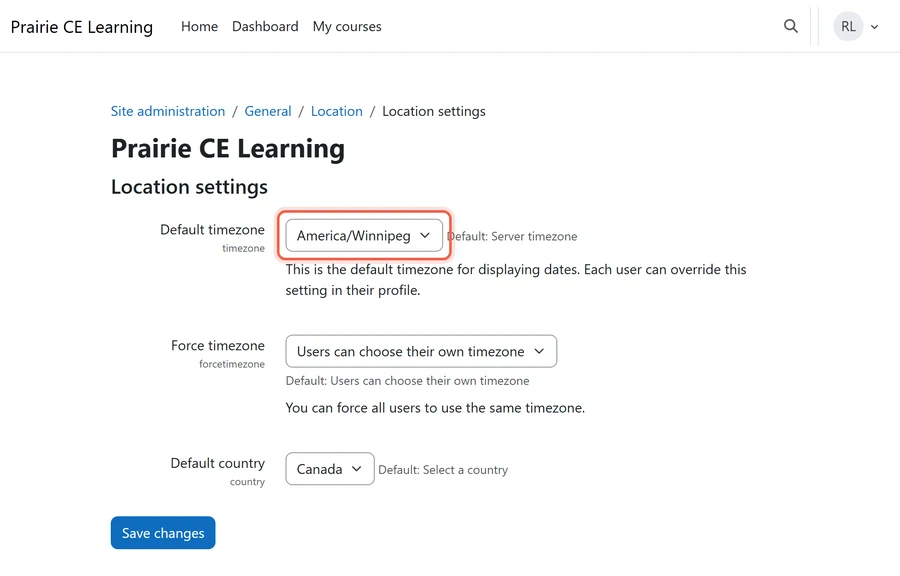
Why Moodle Can Still Be an Hour Off
Moodle takes its time zones from PHP. PHP, in turn, carries its own copy of the Internet Assigned Numbers Authority (IANA) time zone database. IANA added BC in release 2026b on 22 April 2026. However, Manitoba only arrived in release 2026e on 29 September 2026. That left about a month, so many servers never caught up.
- Operating system updates: These refresh the server’s time zone data, but not always PHP’s own copy.
- The PHP Extension Community Library (PECL) timezonedb extension: This replaces PHP’s copy with a newer one. Its current release is 2026.6 (last verified November 2026).
Two Ways the Change Shows Up
- The server is not yet updated: Moodle still expects BC to fall back to UTC-8 and Manitoba to UTC-6. As a result, every time it shows those learners runs an hour behind their real clock, and every deadline closes an hour after the time they were told.
- The server is updated: New dates save correctly. However, dates typed before the update now read an hour late, because the stored moment is read under a new rule.
A Worked Example: The 31 December Cutoff
Suppose a BC coordinator sets a course end date of 11:59 p.m. on 31 December. At that point, the server still has the old winter rule of UTC-8.
- What Moodle stores: 7:59 a.m. UTC on 1 January.
- What it shows under the new UTC-7 rule: 12:59 a.m. on 1 January, so the credit period now ends in the next year.
- What happens in Manitoba: The same hour moves, from the old UTC-6 to the new UTC-5, so 11:59 p.m. also becomes 12:59 a.m.
Only dates in the old winter period, from 1 November to mid-March, are affected. Summer dates are fine, because the old and new rules agree. For the full mechanism, see our article on the Moodle Alberta time change, where the same thing happened one province over.
The CE Dates to Check First in Moodle

Not every date carries the same risk. Start with the dates that decide whether a learner’s CE credit counts.
| Date | Where it lives in Moodle | What an hour off does |
|---|---|---|
| Course end and credit-period cutoffs | Course end dates, enrolment end dates, date-based completion or access conditions | Credits land in the wrong renewal period |
| Assignment due and cut-off dates | Assignment settings | Work is accepted an hour past the published time, or a learner is held to a different time than the one they were told |
| Exam windows | Quiz open and close times | The window opens and closes an hour off; a timed attempt ends at the earlier of the time limit or the close time |
| Live session times | Calendar events | Learners join an hour early or late |
| Certificate dates | Issue and expiry dates, where a certificate plugin stores them | A date near midnight moves to the next day |
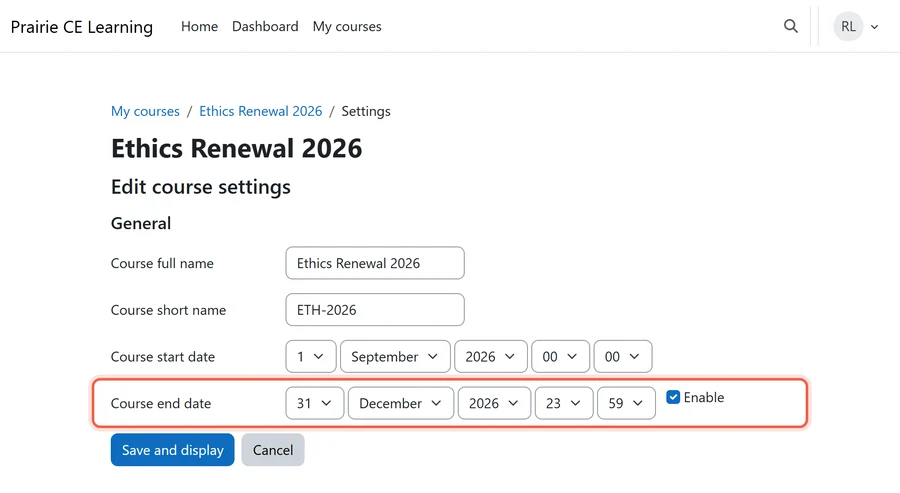
Most of these dates sit near midnight on the last day of a period. That is exactly where one hour changes the date. As a result, continuing education management in Moodle depends on dates that match the published policy. Likewise, certificates issued through Moodle certificate plugins need the same check.
Checking Your Site for the Moodle BC and Manitoba Time Change

Work in order: first the server, then the stored dates, and finally the learners.
Check the Server and the Stored Dates
- Prove the server first: Ask your host to confirm the running site has the new rules for both provinces, for the web pages and for scheduled tasks. “We updated the operating system” is not proof, because PHP may carry its own older copy.
- Scope the review: Look at dates on or after 1 November 2026 in the winter period that were saved before the update. Summer dates and dates saved later are fine.
- Check against what you published: Compare each date with the course page, email or brochure learners received, not with what the screen shows now.
- The trap: Fixing only the calendar. Completion conditions, enrolment end dates and certificate settings hold dates too.
- The owner: The CE program manager or registrar signs off the list. Then keep the before-and-after list with your records, in case an accrediting body asks about a period that closed across the change.
Check every date against what learners were told, not against what Moodle shows today.
Tell Learners What Changed
- Write the province, not the abbreviation: Use “11:59 p.m. Pacific Time” or “11:59 p.m. Manitoba time”. The database labels the new times Mountain Standard Time (MST) for BC and Eastern Standard Time (EST) for Manitoba, so phones may show either.
- Mention the new gap: Learners in provinces that still change clocks, such as Ontario, now have a different winter gap to BC and Manitoba. So say it plainly if you run live sessions across provinces.
- Make reminders match: Reminder emails come from scheduled tasks. After the review, check that a reminder shows the same time as the course page. Our article on Moodle assignment deadline reminders not sent covers the other ways reminders go wrong.
How Mindfield Helps With the Moodle BC and Manitoba Time Change

- Confirm the server rules: We check that your server and PHP run the current time zone rules, for web pages and scheduled tasks.
- List the affected CE dates: We find every course end date, assignment cutoff, exam window and certificate date saved under the old rule.
- Correct them against your records: We fix each date to match what learners were told, with your program manager signing off.
- Draft the learner notice: We write a short notice with full dates, times and provinces, so nobody works from the old time.
Mindfield helps continuing education providers with learners in BC and Manitoba confirm their server runs the new time rules. Then we find and correct the CE dates that shifted. We also draft the learner notice, so everyone works from the same times. For longer-term choices, see our guide to optimizing Moodle timezone settings or explore our Moodle support options.
Frequently Asked Questions (FAQs)
This article may contain conceptual illustrations to help support the article content.
