


A member logs in during the reporting period, the Monday after a quiet weekend host move. Their transcript is short one course. Or their certificate now says November 1 instead of October 31, so the continuing education (CE) credit sits in the wrong cycle. Nobody touched that record on purpose, and that is why associations ask how to migrate Moodle without losing CE credits before they ever compare hosts.
That is the real risk when an association changes hosts. A host move is the moment a CE record is most exposed, and the ways it breaks are predictable. This guide covers what the full record is, the daylight saving time trap, the other common risks, and how to time the cutover and choose the next host.
I recently migrated my site to Mindfield from another host, and the experience couldn’t have been better. Mindfield kept working until they were certain that my site was operating as well as it was before, and they even helped clean up a few issues to improve my site’s performance – issues my prior host never mentioned. I also found Mindfield’s communication to be excellent. Before the migration, they prepared me for what to expect, and during the migration they kept me well-informed.
Jim Benedek
review Source: Google Reviews
Outline
- Why Associations Move Moodle to a New Host
- What Counts as the Full CE Record in Moodle
- Daylight Saving Time Risk When You Migrate Moodle Without Losing CE Credits
- Other Common Migration Risks and How Each Hits CE Records
- Plugins, Custom Code and Integrations That Carry CE Data
- Choosing a Cutover Window Around Renewal Season and CE Deadlines
- A Checklist for Comparing Moodle Hosts Before You Sign
- How Mindfield Helps Associations Migrate Moodle Without Losing CE Credits
- Frequently Asked Questions (FAQs)
Why Associations Move Moodle to a New Host

Most moves start with one of four complaints, and each one hits the CE program first.
- Performance at deadlines. The site slows down exactly when every member logs in to finish courses and download certificates before renewal.
- Support that does not know Moodle. A general web host keeps the server running. However, it cannot explain why completions stopped or a certificate failed to issue.
- Cost without better service. The bill rises every year while response times stay the same.
- Data residency. A regulator, or the association’s own policy, expects member records to stay in Canada.
Our guide on how to migrate Moodle to a new host covers the full set of warning signs and the general playbook. This article picks up where it stops. Whatever the reason for the move, the CE record has to arrive intact, so that is the focus here.
What Counts as the Full CE Record in Moodle

A CE record is more than a list of completed courses. It is spread across Moodle’s database, its data directory and the systems Moodle feeds, and a host move can damage each part differently.
| Record | Where it lives | How a move damages it |
|---|---|---|
| Course completions and completion dates | The Moodle database | Dates shift if the timezone changes; completions recalculated after the move can land on the migration date. |
| CE credit hours and categories | Course and user custom fields or a CE tracking plugin | Plugin missing or a different version on the new host, so the values exist but nothing shows them. |
| Issued certificates | The certificate plugin’s issue records plus the generated files in Moodle’s data directory | Files not copied, or certificates re-issued with a new date; verification links and printed codes still point at the old web address. |
| Grades, quiz attempts and assignment submissions | Database plus data directory | Submission files missing if the data directory copy is incomplete. |
| Logs (the audit trail) | Moodle’s standard log store | Trimmed to make the database smaller to move, or a different log retention setting on the new host. |
| Outside credits and uploaded proof | Uploaded files plus database records | Files missing, so the claim exists but the evidence does not. |
| The member’s transcript in the association management system (AMS) | The AMS, fed from Moodle | Double-posted or missing credits if the sync runs against both sites or not at all during the cutover. |
One Rule for the Database and the Files
Read the table as one rule. The database and the data directory move together, copied from the same moment, or the record is not whole. For example, a database copied on Friday with files copied on Sunday gives you certificates with no files and claims with no proof.
Logs need their own decision before the move. Your Moodle data retention strategies for professional associations should already say how long the audit trail is kept, so the migration plan simply follows them.
Daylight Saving Time Risk When You Migrate Moodle Without Losing CE Credits

Timezones are the risk most migration plans miss. In 2026, daylight saving time ends across most of Canada on Sunday, November 1, at 2:00 a.m. local time. Clocks fall back, so the hour from 1:00 to 2:00 a.m. happens twice. As a result, a move after November 1 lands in a different offset than the old site was tested in.
How Moodle Handles Time, and Who Keeps Their Clocks
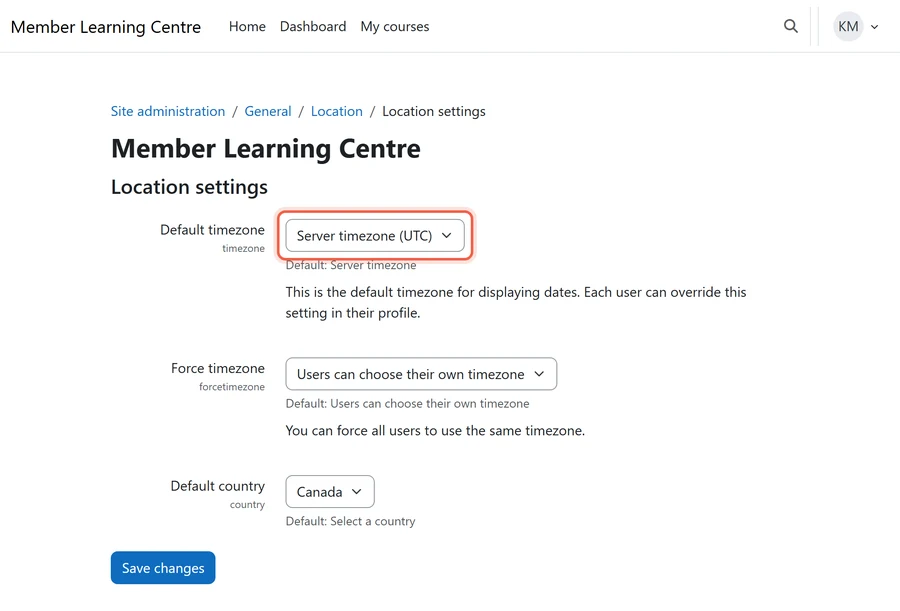
Moodle stores every date as a timestamp in Coordinated Universal Time (UTC). It then shows each date in the user’s own timezone, using the timezone rules in the server’s PHP. The site default timezone can be a named zone or “server timezone”, which follows the server. In addition, an admin can force one timezone for every user.
However, not every member’s clock changes on November 1:
- Saskatchewan: most of the province stays on Central Standard Time all year.
- Yukon: permanent UTC-7 since 2020.
- British Columbia: the Peace River region and Creston.
- Quebec and Nunavut: Quebec east of 63 degrees west, and Southampton Island.
Where the Hour Goes Missing
- The new server sits in another timezone. If the site follows “server timezone”, every deadline, quiz close time and completion date shown in site time moves with it. A host that runs its servers on UTC or US Eastern time shifts them all.
- Members who never change their clocks. Before November 1, a midnight Eastern deadline is 10 p.m. in Saskatchewan. After November 1, it is 11 p.m. If the move also changes the site’s timezone, those members see deadlines move by an hour nobody announced.
- The date on a certificate. A completion at 11:30 p.m. on October 31, shown one hour later, reads November 1. If October 31 ends a CE cycle, the credit lands in the wrong cycle on the certificate and the transcript.
- Cutting over the night clocks change. The repeated hour makes logs, scheduled tasks and the last copied record ambiguous. So never run the final copy on the night of October 31.
- Old timezone rules on the new server. If the new host’s PHP carries out-of-date timezone data, dates for places whose rules changed recently, such as Yukon, can display wrong.
“A completion at 11:30 p.m. on October 31, shown one hour later, reads November 1. That one hour moves a credit into the next cycle.”
The Timezone Rule
Before the move, set the site to a named timezone, never “server timezone”, and write down which one. After the move, compare a sample of completion dates, certificate dates and open deadlines on both sites. Include members in Ontario, Saskatchewan and Yukon. Our guide to optimizing Moodle timezone settings covers the settings themselves.
Other Common Migration Risks and How Each Hits CE Records

Timezones are not the only trap. The five risks below are common on host moves, and each one lands on a member’s credits. To migrate Moodle without losing CE credits, plan a check for every one.
Certificates That Stop Verifying or Get a New Date
What goes wrong: Certificates already issued carry verification links that point at the old web address. Also, certificates generated again on the new host can carry the migration date as their issue date.
How members and auditors see it: An employer or regulator checks a certificate and gets an error.
The check: Verify a sample of old certificates on the new site, and confirm issue dates match. How verification works depends on the plugin, which our review of Moodle certificate plugins and customization strategies compares.
Completions Recalculated After the Move
What goes wrong: Moodle calculates course completion in a scheduled task. If completion settings or activity data do not arrive exactly, that task can stamp completions with the migration date, or hold them back.
How members and auditors see it: Members see courses they finished shown as in progress, and their transcripts lose credits until someone notices.
The check: Compare completion counts and completion dates, course by course, on both sites before members switch over.
Gaps in the Audit Trail
What goes wrong: The log tables are often the largest part of a Moodle database. So they are the first thing someone trims to speed up the move. Meanwhile, the new host may keep logs for a shorter time.
How members and auditors see it: An auditor asks who completed what and when, and the history before the move is gone.
The check: Agree in writing that logs move in full. Then confirm the new host’s log lifetime matches your retention policy.
Members Earning Credit on the Old Site During Cutover
What goes wrong: If members can still reach the old site after the final copy, their completions and claims land on a site that is about to be switched off.
How members and auditors see it: A member says they finished a course, and the new site has no record of it.
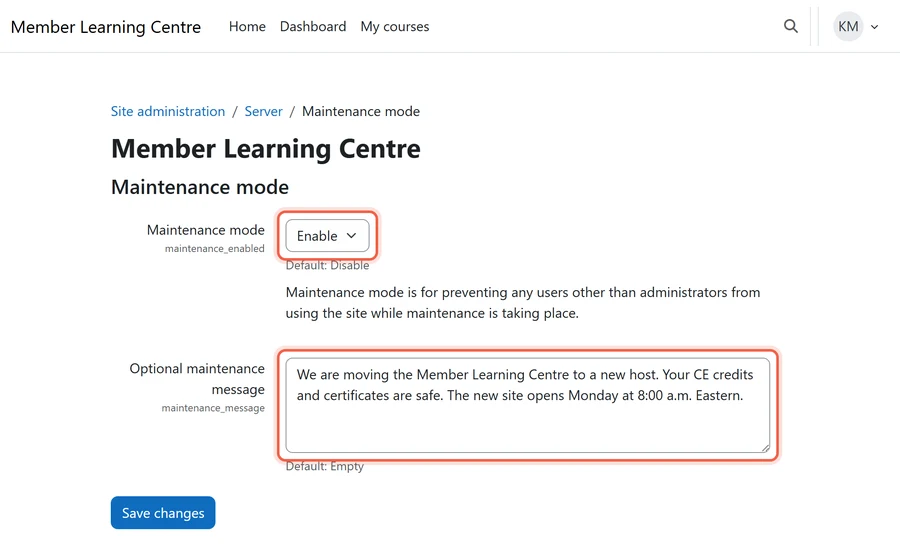
The check: Put the old site into maintenance mode at the final copy. After that, keep it intact and closed to members until the move is signed off.
Certificate and Reminder Emails That Stop Arriving
What goes wrong: Mail from a new server is often rejected or filtered as spam until the sending domain authorizes it.
How members and auditors see it: Certificates, completion notices and renewal reminders simply stop, and nobody sees an error.
The check: Before go-live, send test certificate and reminder emails from the new host to several mail providers.
Every check compares two sites side by side, so it only works while the old site still exists. That is why the old host is not cancelled until CE records are signed off.
Plugins, Custom Code and Integrations That Carry CE Data

The general playbook covers taking stock of every plugin. Here, focus on the parts of the site that hold or move credits.
- Certificate and CE tracking plugins. Use the same plugin and the same version on the new host. Otherwise the credit data exists, but nothing shows it.
- The association management system (AMS). The integration often sends completions and credits to the member record. Pause it for the cutover so it cannot post a credit twice or miss credits earned in the gap, then repoint it. The iMIS Moodle bridge pros and cons show what one of these syncs carries.
- Single sign-on (SSO). Members who cannot log in during renewal season cannot report credits. Review your Moodle SSO options before the move, because the login setup is registered against the site’s address.
- Payment gateways. Notification addresses registered with the payment provider still point at the old site. As a result, paid enrolments do not open courses.
- Custom code. CE reports or credit rules written for the association often have no one left who knows they exist.
Integrations we cover in more depth: single sign-on (SSO) for Moodle, our iMIS Moodle plugin review, and how to tell when iMIS or Moodle is offline.
Choosing a Cutover Window Around Renewal Season and CE Deadlines

Pick the window from the CE calendar, not the technical team’s calendar. In particular, avoid these weeks:
- Renewal season, when member logins peak.
- The last weeks before a reporting deadline or the end of a CE cycle.
- A large conference or webinar series that issues credit.
- The daylight saving time weekends: around November 1, and the second Sunday of March when clocks spring forward.
- The weeks before an accreditation review or a regulator audit.
The good window is the quiet weeks just after a cycle closes and its reports are filed. The trap is moving over the holidays. Support teams on both hosts are short-staffed then, and many CE cycles end December 31.
Keep a backstop, too. Write down the rollback point, and keep the old site intact until CE records are signed off. Finally, the CE manager signs off those checks, not only the technical team.
“Choose the cutover window by the CE calendar. The quietest week for the server team is often the busiest week for members.”
A Checklist for Comparing Moodle Hosts Before You Sign

Generic hosting specs are easy to compare. However, the host you choose decides whether you can migrate Moodle without losing CE credits, so ask these questions before you sign:
- Residency. Where is member data stored and backed up, and does it stay in Canada?
- Log retention. How long are logs kept, and does the host ever trim them?
- Restores. Will the host restore a backup with you as a test before you sign?
- Timezone. Which timezone do the servers run in, and how current is their PHP timezone data?
- Support in renewal season. What are the support hours and response times, in writing?
- Deadline capacity. Can the site handle most members logging in during the same few days?
- Exit terms. Can you get a full copy of the database and data directory on request, in a form another host can restore?
- Staging. Is there a staging copy for the migration rehearsal and later upgrades?
- Email. Will the host help set up sending, so certificates and reminders are delivered?
Also ask how the host fits your Moodle maintenance strategy, since upgrades continue long after the migration. The last item is not a host question at all: decide who signs off the CE record.
How Mindfield Helps Associations Migrate Moodle Without Losing CE Credits

We plan host moves around the CE record, not only the server.
- Record audit. We map where your credits, certificates, completion dates and logs live before anything moves.
- Timezone plan. We set a named timezone and plan around the daylight saving time change.
- Cutover window. We pick the window against your CE calendar, not ours.
- One clean copy. The database, data directory and logs move together, from the same moment.
- Integrations. We pause and repoint the AMS and payment integrations, then reconcile the gap.
- Side-by-side checks. Completions, credits and certificates are compared on both sites before the old host is turned off.
Get Help to Migrate Moodle Without Losing CE Credits
Mindfield helps associations plan a host move around their CE calendar. We protect credits, completion dates, certificates and logs through the move. Then we prove the record matches on both sites before the old host is switched off. Talk to us before you sign with your next host.
Frequently Asked Questions (FAQs)
This article may contain conceptual illustrations to help support the article content.
