


TalentLMS gets a continuing education (CE) provider running fast. Then the catalogue grows, an accreditor asks for a report the platform cannot build, and the monthly bill starts tracking logins instead of revenue. At that point the question is no longer whether to migrate from TalentLMS to Moodle, but how to do it without losing a single credit.
This article covers the signs you have outgrown the platform, what has to move, four migration methods with their pros, cons and the organizations each one suits, the gotchas providers hit on the way, and how to keep selling courses through the cutover.
I recently migrated my site to Mindfield from another host, and the experience couldn’t have been better. Mindfield kept working until they were certain that my site was operating as well as it was before, and they even helped clean up a few issues to improve my site’s performance – issues my prior host never mentioned. I also found Mindfield’s communication to be excellent. Before the migration, they prepared me for what to expect, and during the migration they kept me well-informed.
Jim Benedek
review Source: Google Reviews
Outline
- Signs a Continuing Education Provider Has Outgrown TalentLMS
- What Has to Move When You Migrate from TalentLMS to Moodle
- Four Migration Methods Compared
- Gotchas Providers Hit Moving Off TalentLMS
- Keeping the Storefront Live Through Cutover
- Plan Your TalentLMS to Moodle Migration
- Frequently Asked Questions (FAQs)
Signs a Continuing Education Provider Has Outgrown TalentLMS

TalentLMS is built for simplicity, and for a small catalogue that is a strength. However, these are the signs it has stopped fitting.
Five Signs It Is Time to Migrate from TalentLMS to Moodle
- The bill follows logins: TalentLMS prices its plans on the number of unique users who log in each month. On its price list, Core starts at $119 a month, Pro at $449 a month plus $6 for each user over the plan, and Enterprise starts at 1,000 users (last verified October 2026). A renewal deadline that brings every member back in one month is billed in that month.
- Accreditor reports live in spreadsheets: someone exports course reports every month and then rebuilds them by hand to match the regulator’s format.
- The membership system can’t talk to the LMS: your association management system (AMS) or customer relationship management (CRM) platform should drive enrolments and receive credits. This is the core of continuing education management strategies in Moodle.
- Your records sit behind someone else’s limits: history comes out through exports and an application programming interface (API) whose hourly request limit depends on your plan.
- One learner journey no longer fits: members, non-members and employer groups now need different prices, catalogues or branding.
If two or more of these apply, start planning now. After all, migrations go best when they are scheduled, not forced by a renewal date.
When Staying on TalentLMS Is the Right Call
A short catalogue, no integrations and a bill you are comfortable with is a good reason to stay. Moving costs rebuild time, so the case rests on what Moodle unlocks, not on price alone.
What Has to Move When You Migrate from TalentLMS to Moodle

Content and records leave TalentLMS by different doors. For instance, courses come out by hand, while learner data comes out through the portal’s comma-separated values (CSV) and Excel export and the TalentLMS API.
Course Content
| TalentLMS content | How it leaves TalentLMS | Where it lands in Moodle | Recommended by provider size |
|---|---|---|---|
| Sharable Content Object Reference Model (SCORM), Experience API (xAPI) and cmi5 packages you uploaded | Not exported as packages; re-use your original files | SCORM package activity (xAPI and cmi5 need a plugin) | All sizes: re-upload the source files. |
| Native units: text, video, files, presentations | No course export to another LMS; copy out and download originals | Page, Book, File or Text and media area | Small: rebuild. Large: rebuild on a template, script the files. |
| Tests and surveys | Questions are rebuilt; past answers are readable through the API | Quiz and question bank, Feedback or Questionnaire | All sizes: rebuild questions, archive past answers. |
Learner and Business Records
| TalentLMS record | How it leaves TalentLMS | Where it lands in Moodle | Recommended by provider size |
|---|---|---|---|
| Learner accounts and profile fields | Spreadsheet export from Account & Settings, or the API | Upload users, with the old TalentLMS number kept in Moodle’s identifier (ID) number field | All sizes: export and upload. |
| Branches and groups | Export or API | Categories, cohorts and course groups | Small: recreate by hand. Large: script it. |
| Completions, scores and CE hours | Course and user reports; the API’s user status in course | Course completion records or a transcript, written by script | Small: archive the reports. Mid/Large: script them in. |
| Certificates | The API lists each certificate’s issue date, unique number and download link | Archived PDFs, then a certificate plugin for new awards | All sizes: download every PDF before the subscription ends. |
| In-progress enrolments | API enrolment and progress status | New Moodle enrolments; progress inside a course usually restarts | All sizes: set a finish-by date on TalentLMS or restart in Moodle. |
Sizes: small means a short catalogue where you keep past completions for reference only. Mid means courses in active sale and completions an auditor may ask for. Large means completions feed member transcripts or an AMS, across several branches or audiences.
Four Migration Methods Compared

Every method rebuilds the courses. Instead, the differences are how learner history moves and who does the work.
Manual Rebuild (Method 1)
- What moves: courses rebuilt by your team, learners added by hand or by upload. History stays in archived reports.
- Pros: the cheapest in cash, and a chance to clean up a catalogue that grew by accident.
- Cons: slow, error-prone, and as a result learner history no longer sits beside the learner.
- Best for: small providers who keep past completions for reference only.
Exports Plus Moodle’s Upload Tools (Method 2)
- What moves: learner accounts through Moodle’s Upload users tool, course shells through Upload courses, and SCORM files re-uploaded.
- Pros: standard tools and no code. Moreover, accounts arrive in one pass.
- Cons: however, completions and certificates still stay behind, and every column needs mapping by hand.
- Best for: small to mid providers redesigning their courses anyway.
Scripted Migration Over the TalentLMS API (Method 3)
- What moves: accounts, enrolments, completion dates, unit scores and certificate records, written into Moodle by a script.
- Pros: the only route that keeps CE history with each learner. Also, you can rerun it until the numbers reconcile.
- Cons: developer time, hourly API limits on large histories, and course content still rebuilt.
- Best for: mid and large providers with audited credits or an AMS that reads them.
Mindfield’s Proposed Migration Wizard (Method 4)
Mindfield is developing a migration wizard for this move. The concept has four steps: connect with a TalentLMS API key, choose the learners and courses, map each field onto Moodle, then import and print a reconciliation report.
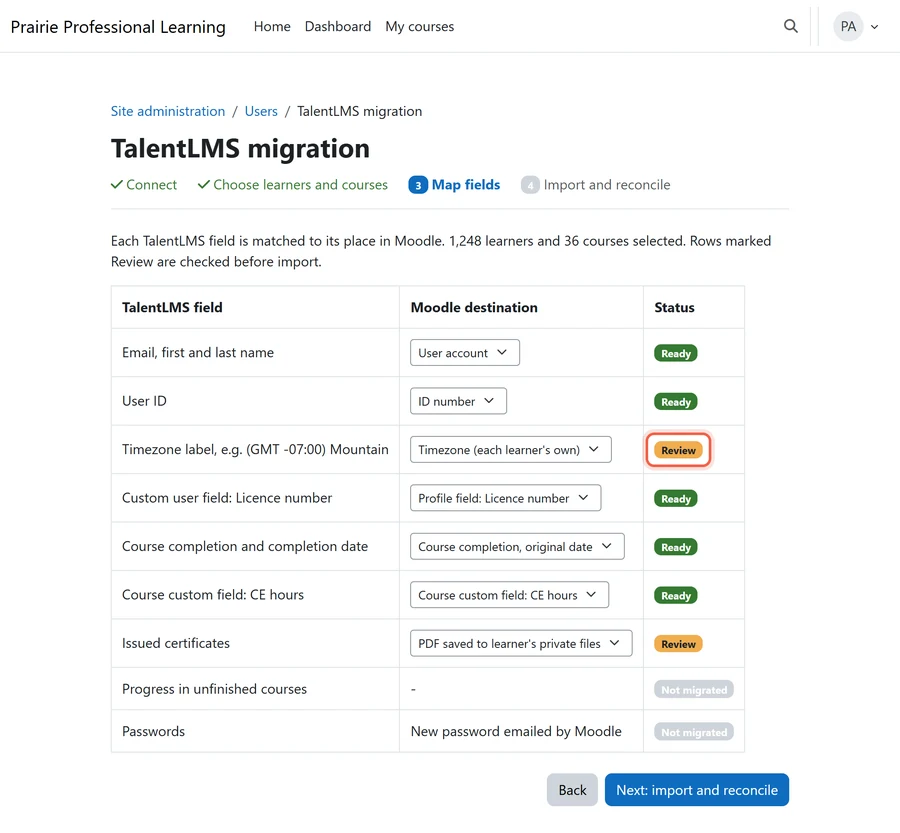
- What moves: the same records as Method 3, through guided steps instead of a one-off script.
- Pros: repeatable, with a count-for-count report before anything goes live.
- Cons: it is proposed, not released. In addition, it can only move what TalentLMS makes available.
- Best for: providers who want Method 3’s fidelity without commissioning a one-off script.
Choosing a Method
- Short catalogue, history for reference only: Method 1.
- Redesigning anyway, no audit pressure: Method 2.
- Credits audited or synced to an AMS: Method 3 now, or Method 4 once it ships.
Gotchas Providers Hit Moving Off TalentLMS

For example, these are the traps that look safe until cutover week.
- There is no course export: TalentLMS’s built-in copy only pulls a course from another TalentLMS portal. So keep the original files from your authoring tool.
- Course syncs can wipe completions: TalentLMS notes that syncing course content can remove a user’s Complete status when new units appear. Therefore, freeze course edits during the export window.
- Dates come in two shapes: the API returns day/month text and Unix timestamps. Read the timestamps, because 04/11 is the 4th of November, not April 11.
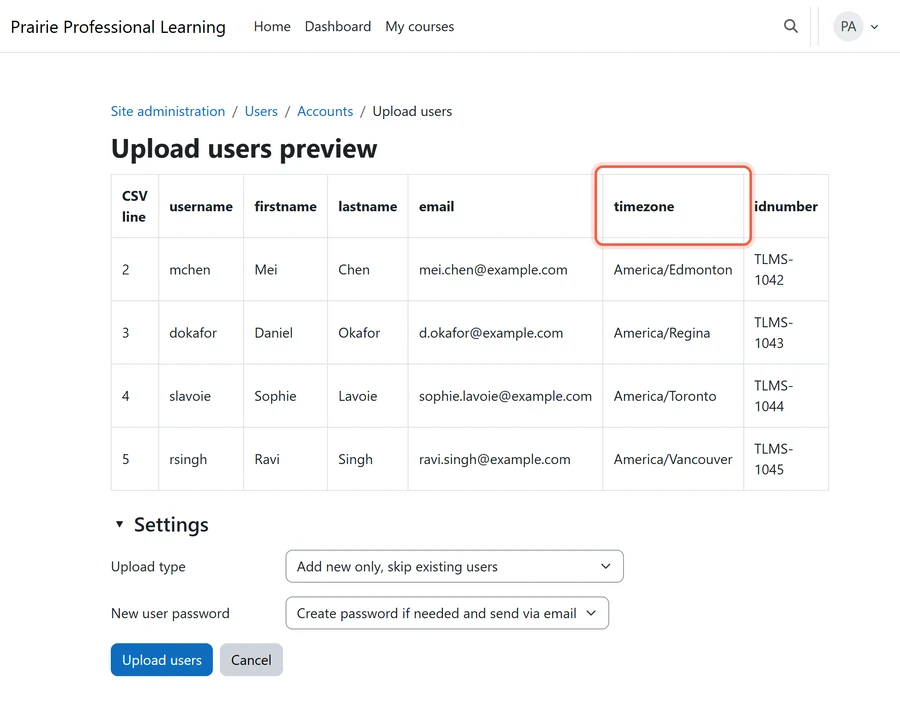
- Every learner has a timezone: TalentLMS stores Greenwich Mean Time (GMT) offset labels like “(GMT +02:00) Athens”, which must be mapped to Moodle names such as America/Regina.
- Clocks change on November 1: a cutover after that crosses daylight saving time (DST), and Saskatchewan does not change clocks. Read Alberta’s permanent daylight time change in Moodle before you pick a date.
- Certificate links die with the portal: download links point at your TalentLMS site, so save every PDF first.
- Other records shift too: a learner with two TalentLMS accounts splits their credits across two Moodle accounts, so merge duplicates and changed emails before import. Activity logs stay behind, and an AMS still syncing to TalentLMS on cutover day sends new credits to the old system.
A Cutover Checklist with Owners
- Rule: keep TalentLMS live until Moodle’s learner, completion and certificate counts match the export.
- Trap: a clean test import of twenty recent learners still proves nothing about records from three years ago.
- Backstop: freeze course edits two weeks before the final export, and keep one billing month after go-live.
- Owners: the CE coordinator signs off credits, the LMS administrator owns imports, finance owns the storefront, and communications owns learner notices.
Archived reports are part of your Moodle data retention strategy, so decide now how long they are kept.
Keeping the Storefront Live Through Cutover
Sales cannot pause for a migration. So set up checkout in Moodle first, then move buyers on a fixed date.
Three Ways to Sell Courses in Moodle
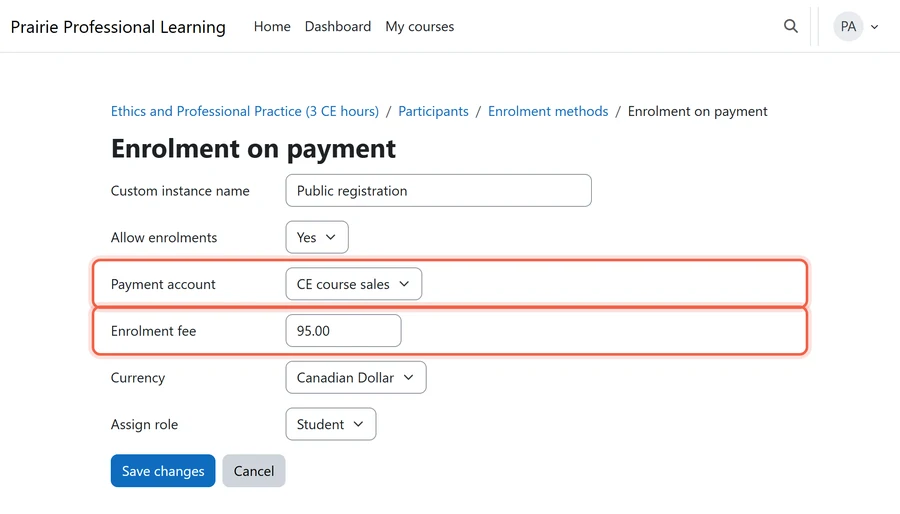
- Core checkout: Enrolment on payment puts a price on each course, the simplest way of enabling eCommerce in Moodle. Currently, PayPal ships with Moodle, while other gateways are plugins.
- A commerce plugin: ModernCommerce adds a cart, bundles, coupons and access codes inside Moodle.
- A WordPress storefront: Edwiser Bridge connects WooCommerce to Moodle enrolments, the usual route when integrating WordPress and WooCommerce with Moodle.
Moving Buyers Without Losing Sales
- Rule: stop new sales on TalentLMS at a set date and time, published to learners in advance.
- Trap: an old course link in a newsletter or partner site keeps selling the TalentLMS version, so redirect each one to its Moodle course.
- Backstop: learners mid-course get a finish-by date on TalentLMS or a free restart in Moodle, and for the first week failed payments are checked daily.
- Owners: finance owns prices and payments, the LMS administrator owns enrolments, and communications owns the cut-off notice.
Plan Your TalentLMS to Moodle Migration

Mindfield’s Moodle specialists help CE providers migrate from TalentLMS to Moodle with every credit accounted for. We map what has to move, pick the method that fits your catalogue and audit needs, and script the learner history where it matters. Then we reconcile the counts and keep the storefront selling through cutover. Tell us when your next renewal season starts, and we will plan back from it.
Frequently Asked Questions (FAQs)
This article may contain conceptual illustrations to help support the article content.
