


Professional associations often reach a point where their current learning platform no longer meets their evolving needs. When the limitations of a hosted solution become apparent, many consider whether to migrate from Path LMS to Moodle. Path LMS offers convenience, but it can restrict the deep customization and control professional bodies require for their unique educational programs.
Understanding this transition is essential for maintaining member engagement and delivering robust continuing education. This article explores the strategic considerations for such a migration, covering why associations make this move, the available migration paths, and critical planning considerations.
I recently migrated my site to Mindfield from another host, and the experience couldn’t have been better. Mindfield kept working until they were certain that my site was operating as well as it was before, and they even helped clean up a few issues to improve my site’s performance – issues my prior host never mentioned. I also found Mindfield’s communication to be excellent. Before the migration, they prepared me for what to expect, and during the migration they kept me well-informed.
Jim Benedek
review Source: Google Reviews
Outline
- Why Professional Associations Migrate from Path LMS to Moodle
- Strategic Approaches to Migrate from Path LMS to Moodle
- Ensuring Data Integrity: Continuing Education Credits, Certificates, and Transcripts
- Designing E-commerce for Member-Centric Learning
- Managing Timelines and Cutover Risks When You Migrate from Path LMS to Moodle
- Partnering with Experts to Seamlessly Migrate from Path LMS to Moodle
- Frequently Asked Questions (FAQs)
Why Professional Associations Migrate from Path LMS to Moodle

Professional associations often face unique challenges in delivering continuing education and member value. Their learning platforms must adapt to specific accreditation requirements, complex membership structures, and evolving professional development needs. Consequently, many associations find that the convenience of a hosted Learning Management System (LMS) like Path LMS eventually gives way to a demand for greater control and customization.
Limitations of Hosted Platforms for Associations
Hosted LMS solutions, while easy to deploy, often come with inherent limitations that can hinder a professional association’s long-term strategy. While they provide a standardized experience that is efficient for many organizations, they typically present several challenges:
- They offer a fixed set of features and limited options for deep system modifications.
- They lack the bespoke setup associations frequently require to align with their brand identity, integrate with specialized systems, or implement highly specific learning pathways.
- They might restrict access to the underlying database, preventing custom reporting or complex data analytics.
- They often lack the unique authentication methods or advanced user provisioning systems that associations need.
- The inability to fully control the platform’s code or extend its functionality can become a significant bottleneck.
This lack of control ultimately limits an association’s ability to innovate and respond quickly to member demands or industry changes.
Moodle’s Flexibility and Control for Professional Development
Moodle, as an open-source LMS, provides professional associations with unparalleled flexibility and control. Its architecture allows for extensive customization, from branding and user interface to core functionality. Associations can tailor Moodle to match their exact requirements, rather than adapting their processes to fit a proprietary system.
In particular, that control pays off in three ways:
- A distinct presence: the association keeps its own brand online and offers highly specialized content.
- A large ecosystem: a vast developer community contributes thousands of plugins, integrations and themes to build on.
- Room to grow: owning and modifying the codebase lets the platform evolve alongside the association’s mission.
Strategic Approaches to Migrate from Path LMS to Moodle

Migrating data and content from one LMS to another requires a well-defined strategy. Professional associations moving from Path LMS to Moodle must carefully evaluate their options for transferring historical records and active courses. However, each approach trades cost against effort and data fidelity.
What Each Type of Path LMS Content Needs
Each type of Path LMS content takes its own route out, so sort your catalogue by type before you pick an approach.
| Path LMS content | How it leaves Path LMS | Where it goes in Moodle | Recommended by association size |
|---|---|---|---|
| Recorded webinars and video lectures | Downloaded, or pulled from your video host | Uploaded to the course, or embedded from a video host such as Vimeo | Small: upload to Moodle. Large: a video host keeps storage and backups lean. |
| Sharable Content Object Reference Model (SCORM) packages | The original files from your authoring tool | SCORM activity | All sizes: re-upload the originals, then retest completion tracking. |
| PDFs, slides and handouts | Downloaded file by file | File or Folder resources | All sizes: download and re-upload. |
| Live webinars and virtual conference sessions | No export; each holds a session link | Zoom or Microsoft Teams plugin, or BigBlueButton, which ships with Moodle | All sizes: set up fresh, then add recordings after each event. |
| Quizzes and advanced assessments | Question export, however, depends on your contract | Quiz activity and question bank, importable as a Moodle XML (Extensible Markup Language) file | Small: rebuild by hand. Mid-size and up: script an import file. |
| Surveys and course evaluations | Results through reports; questions are rebuilt | Feedback activity | All sizes: rebuild the template; also keep past results as reports. |
| Learning journeys and course sequences | No export | Course completion conditions and course prerequisites | All sizes: first move the courses, then rebuild the sequence. |
| Discussion forums | Rarely exportable | A Forum activity, starting fresh | All sizes: instead, archive the threads you must keep. |
Member and Business Records
Records matter most, because members and auditors ask for them after cutover.
| Path LMS record | How it leaves Path LMS | Where it goes in Moodle | Recommended by association size |
|---|---|---|---|
| Member accounts and profiles | Report export as a Comma-Separated Values (CSV) file | Upload users, with member number and credit cycle in custom profile fields | All sizes: CSV upload, but only after the login method is decided. |
| Enrolments and completions | Completion reports | Enrolments via Upload users; history via a custom script | Small: archive the reports. Large: migrate history onto each profile. |
| Continuing education credit history | Credit reports by member and credit type | Gradebook categories or custom profile fields, filled by a custom import | Small: archive. Large or audited: migrate each member’s history. |
| Earned certificates | Members download their own; also ask about a bulk export | New ones from a certificate plugin; past ones imported or archived as PDFs | Small: archive and reissue on request. Large or audited: migrate issue records with original dates. |
| Assessment scores | Score reports | Grades import from a CSV file; attempt detail stays archived | All sizes: move final scores only. |
| Orders and member pricing | Order reports; instead of moving prices, rebuild them | Finance records; new sales through an e-commerce plugin or WooCommerce | All sizes: also keep order history for audit. |
Small: a few dozen courses and little credit history. Large: a big catalogue, years of credit history, or an accreditor that audits records. Momentive does not publish Path LMS export options; confirm each with your account team. Path LMS features are from Momentive’s Path LMS page, checked November 2026.
Manual Data Export and Import
The most basic approach involves manually exporting data from Path LMS and importing it into Moodle. This method is often chosen for smaller datasets or when the source platform offers limited export options. Associations typically export user records, course completion data, and content files into common formats like CSV or XML.
Then, they use Moodle’s built-in tools, such as the user upload feature or course restore functions, to bring the data into the new system. However, manual migration can be time-consuming and prone to errors.
Moreover, Moodle’s built-in tools reach past accounts:
- Upload users: Moodle bulk user upload creates member accounts from a spreadsheet, custom profile fields included.
- Upload courses: creates course shells in bulk.
- Package import: content you can export as a SCORM or Common Cartridge package goes into a Moodle course without being rebuilt by hand.
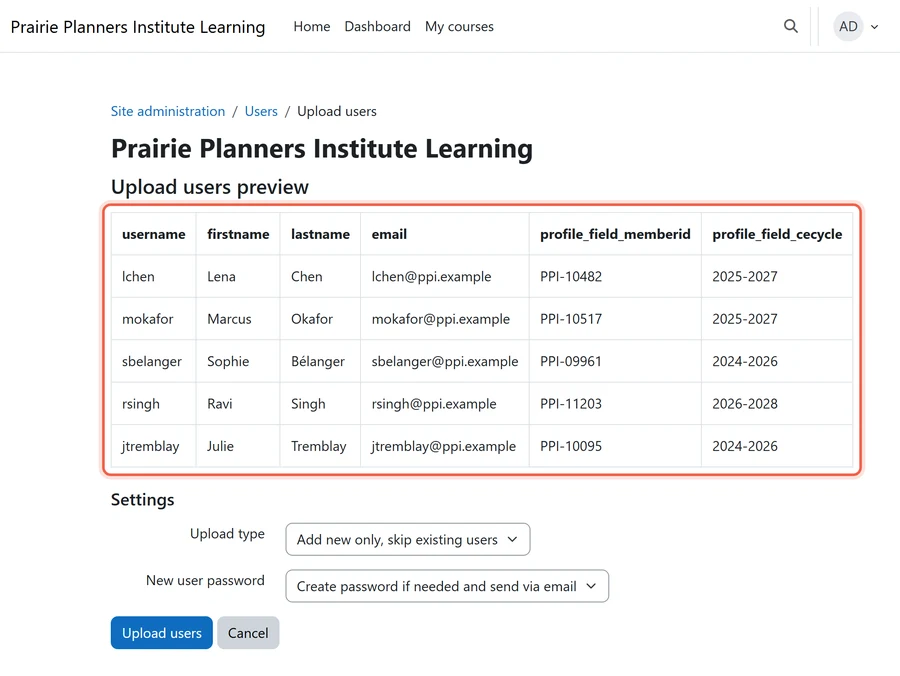
For instance, user profile fields in Path LMS might not directly correspond to Moodle’s default fields. While it offers complete control over each data point, the labor costs for large associations can quickly become prohibitive.
Leveraging Custom Migration Tools
For associations with large datasets or complex data structures, developing custom migration tools is often the most effective solution. These tools are scripts or programs designed specifically to extract data from Path LMS, transform it to fit Moodle’s schema, and then import it automatically. A custom tool can handle nuanced data relationships, such as linking user records to specific course enrollments or credit achievements.
This approach thus minimizes manual effort and reduces the risk of data loss or corruption during the transfer.

First, developing a custom tool involves initial investment in programming expertise. However, the long-term benefits outweigh this cost for many organizations. These benefits include:
- High Data Fidelity: Ensures that all data, including complex relationships, is transferred accurately.
- Automation: Reduces manual effort and the potential for human error.
- Repeatability: Allows for multiple test migrations before the final cutover.
- Custom Mapping: Handles unique data fields and structures specific to the association.
Engaging Professional Services to Migrate from Path LMS to Moodle
Many professional associations opt to engage specialized Moodle consulting firms like Mindfield Consulting for their migration projects. These services bring experience mapping another platform’s records onto Moodle’s architecture. They also provide a proven methodology for planning, executing, and validating complex data transfers.

Professional services can manage the entire migration lifecycle, from initial data assessment to post-migration support. In short, hiring experts offers several advantages:
- Reduced Risk: Minimizes the chance of data loss, corruption, or project delays.
- Faster Turnaround: Leveraging specialized tools and experience, experts can complete migrations more quickly.
- Optimized Performance: Ensures the new Moodle site is configured for optimal performance from day one.
- Comprehensive Support: Provides guidance on potential challenges and best practices.
Ensuring Data Integrity: Continuing Education Credits, Certificates, and Transcripts

For professional associations, the accurate transfer of Continuing Education (CE) credit history, certificates, and transcripts is non-negotiable. These records are vital for member compliance, professional standing, and accreditation. Any gap or error in this data can have serious consequences.
Mapping Complex CE Credit Structures
Path LMS might store CE credit information in a specific format or structure that differs from Moodle’s capabilities. Moodle’s activity completion and gradebook features can track various types of credit. However, careful mapping is required to ensure that all historical credit data translates correctly.
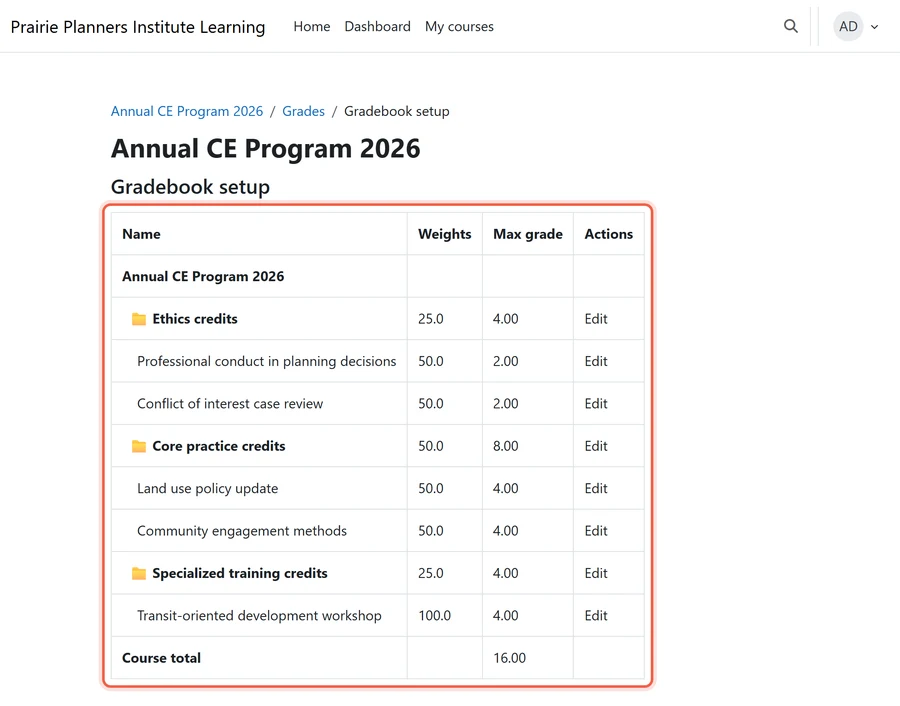
This involves identifying how Path LMS categorizes credits and then designing corresponding structures within Moodle. For example, some professional associations might have different credit types for ethics, general education, or specialized training. A robust mapping strategy includes:
- Identifying all credit types: Cataloging every distinct CE credit category from Path LMS.
- Defining Moodle equivalents: Determining how these will be represented in Moodle, possibly using custom profile fields, activity completion settings, or gradebook categories.
- Validating historical data: Ensuring that the numerical values and associated metadata for each credit are preserved.
It also demands a clear definition of the association’s accreditation rules, the foundation of continuing education management in Moodle.
Validating Certificate and Transcript Data
Certificates and transcripts are official records of a member’s achievements. So their transfer must be flawless. Path LMS typically generates these documents based on completed courses and accumulated credits.
During migration, the underlying data that feeds these documents must be accurately transferred. This includes course names, completion dates, grades, and any specific certificate identifiers. Moodle certificate plugins offer robust certificate generation.
However, the historical data must populate these new templates correctly. Validation involves:
- Cross-referencing samples: Comparing a subset of migrated certificates and transcripts against their original Path LMS versions.
- Verifying data points: Checking key fields like member name, course title, completion date, and credit hours.
- Testing certificate generation: Ensuring that Moodle can correctly generate new certificates based on the migrated data.
Ultimately, this validation process prevents discrepancies. It also ensures that members retain access to their complete, accurate professional history.
Designing E-commerce for Member-Centric Learning

Professional associations often rely on complex e-commerce models to manage member and non-member pricing tiers for courses and certifications. Path LMS typically provides integrated e-commerce functionalities. However, when migrating to Moodle, associations need a strategic approach to replicate these intricate pricing structures.
This ensures continued revenue generation and fair access to educational content. Moodle’s open architecture allows for powerful e-commerce integrations, but careful design is essential.
Replicating Tiered Pricing Models
Associations commonly offer different pricing for members, non-members, and various membership levels. This tiered pricing model is crucial for member benefits and engagement. Implementing this in Moodle requires a robust e-commerce solution that can integrate with an Association Management System (AMS) or customer relationship management (CRM) system.
However, Moodle itself does not have native e-commerce functionality for these complex pricing rules. Therefore, external solutions are necessary. Common strategies involve:
- Integrating with dedicated e-commerce platforms: Integrating WordPress and WooCommerce with Moodle through a bridge plugin such as Edwiser Bridge handles complex product catalogs and pricing rules.
- Custom development for pricing logic: Building custom Moodle plugins to fetch member status and apply discounts dynamically.
- Leveraging Moodle enrollment plugins: Utilizing plugins that can manage different enrollment key prices or payment gateway integrations based on user roles.
The goal is to create a seamless purchasing experience. It must accurately reflect an association’s membership structure.
Integrating with Association Management Systems (AMS)
The AMS is often the single source of truth for member data, including membership status and historical purchases. A successful Moodle e-commerce architecture relies heavily on its integration with the AMS. This integration ensures that member pricing is automatically applied and that new enrollments or purchases are recorded back into the AMS.
It also allows for streamlined user provisioning and role assignment within Moodle based on AMS data.

Key considerations for AMS integration include:
- Single Sign-On for Moodle (SSO): Implementing SSO ensures a unified login experience across the AMS and Moodle.
- Data synchronization: Establishing reliable mechanisms to sync user data, membership status, and course completion records.
- API-driven integration: Utilizing Application Programming Interfaces (APIs) for real-time data exchange between systems.
This integrated approach minimizes manual data entry. It also ensures consistent data across all platforms.
Managing Timelines and Cutover Risks When You Migrate from Path LMS to Moodle

The timing of a Path LMS to Moodle migration is a critical strategic decision for professional associations. Poorly managed cutover timing can disrupt member access to vital continuing education, especially around key periods like renewal deadlines. A well-executed plan minimizes downtime and ensures uninterrupted service.
Timing Around Membership Renewal Cycles
Professional associations often have annual or semi-annual membership renewal periods. These periods are characterized by high member activity, including payment processing and access verification for benefits. So migrating an LMS during or just before a renewal cycle carries significant risks.
Any disruption could prevent members from renewing or accessing their required courses. Consequently, this could lead to decreased member satisfaction and lost revenue. The rule for optimal timing is to schedule the migration during the quietest period in the association’s calendar.
This is typically a gap furthest from major events such as:
- Membership renewal deadlines: Avoid peak renewal periods.
- Annual conferences or major events: These often involve increased course enrollment or certification activities.
- Accreditation audit windows: Ensure all records are stable and accessible for review.
- Daylight saving time: A cutover after November 1 crosses the clock change. Completions recorded near midnight can land on a different date, and members in places that don’t change clocks, such as most of Saskatchewan, see CE deadlines shift. Compare completion dates in one timezone when you validate, after optimizing Moodle timezone settings.
It is prudent to commit the migration window at least two full quarters before any critical deadlines. The executive leadership and technology team must therefore jointly own this decision.
Minimizing Downtime and Ensuring Continuous Access
Minimizing downtime during cutover is paramount for professional associations. Members expect continuous access to their learning resources. A phased migration or a “big bang” approach, where both systems run in parallel for a short period, is a common strategy.
A phased approach allows for gradual data transfer and validation, reducing the impact of any single failure. By contrast, a big bang cutover requires meticulous planning and extensive testing. A robust cutover plan includes:
- Pre-migration communication: Informing members about the upcoming change and potential brief service interruptions.
- Data freeze periods: Halting all new data entry on Path LMS before the final transfer.
- Rollback plan: Having clear backup and migration strategies for Moodle so you can revert to the old system if critical issues arise.
- Post-cutover monitoring: Actively monitoring the new Moodle site for performance and data integrity issues.
The goal is to provide continuous access to continuing education. That is, members can fulfill their professional obligations without interruption.
Lessons Learned from LMS Migrations
The same lessons come up in most LMS moves. So build each into the plan with a named owner.
| Lesson | Why it matters | Owner |
|---|---|---|
| Get the export list in writing first | Path LMS export options vary by contract, so they decide your route | Project lead, before the Path LMS renewal notice date |
| Map credit types before rebuilding courses | Otherwise, every course built first needs its gradebook redone | Education or accreditation manager |
| Run two test migrations, not one | The first run surfaces field mismatches; then the second proves the fixes | Technical lead or migration partner |
| Check certificates against the old site | After all, members need proof for licensing bodies from day one | Member services, on a sample of member records |
| Settle the login switch before the member upload | Above all, the login is the change every member feels | Technology team |
| Keep Path LMS readable after cutover | Requests for old certificates keep coming, especially at renewal | Executive sponsor, if the contract allows a read-only period |
Partnering with Experts to Seamlessly Migrate from Path LMS to Moodle

Migrating from Path LMS to Moodle presents a complex undertaking, particularly for professional associations with unique data and e-commerce requirements. The intricacies of data mapping, system integration, and risk management demand specialized expertise. Mindfield Consulting’s Moodle specialists plan each migration around the records you cannot afford to lose: CE credits, certificates and member history. We can navigate these challenges end-to-end, ensuring your association’s transition is smooth, secure, and strategically aligned with your long-term goals.
Frequently Asked Questions (FAQs)
This article may contain conceptual illustrations to help support the article content.
