


Most private schools start asking whether to migrate from Schoology to Moodle when the Schoology renewal lands. Schoology is PowerSchool’s learning management system (LMS), so the renewal is also a question about how much of the school’s teaching platform sits inside one vendor’s suite. However, the price is rarely what derails the move. Instead, schools get caught by what Schoology quietly holds: years of gradebooks, student work, parent accounts fed from the Student Information System (SIS), and a single sign-on (SSO) that every family already uses.
This article walks through that inventory first. Then it compares the four realistic ways to move it, and covers the systems that have to keep working on the first day of the new term.
I recently migrated my site to Mindfield from another host, and the experience couldn’t have been better. Mindfield kept working until they were certain that my site was operating as well as it was before, and they even helped clean up a few issues to improve my site’s performance – issues my prior host never mentioned. I also found Mindfield’s communication to be excellent. Before the migration, they prepared me for what to expect, and during the migration they kept me well-informed.
Jim Benedek
review Source: Google Reviews
Outline
- Why Private Schools Migrate from Schoology to Moodle
- What Schoology Holds and Where It Lands in Moodle
- Four Ways to Migrate from Schoology to Moodle
- Keeping the SIS, Parent Access and SSO Working
- Cutover Planning Around the School Calendar
- How a Moodle Partner Lowers the Risk
- Frequently Asked Questions (FAQs)
Why Private Schools Migrate from Schoology to Moodle

For a private school, the case for Moodle is mostly about control. Three reasons come up again and again.
Licensing and Renewal Leverage
Schoology Enterprise is sold as Software as a Service (SaaS) on a recurring subscription. Moodle is open source, so there is no licence fee for the software itself. Hosting, support and development still cost money, though. As a result, the honest comparison is total cost over a renewal cycle, not licence against zero.
- What to compare: the Schoology quote against hosting, support hours and any custom work on Moodle.
- What changes: you choose the host and the support partner, and you can change either without moving platforms again.
Branding, Plugins and Integrations on Your Terms
Schoology’s features and roadmap belong to PowerSchool. With Moodle, the school can commission custom Moodle themes that match its brand, add plugins for its own teaching model, and connect the systems it already runs. That freedom also means someone has to own upgrades and plugin choices, which is where a partner usually comes in.
What Schoology Holds and Where It Lands in Moodle

Start from what Schoology actually holds, because each kind of record leaves in a different way. Schoology exports resource collections as Common Cartridge v1.3, and each course gradebook exports as a Comma-Separated Values (CSV) file from the gradebook itself. Users and parents, however, should come from your SIS.
| What Schoology holds | How it leaves Schoology | Where it lands in Moodle | Recommended by school size |
|---|---|---|---|
| Course materials (folders, pages, files, links) | Saved to Resources, then exported as Common Cartridge v1.3 | Course sections, Page, File and URL resources | Move for every school size |
| Assignments and discussions | Inside the Common Cartridge export, settings vary | Assignment and Forum activities | Move, then a teacher checks due dates and settings |
| Tests and question banks | Common Cartridge or Question and Test Interoperability (QTI) export, some question types drop | Quiz activities and the question bank | Small: rebuild key tests. Medium and large: convert, then review |
| Gradebooks | CSV export per course | Archive; current-year marks can be re-entered | Archive for every size |
| Student submissions | No bulk export in the course tools; Schoology’s application programming interface (API) can reach them | Read-only archive, not live courses | Small: keep what policy requires. Large: scripted archive |
| Users, enrolments and parents | Come from the SIS, not Schoology | Moodle accounts, cohorts and the Parent role | Rebuild from the SIS for every size |
Small means fewer than 30 courses, medium 30 to 200, and large more than 200. Export behaviour last verified October 2026.
What to Archive Instead of Migrate
Most schools do not need old courses running in Moodle. Instead, they need them findable when a parent, auditor or university asks. A clear policy on Moodle data retention strategies for private schools decides what stays live, and video-heavy archives need a plan for large Moodle storage in schools.
- Rule: migrate only courses on next year’s timetable. Everything else is archived.
- Trap: moving every historical course “to be safe”. It multiplies cleanup and buries teachers in old shells.
- Backstop: export every gradebook to CSV before the Schoology contract ends, and keep read access for at least one term after cutover.
- Owner: the registrar decides what is kept; the technology office runs the exports.
Four Ways to Migrate from Schoology to Moodle

There are four realistic routes, and each one is described the same way below so you can compare them directly.
Route 1: Manual Rebuild
Teachers or instructional designers rebuild each course in Moodle, using course development on Moodle as a chance to redesign.
- What it moves: Whatever teachers choose to recreate, built natively for Moodle.
- Where it falls short: It is slow across a big catalogue, and no student history comes across.
- Who supports it: Your own staff.
- Best for: Small schools, or any school already overhauling its curriculum.
Route 2: Common Cartridge Export With Conversion
Schoology’s export is Common Cartridge v1.3. However, Moodle imports only versions 1.0 and 1.1, and the work to add 1.3 (MDL-60803) is still open (last verified October 2026). So the package has to be converted before Moodle can restore it.
- What it moves: Course structure, pages, files, links and many activities.
- Where it falls short: Some question types and settings drop, and grades and submissions never travel in the package.
- Who supports it: Your team or a Moodle partner who has run the conversion before.
- Best for: Medium schools with well-organised courses.
Route 3: Scripted Migration on the Schoology API
A custom script reads courses, users and grades through the Schoology API and writes them into Moodle.
- What it moves: The widest range, including enrolments and grade history if you want them live.
- Where it falls short: It needs developers, and it depends on API access in your Schoology contract.
- Who supports it: A Moodle development partner.
- Best for: Large schools, or any school that must keep records live in Moodle.
Route 4: Mindfield’s Proposed Migration Wizard
Mindfield is proposing a wizard that walks a school through connect, choose courses, map content and import. Anything that cannot convert cleanly lands on a review list for the teacher.
- What it moves: Next year’s courses, mapped onto department templates.
- Where it falls short: It is proposed, not shipped, so scope and timing are agreed per project.
- Who supports it: Mindfield.
- Best for: Schools that want Route 3’s reach without commissioning a one-off script.
Pick by situation:
- Fewer than 30 courses, or a curriculum refresh: Route 1, a manual rebuild.
- Clean courses and no need for live history: Route 2, a Common Cartridge export with conversion, with gradebooks archived.
- Hundreds of courses, or records that must stay live: Route 3, a scripted migration on the Schoology API, or Route 4, Mindfield’s proposed migration wizard.
- Coming from another platform too: the same logic applies when schools migrate from Canvas to Moodle.
Keeping the SIS, Parent Access and SSO Working
Leaving Schoology changes more than courses. In fact, the riskiest pieces are the connections families and staff use every day.
Your SIS Stays; Only the LMS Job Moves
Many Schoology schools run PowerSchool SIS, which can stay. Schoology’s grade sync to PowerSchool ends with the contract, so Moodle needs its own route for rosters and final marks. Decide which system is the source of truth for Moodle user provisioning before anyone builds a sync.
The SIS owns people and enrolments, and Moodle owns teaching. A sync that runs both ways is where duplicate accounts come from.
Parent and Guardian Access
Schoology gives parents their own accounts. In Moodle, the equivalent is a Parent role that an administrator links to each student. As a result, a guardian sees only their own child’s grades and activity.
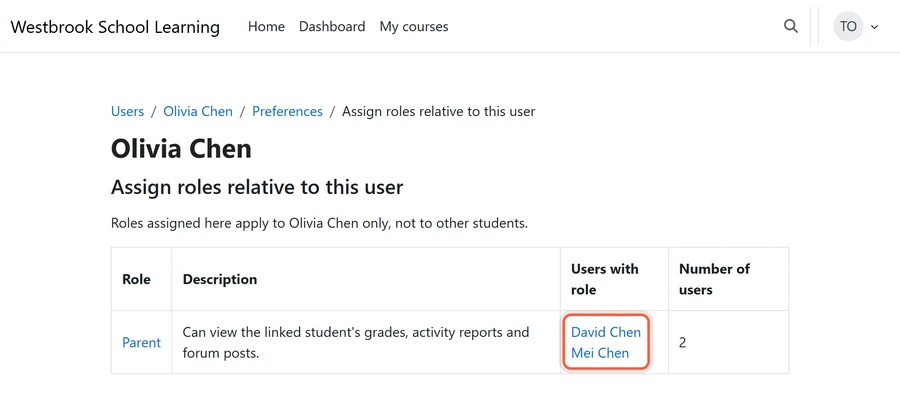
- Rule: every parent link comes from the SIS, never from a form in Moodle.
- Trap: creating parent accounts by hand. Links between siblings and split households break first.
- Backstop: load parent links from the SIS, and test with real families two weeks before cutover.
- Owner: admissions or the registrar, because they hold custody and contact records.
Sign-On Families Already Use
If families already sign in with Google Workspace or Microsoft 365, Moodle’s OAuth 2 authentication can keep that login. Security Assertion Markup Language (SAML) needs a plugin. Compare the Moodle SSO options early, because a login change on the first day back costs more goodwill than any course issue.
Cutover Planning Around the School Calendar
A term break gives you the quiet window, but each break carries its own risks.
- Summer: the safest window. Staff are away, though, so teacher review of migrated courses has to finish before June.
- Winter break: it is short, and it lands just after report cards, when gradebooks must be frozen and archived.
- March break: daylight saving time starts on March 14, 2027. Check due dates after import, because optimizing Moodle timezone settings for every user is what keeps quiz windows right. Most of Saskatchewan does not change clocks, so boarding families there see different times.
- Rule: freeze Schoology course edits four weeks before cutover, then sync only grades.
- Trap: leaving Schoology writable “just in case”. Teachers keep posting there, and the two systems drift apart.
- Backstop: a full rehearsal on a staging site two weeks before the break, signed off by department heads.
- Owner: the academic dean sets the freeze; the technology office runs the cutover.
How a Moodle Partner Lowers the Risk

A Moodle partner earns its fee on the parts that are hard to undo.
- Mapping: how a Schoology test with multiple attempts, or a weighted gradebook category, should behave in Moodle.
- Integrations: the SIS sync, parent links and SSO, tested on a staging site before go-live.
- After cutover: fixes in the first weeks, plus hosting, upgrades and teacher training.
Mindfield does this work for private schools, from the inventory and route choice through to the archive of what stays behind.
Migrate from Schoology to Moodle Without Losing a Term

Mindfield’s Moodle team can take your school from the Schoology inventory to a tested cutover in one term break. We pick the route that fits your catalogue, archive what should not move, and keep your SIS, parent access and sign-on working. If the proposed wizard suits your school, we will scope it with you. Tell us your course count and your next break, and we will send a plan.
Frequently Asked Questions (FAQs)
This article may contain conceptual illustrations to help support the article content.
