


Moodle schedules custom reports hourly out of the box. Its Custom reports feature can email a saved report on a recurring cycle, and hourly sits in the same menu as daily, weekly and monthly, so the frequency itself is a setting rather than a development project. Most teams searching for this never find the option, because it lives on a tab of the report rather than in the site’s scheduling settings.
The real work starts after you pick hourly. Whether reports actually arrive every hour depends on how often your server’s cron runs, how long the report takes to build, and whether the data volume can absorb that pace. This article covers the native path, the conditions that make it hold, the point at which a custom build genuinely becomes the answer, and the performance and security trade-offs of reporting at speed.
Engaged the team for a global retailer application development project. Schedules were consistently met with flexibility to changing scope. Was always impressed with Mindfield’s responsiveness and ability to quickly grasp the problem while offering creative solutions. Applications were of high quality and I wouldn’t hesitate to recommend Mindfield Consulting for any custom development.
Grant R
review Source: Google Reviews
Outline
- How Moodle Schedules Custom Reports Hourly, Natively
- What Decides Whether Hourly Actually Means Hourly
- Optimizing Performance, Security, and Compliance for Hourly Reporting
- Achieving Optimal Report Delivery with Mindfield Experts
- Frequently Asked Questions (FAQs)
How Moodle Schedules Custom Reports Hourly, Natively

Moodle LMS ships this as Custom reports, the report-builder interface it inherited from Moodle Workplace. It lets administrators assemble a report from across the data model and then hand it to a schedule. Scheduling is a property of the report itself rather than a site-wide setting, which is the main reason teams conclude it is not there: each saved report carries its own Schedules tab alongside its audience and access settings.
A schedule takes a name, an output format, a start date and time, and a recurrence. The recurrence menu runs from hourly through annually, and there is a weekdays-only option for reports that should skip weekends. Output can be delivered as CSV, Excel, HTML, JSON, ODS or PDF, so the report can land in a mailbox in a format the recipient can actually work with.
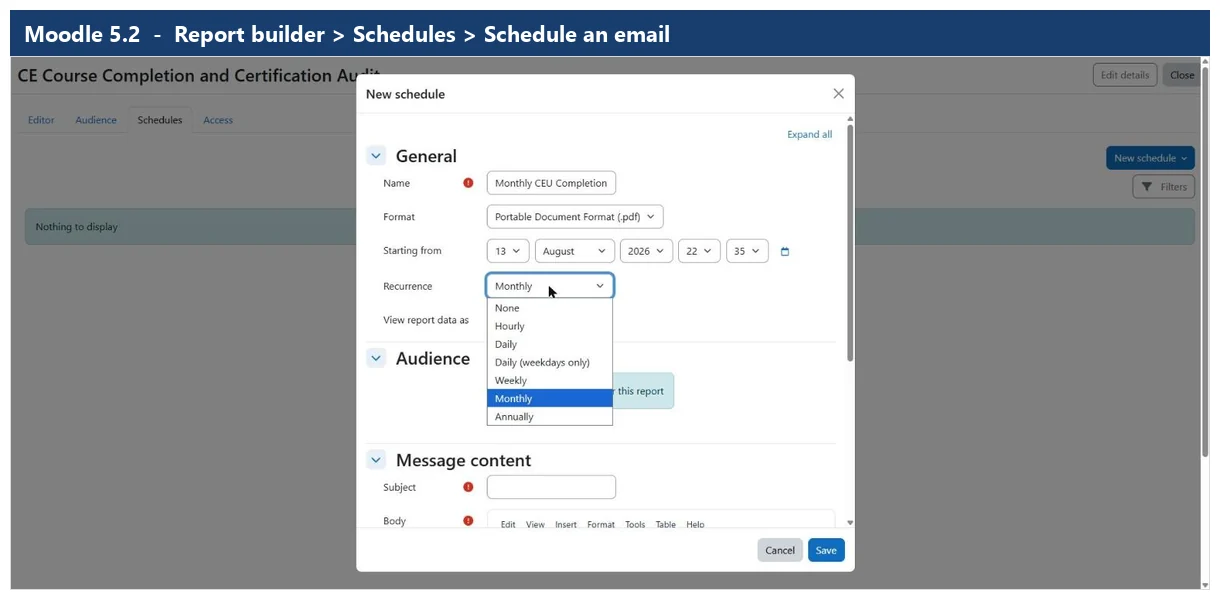
This matters for the cases that usually prompt the search in the first place: live enrolment counts during a registration window, completion figures in the run-up to a compliance deadline, or a certification audit that has to reflect the state of play this morning rather than last night. None of those need custom development.
Worth knowing what changed: on older Moodle releases this genuinely was plugin territory, and the third-party Configurable Reports block was the usual answer. A great deal of the advice still circulating online dates from that era and sends people toward a plugin they may no longer need. Check whether your site already has Custom reports before installing anything.
What Decides Whether Hourly Actually Means Hourly

Selecting hourly sets an intention, not a guarantee. Three conditions decide whether the reports actually arrive on the hour, and all three are worth checking before anyone promises hourly figures to a stakeholder.
- Cron frequency is the floor. Moodle dispatches due schedules when Moodle cron runs, so cron is the shortest interval your site can honour. A site whose cron fires every fifteen minutes can support hourly comfortably; one running cron a few times a day cannot, whatever the schedule says. This is the single most common reason an hourly schedule silently under-delivers.
- Report runtime has to fit inside the interval. A report that takes forty minutes to build is a poor candidate for an hourly cycle. Time the report at realistic data volumes, not on a quiet staging site.
- Recipients have to be able to absorb the volume. Hourly delivery to a distribution list produces dozens of messages a day. Reports people stop opening are worse than reports that arrive less often.
One related correction while you are in the area: Moodle’s scheduled tasks are not locked to daily execution. Each task carries its own cron-style expression covering minute, hour, day, month and day of week, and can be adjusted without touching code. The constraint is how often cron itself runs, not the task definitions.
When the Native Schedule Genuinely Is Not Enough
There are real cases the built-in scheduler does not cover, and they are narrower than the search results suggest. This is the genuine version of when Moodle plugins stop being enough. The native path stops being sufficient when the data you need is not reachable through the Custom reports data sources, when delivery has to go somewhere other than email — a data warehouse, a dashboard, an internal API — or when the cadence needs to be faster than hourly.
In those cases the options are a custom scheduled task inside a small plugin, Moodle’s web services API pulled by an external system, or a read-only query against a database replica. The choice is mostly about ownership rather than difficulty: a scheduled task lives inside Moodle and survives upgrades but needs a developer to change; a web services integration keeps the logic in a system your team may already run; direct database access is the quickest to stand up and the most exposed to schema changes between versions.
The decisions worth settling before commissioning any of them are what happens when a run fails halfway through, where the output is retained and for how long, and who is accountable for the integration when Moodle is next upgraded. An unattended job that half-writes a file every hour is worse than no job at all.
Optimizing Performance, Security, and Compliance for Hourly Reporting

Implementing high-frequency Moodle custom reports introduces critical considerations beyond mere functionality. Administrators must carefully balance the need for immediate data with the potential impacts on system performance, data security, and regulatory compliance. Neglecting these aspects can lead to an unstable Moodle environment or expose sensitive information.
Mitigating Performance Impacts
Running reports more frequently inherently increases the load on your Moodle server and database. Therefore, tuning your setup to make Moodle run faster is paramount. Frequent queries against large datasets can slow down the entire system, affecting user experience and potentially causing timeouts.
Consider these strategies:
- Optimize SQL Queries: Ensure all custom report queries are highly optimized. Use appropriate indexes on database tables, avoid
SELECT *in favor of specific columns, and minimize complex joins where possible. Test query performance using database tools before deployment. - Incremental Data Fetching: Instead of re-generating the entire report each time, fetch only the new or changed data since the last run. For example, query user activity records from the last hour instead of the full history. This significantly reduces processing time.
- Offload Processing: For very large or complex reports, consider offloading the report generation to a separate, dedicated reporting server or a read-replica of your Moodle database. This isolates the heavy processing from your primary Moodle instance.
- Caching Strategies: Implement caching for static parts of reports or frequently accessed data. While Moodle has its own caching, custom reports might benefit from additional, specific caching layers.
- Schedule During Low Usage: If sub-daily reports are not strictly real-time, schedule them during periods of lower Moodle usage to minimize impact on active users.
By implementing these optimizations, you can ensure that your rapid reporting needs do not degrade the overall Moodle experience for learners and educators.
Ensuring Data Security and Access Control
Accessing Moodle data, especially for custom reports, requires rigorous security and access control measures. Reports often contain sensitive information, such as personal user data, grades, or activity patterns. Therefore, protecting this data is non-negotiable.
- Principle of Least Privilege: Grant only the minimum necessary database or API permissions required for the report generation. For direct database access, use a read-only user account. For API access, create specific external services with limited functions and assign tokens only to trusted applications.
- Secure Credential Handling: Never hardcode database credentials or API tokens directly into scripts. Use environment variables, secure configuration files, or Moodle’s internal configuration settings to store sensitive information.
- Data Anonymization/Pseudonymization: For reports that don’t require personally identifiable information, anonymize or pseudonymize data before generation and delivery. This reduces the risk if the report falls into the wrong hands.
- Secure Delivery Channels: Ensure reports are delivered over secure channels (e.g., encrypted email, SFTP, HTTPS API endpoints). If reports are stored, ensure the storage location has appropriate access restrictions.
- Regular Security Audits: Periodically review the custom report scripts, their access permissions, and delivery methods to identify and address any potential vulnerabilities.
These practices are fundamental to maintaining the integrity and confidentiality of your Moodle data.
Matching Frequency to Business and Compliance Needs
The optimal frequency for Moodle custom reports is not a one-size-fits-all solution; it must be carefully chosen based on specific business and compliance needs. Over-reporting can lead to performance issues, while under-reporting can result in missed insights or regulatory non-compliance.
- Business Objectives: Identify the critical questions the report needs to answer. For instance, a report tracking real-time course completions for immediate certification might need hourly updates. Conversely, a report analyzing quarterly enrollment trends might only need monthly generation.
- Regulatory Requirements: Certain industries or regions have strict data retention and reporting requirements (e.g., GDPR, HIPAA). Ensure your report frequency and data handling align with these mandates. For example, if an auditor requires access to specific activity logs within 24 hours, your reporting mechanism must support that immediacy.
- Data Volatility: Consider how quickly the underlying data changes. Reports on rapidly evolving metrics (e.g., live quiz scores, forum posts) benefit from higher frequency. Static data or slow-changing trends require less frequent updates.
- Resource Availability: Assess your server’s capacity. Can it handle hourly report generation without impacting other critical Moodle operations? If not, a compromise on frequency or an infrastructure upgrade may be necessary.
- User Expectations: Understand what your stakeholders expect. If instructors need daily summaries of student progress, a sub-daily report might be overkill. However, if an integration requires a data feed every 30 minutes, you must meet that expectation.
By aligning report frequency with these strategic considerations, you ensure that your Moodle custom reports are both effective and sustainable.
Achieving Optimal Report Delivery with Mindfield Experts

Turning hourly reporting on is straightforward; keeping it reliable at scale is where it gets involved, and a cron interval that cannot keep up or an unoptimized query can cost you system stability, security, or the accuracy of the data itself. Mindfield Consulting’s Moodle specialists bring deep knowledge of Moodle’s architecture, database schema, and web services API. We design and implement tailored reporting solutions that hit your frequency and delivery requirements without trading away performance or security.
Frequently Asked Questions (FAQs)
This article may contain conceptual illustrations to help support the article content.
