


Continuing education providers often decide to migrate from Teachable to Moodle when the platform can no longer keep up. While Teachable suits individual course creators, its limits show for organizations with complex business-to-business (B2B) sales, cohort management or certification standards. Understanding these constraints and Moodle’s robust capabilities is essential for strategic growth. In this article, we explore why providers outgrow Teachable and compare the migration routes. We also cover the planning decisions and how expert help keeps the move seamless.
I recently migrated my site to Mindfield from another host, and the experience couldn’t have been better. Mindfield kept working until they were certain that my site was operating as well as it was before, and they even helped clean up a few issues to improve my site’s performance – issues my prior host never mentioned. I also found Mindfield’s communication to be excellent. Before the migration, they prepared me for what to expect, and during the migration they kept me well-informed.
Jim Benedek
review Source: Google Reviews
Outline
- Why Continuing Education Providers Outgrow Teachable
- Evaluating Teachable to Moodle Migration Routes
- Navigating Checkout Flows and Compliance Deadlines
- Executing Complex Teachable Migrations with Mindfield Consulting
- Plan Your Move from Teachable to Moodle
- Frequently Asked Questions (FAQs)
Why Continuing Education Providers Outgrow Teachable

Teachable serves as an excellent platform for individual creators and small businesses due to its simplicity and ease of use. However, as continuing education (CE) providers scale, its limitations often prompt a move to more flexible systems like Moodle. Ultimately, this transition is driven by the need for greater control over sales, learner management, and certification processes.
Limitations in B2B Sales and Customization
Teachable’s native capabilities for B2B sales often fall short for larger organizations. So they need custom pricing models, bulk enrollment for corporate clients and white-labeling to keep their brand consistent. Teachable’s standardized checkout and enrollment processes can hinder these specialized sales strategies.
Moodle, by contrast, offers unparalleled flexibility. Furthermore, enabling eCommerce in Moodle opens up custom pricing, bulk seats and the customization complex B2B scenarios need.
Advanced Cohort Management Requirements
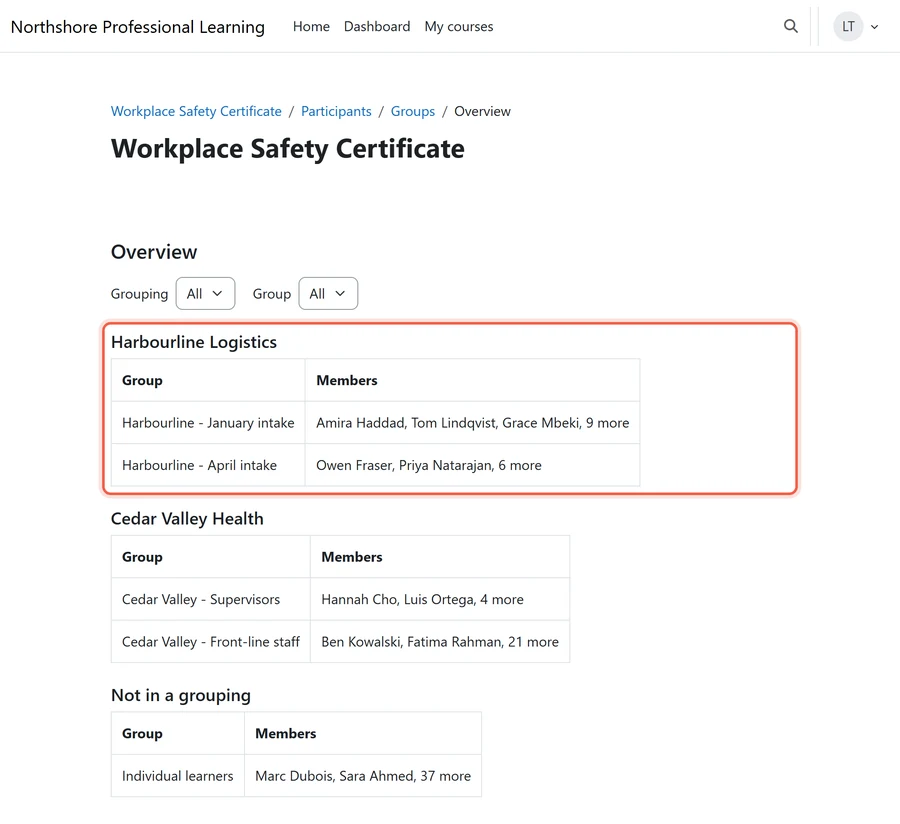
Effective cohort management is crucial for many CE programs, especially those involving structured learning paths or group-based activities. Teachable is built around individual enrollments, so dynamic cohorts, targeted content and group progress tracking are hard to run there. In contrast, Moodle’s group and grouping features, plus activity completion and course formats, let providers manage diverse cohorts with precision.
This includes setting up specific deadlines, assigning group projects, and facilitating peer interaction within defined learning boundaries.
Meeting Complex Certification Standards
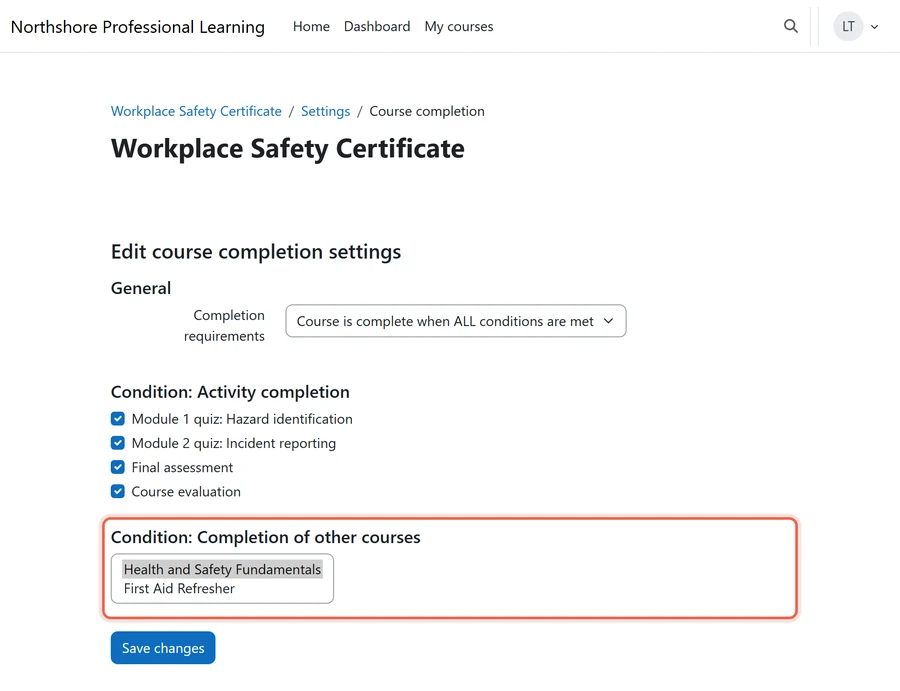
Continuing education often involves strict compliance with industry or regulatory certification requirements. Teachable can issue certificates on completion. However, multi-course pathways, external validation of credentials and detailed audit trails are harder to build there. Moodle’s extensible framework, combined with Moodle certificate plugins, supports highly customized certification workflows.
Consequently, it can track granular progress, manage prerequisites and connect to external credentialing bodies for full compliance. This level of detail is critical for maintaining accreditation and learner trust.
Moodle can also flag learners at risk before a deadline passes:
- Students at risk of dropping out: a built-in analytics model that predicts who is falling behind from their activity.
- Completion reports: show who has stalled, so staff can step in before a credit is lost.
Evaluating Teachable to Moodle Migration Routes

Migrating from Teachable to Moodle means weighing each approach’s trade-offs in effort, cost and data fidelity. The right route therefore depends heavily on the volume and complexity of your existing courses and learner data.
What Each Type of Teachable Content Needs
Every Teachable lesson block takes its own route out, so sort your school by content type before you pick a route.
| Teachable content | How it leaves Teachable | Where it goes in Moodle | Recommended by provider size |
|---|---|---|---|
| Text and image lessons | Copied out lesson by lesson | Page, Book or Text and media area | Small: rebuild by hand and tidy as you go. Large: fold it into a custom migration. |
| Video and audio | Downloaded one file at a time from each block | Uploaded to the course, or kept on a video host such as Vimeo and embedded | Small: upload to Moodle. Large: a video host spares storage and backups. |
| PDFs, banner images and downloadable resources | Downloaded one file at a time | File or Folder resources | All sizes: download and re-upload. |
| Code examples, custom code and third-party embeds | Copied from each block | Pasted into a Page, if your site’s content filters allow the embed | All sizes: re-paste by hand, then test each embed. |
| Zoom blocks | No export; it holds a live-session link | Zoom plugin, or BigBlueButton, which ships with Moodle | All sizes: set up fresh in Moodle. |
| Quizzes (multiple choice, fill in the blank, matching) | Not in Teachable’s export options; questions and responses can be read through its Application Programming Interface (API) | Quiz activity, rebuilt or imported into the question bank | Small: rebuild in the question bank. Mid-size and up: script an import file. |
Learner and Business Records
Records matter most, because auditors and learners ask for them later.
| Teachable content | How it leaves Teachable | Where it goes in Moodle | Recommended by provider size |
|---|---|---|---|
| Student list | Comma-separated values (CSV) file, emailed to the school owner | Upload users, which can enrol each learner in the same file | All sizes: CSV upload, with the welcome email planned first. |
| Progress and graded quiz scores | Teachable reports, or the API | Grades import from a CSV file; completion history needs a custom script | Small: keep the reports as your record. Large: custom migration, so CE history sits on each learner’s profile. |
| Earned certificates | Not in Teachable’s export options | New ones from a certificate plugin; past ones need a custom import or archive | Small: archive copies and reissue on request. Large or audited: migrate the issue records. |
| Transactions | CSV file, emailed to the school owner | Stay in finance records; new sales use a Moodle payment gateway or e-commerce plugin | All sizes: keep the CSV for audit. |
| Lesson comments | Not in Teachable’s export options | None; a Forum starts fresh | All sizes: save what you need before closing the account. |
| Upsells, referrals and AI lesson summaries | Nothing to export | No direct equivalent; upsells move to your storefront or e-commerce plugin | All sizes: rebuild only what you still use. |
Small: a handful of courses and little CE history. Large: a big catalogue or years of CE records. Export details are from Teachable’s help centre, checked October 2026.
Manual Course Rebuilding
The most labor-intensive approach is to manually rebuild courses within Moodle. This involves recreating course structures, uploading content files, and reconfiguring activities one by one.
- Strengths: Offers a clean slate, allowing for complete content review and optimization for Moodle’s environment.
- Limitations: Extremely time-consuming and prone to human error, especially for providers with a large course catalog. Historical learner data, such as quiz attempts, forum posts, and grades, cannot be transferred this way. Therefore, this method is generally suitable only for organizations with a very small number of courses or for those starting fresh.
Teachable Export Limitations
Teachable has no option to export a course as a single unit. Its help centre says video and image files download one at a time from the curriculum. Meanwhile, student lists and transactions export as spreadsheet files (Teachable: How to export school content and data, last verified October 2026).
- Strengths: the student roster with names and emails, plus sales and transaction records.
- Limitations: you rebuild or script the course structure, quizzes and the learner history behind your CE records, such as progress, scores and certificates.
Leveraging Moodle Import Plugins
Moodle supports standard import formats for content transfer, though these are rarely a complete solution for Teachable data.
- Strengths: Moodle can import courses packaged in Common Cartridge or Shareable Content Object Reference Model (SCORM) formats. Teachable doesn’t export these formats, so this route only helps with content you rebuild elsewhere or already hold as packages.
- Limitations: These imports move content only, never learner progress, grades or user interactions.
Custom Migration Processes for Comprehensive Data Transfer
For providers with years of learner data and complex courses, a custom migration process is often the most effective route. This approach involves developing bespoke scripts and tools to extract, transform, and load (ETL) data from Teachable into Moodle.

It is the route that preserves:
- Learner Progress: Detailed records of completed activities, quiz attempts, and module progress.
- Gradebook Data: All historical scores and grades associated with courses and activities.
- Certificates and Credentials: Ensuring that previously earned certificates and their associated data are accurately reflected in Moodle.
- User Accounts and Enrollments: Maintaining accurate user profiles and their enrollment history across all courses.
So a custom solution needs expertise in Teachable’s data model, via its API, and in Moodle’s database.
Navigating Checkout Flows and Compliance Deadlines

A successful migration from Teachable to Moodle involves more than just moving course content. It requires strategic decisions about integrating new eCommerce capabilities and meticulous planning around compliance deadlines. These elements are crucial for maintaining operational continuity and regulatory adherence.
Rebuilding Checkout Flows versus Integrating Existing Systems
Continuing education providers must decide how to handle course purchases and enrollments in their new Moodle environment.
- Moodle’s eCommerce Options: Integrating WordPress and WooCommerce with Moodle through a bridge plugin lets providers build flexible checkout processes, offering various payment gateways, coupon codes, and subscription models. Rebuilding these flows in Moodle offers significant control and customization.
- Customer Relationship Management (CRM) or Association Management System (AMS) Integration: Many CE providers already run a CRM or AMS for member management, sales, and billing. Integrating Moodle with a CRM or an existing AMS ensures a single source of truth for learner data and streamlines B2B sales processes. This approach typically involves developing an integration layer that syncs user accounts, enrollments, and potentially course completion data between Moodle and the external system. While initial setup costs can be higher, the long-term operational efficiency and data consistency often justify the investment, especially for large organizations.
The trade-offs involve initial development costs, ongoing maintenance, and the level of integration complexity. For example, integrating with an existing CRM or AMS usually costs more upfront than rebuilding simple checkout flows in Moodle. However, it prevents data silos and enhances overall business intelligence.

Managing Cutover Calendar Risks
The cutover is the moment Teachable switches off and Moodle goes live. It also carries inherent risks, particularly concerning data integrity and user access.
- Data Freeze and Synchronization: Establish a clear “data freeze” point where no new activity is allowed on Teachable. All data up to this point is then extracted and transferred to Moodle. A phased approach or parallel run might be necessary for minimal disruption.
- Minimizing Downtime: Plan the cutover during periods of low learner activity, such as weekends or holidays, to reduce impact. Communicate clearly with learners and staff about planned outages and new access procedures.
- Daylight Saving Time Impacts: For continuing education records, precise timekeeping is critical for compliance and credit hour calculations. Daylight Saving Time (DST) transitions can introduce discrepancies if not managed meticulously. Therefore, start by optimizing Moodle timezone settings and make sure historical data keeps its original timestamp context. A cutover after November 1 crosses the clock change, and learners in places that don’t change clocks, such as most of Saskatchewan and Yukon, see deadlines shift. Incorrect handling of DST can lead to inaccurate completion dates and compliance issues.
Strict Compliance Deadlines and Data Preservation
CE providers often answer to regulators or accreditation bodies with strict data retention and reporting rules. Those rules are also the backbone of continuing education management in Moodle.
- Audit Trails: Moodle must be configured to maintain robust audit trails for all learner activities, course completions, and certificate issuances. This ensures that compliance reports can be generated accurately and on demand.
- Historical Data Preservation: The migration process must prioritize the accurate transfer of all historical learner data, including course attempts, grades, and completion dates. Any loss or corruption of this data can jeopardize accreditation and lead to significant administrative burdens. Thorough validation and reconciliation of data post-migration are indispensable.
So meeting these deadlines is not only a technical task. It is a strategic imperative that shapes the provider’s credibility and legal standing.
Executing Complex Teachable Migrations with Mindfield Consulting

Migrating from Teachable to Moodle is a significant undertaking, particularly for continuing education providers with complex data and compliance needs. The intricacies of data mapping, custom development, and cutover management demand specialized expertise. Mindfield Consulting offers a structured approach to ensure a seamless and compliant transition.
Mindfield’s Custom Migration Methodology
Mindfield Consulting specializes in developing tailored migration solutions that go beyond standard import tools. Our methodology protects your historical learner data, so certificates, progress and every other critical record transfer accurately.
- Detailed Data Discovery and Mapping: We begin by thoroughly analyzing your Teachable instance to identify all relevant data points, including user profiles, course enrollments, activity completion records, quiz scores, and certificate data. We then create a precise mapping strategy to align this data with Moodle’s database schema.
- Custom Extraction and Transformation Scripts: Our experts develop bespoke scripts to extract data from Teachable, clean it, and transform it into a format compatible with Moodle. This includes handling data inconsistencies and ensuring proper formatting for Moodle’s various modules.
- Validation and Reconciliation: Post-migration, we conduct extensive validation to ensure that all data has been transferred accurately. This involves comparing data samples, running integrity checks, and reconciling any discrepancies to guarantee a faithful representation of your learner history.
As a result, this approach minimizes data loss and gives you a fully populated Moodle platform from day one.
Ensuring Compliance and Operational Continuity
Mindfield Consulting understands the critical importance of compliance for continuing education providers. Our migration services are designed to address regulatory requirements and minimize operational disruption.
- Compliance-Focused Data Transfer: We prioritize the transfer of all data necessary for audit trails and regulatory reporting, such as Continuing Professional Development (CPD) hours and certificate issuance dates. This ensures that your organization remains compliant throughout and after the migration.
- Strategic Cutover Planning: We work with your team to develop a detailed cutover plan, including communication strategies for learners and staff, to minimize downtime and ensure a smooth transition. This involves defining clear data freeze points and rollback strategies.
- Post-Migration Support and Optimization: Our engagement extends beyond the migration itself. We provide post-migration support to address any unforeseen issues and help optimize your new Moodle environment for performance and usability. This includes configuring advanced features for B2B sales, cohort management, and custom reporting.
Plan Your Move from Teachable to Moodle
If your Teachable school holds years of completions and certificates, the migration route decides whether that history survives. Mindfield scopes the move around your records: what Teachable exports, what gets rebuilt and what a custom process carries. We then plan the cutover around your renewal and reporting calendar, so learners keep every credit they earned. Talk to us before you migrate from Teachable to Moodle.
Frequently Asked Questions (FAQs)
This article may contain conceptual illustrations to help support the article content.
