


For continuing education providers, choosing between LearnDash vs Moodle is critical. The right platform manages certifications, tracks CEU credits, ensures accreditation, and scales operations. A mismatch creates hurdles, impacting experience, efficiency, and costs.
This article examines their architecture, capabilities and suitability for continuing education, then offers a clear recommendation.
I recently migrated my site to Mindfield from another host, and the experience couldn’t have been better. Mindfield kept working until they were certain that my site was operating as well as it was before, and they even helped clean up a few issues to improve my site’s performance – issues my prior host never mentioned. I also found Mindfield’s communication to be excellent. Before the migration, they prepared me for what to expect, and during the migration they kept me well-informed.
Jim Benedek
review Source: Google Reviews
Outline
- LearnDash vs Moodle: Quick Comparison for Continuing Education
- Platform Foundations: What Each is Built For
- User Experience: Admin and Learner Perspectives
- Scaling and Performance Under Real-World Enrollment
- True Cost of Ownership: Beyond the Sticker Price
- Choosing the Right Platform: A Clear Verdict
- Streamline Your CE Operations with Moodle Experts
- Frequently Asked Questions (FAQs)
LearnDash vs Moodle: A Quick Comparison for Continuing Education

| Dimension | Moodle | LearnDash |
|---|---|---|
| User Experience and Accessibility | ★★★★☆ | ★★★★☆ |
| Customization and Flexibility | ★★★★★ | ★★★★☆ |
| Plugin and Integration Ecosystem | ★★★★★ | ★★★☆☆ |
| Hosting, Scaling and Performance | ★★★★★ | ★★★☆☆ |
| Reporting, Compliance and Certification | ★★★★★ | ★★★☆☆ |
| Cost and Licensing | ★★★★☆ | ★★★★☆ |
| Support and Community | ★★★★★ | ★★★★☆ |
Ratings reflect suitability for continuing education specifically: multi-cohort delivery, accreditation reporting and total cost of ownership. Assessed on Moodle 5.2 and LearnDash 5.1. The ecosystem score counts LMS-specific extensions, where the official Moodle plugin directory lists more than 1,500 against a far shorter LearnDash add-on catalogue.
Why Continuing Education Providers Choose Moodle Over LearnDash
Many providers start on LearnDash for its WordPress convenience. They then migrate from WordPress LMS plugins to Moodle once accreditation and volume enter the picture. Five limits drive that move:
- Scale: LearnDash inherits WordPress architectural limits and strains under concurrent users, while Moodle is engineered for thousands.
- Audit-grade reporting: LearnDash needs several add-ons for basic audit output; Moodle ships a custom report builder covering progress, CEU and certification.
- Cohort management: Moodle offers granular roles, cohort synchronization and multiple enrollment methods for diverse adult learner groups.
- Credentialing: Moodle badges and certificates are verifiable and trackable, where LearnDash certificates stay basic.
- Enterprise integration: Moodle connects to CRM, SIS and association management systems through the established Moodle Web API. LearnDash usually needs custom development.
Long-term stability reinforces the pattern. Moodle follows a focused release roadmap with a defined security framework. A LearnDash site, however, depends on many WordPress plugins, and each one widens the update and vulnerability surface.
Platform Foundations: What Each is Built For

LearnDash and Moodle have distinct architectures, and each serves a different purpose and audience.
LearnDash: WordPress LMS
LearnDash is a WordPress plugin that converts a site into an LMS. It targets individual creators, small businesses, and entrepreneurs needing simple online courses. LearnDash uses WordPress themes, plugins, and hosting, allowing rapid deployment. That general WordPress ecosystem is its clearest advantage, since it offers far more ecommerce, marketing and page-building options than Moodle’s catalogue. So where that matters, integrating WordPress and WooCommerce with Moodle keeps both sides. The picture inverts for learning-specific extensions. LearnDash covers those through a short official add-on list. By contrast, the Moodle plugin directory carries more than 1,500 purpose-built modules for assessment, credentialing, reporting and enrolment. Its performance and scalability depend on the WordPress installation. Complex functions, high user loads, or stringent security can exceed its limits.
Moodle: Standalone Open-Source LMS
Moodle is a standalone, open-source LMS built for education. This database-driven PHP application serves institutions of all sizes, and its architecture prioritizes flexibility, scalability and pedagogy.
That combination explains its user base. Colleges, examining boards and continuing education providers consistently choose Moodle. That is because it satisfies compliance obligations and bends to regulatory requirements, rather than forcing programs to fit the software. An accreditor may dictate how attendance is evidenced, how CEU credits are calculated, or how long records stay retrievable. In each case, Moodle exposes the roles, completion rules and reporting needed to meet the rule as written. Moodle also offers built-in features for course management, assessment, collaboration, and reporting, without a separate CMS.
User Experience: Admin and Learner Perspectives

Both platforms aim for intuitive interfaces, but their approaches differ by architecture and target user.
Admin and Learner Experience
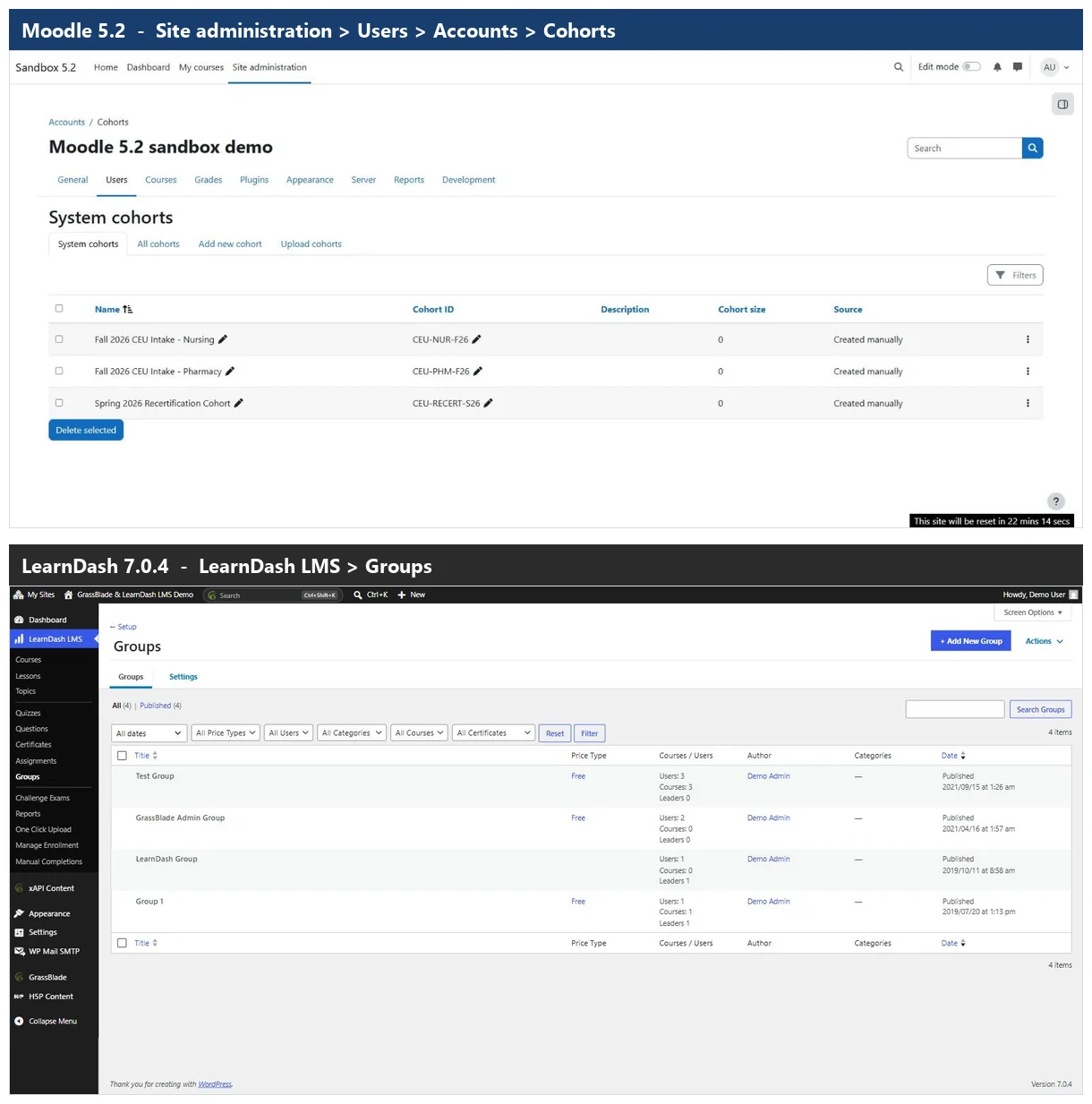
The screens above capture the underlying difference in administration. LearnDash extends the WordPress dashboard you already know, while Moodle gives you a dedicated console built for the job:
| Admin task | LearnDash approach | Moodle approach |
|---|---|---|
| Where you work | WordPress dashboard, custom post types | Dedicated Site administration console |
| Grouping learners | Groups created one at a time | Cohorts with site-wide ID, bulk upload |
| Permissions | WordPress roles, plugins for finer control | Users > Permissions > Define roles |
| Course structure | Flat course list | Nested categories for program hierarchies |
| Advanced reporting | Extra plugins or custom code | Built into the core console |
| Learning curve | Low for existing WordPress admins | Higher upfront, single interface afterwards |
When each approach wins. LearnDash is the better fit when your team already administers WordPress daily. In practice it holds up so long as grouping and reporting never leave the basics. Moodle wins the moment administration becomes its own job. That is because the tasks forcing LearnDash into a second or third plugin interface are all reachable from one console.
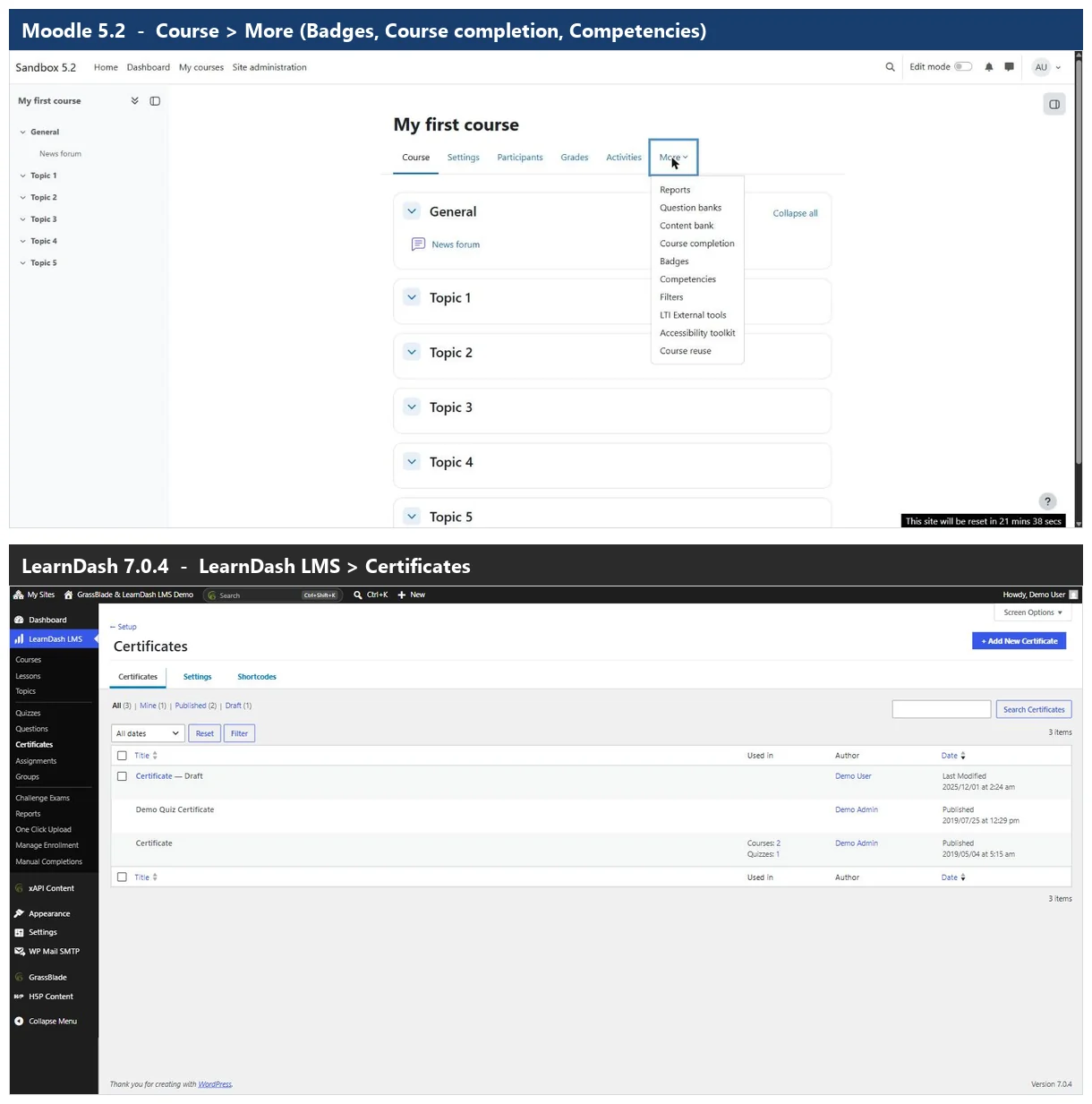
The learner side follows the same split. LearnDash presents courses through the WordPress theme, which looks clean and navigates simply for sequential content. However, dynamic learning paths, complex prerequisites and social learning depend on third-party integrations, and those often break visual consistency. Moodle’s learner interface is themeable and accessible, supports everything from interactive quizzes to collaborative forums, and shows progress through Activity completion settings. Administrators configure badges under Course > More > Badges and add a certificate module such as the Moodle Certificate plugin to issue verifiable CE proof automatically on completion.
Certification, Compliance, and Reporting
For continuing education providers, robust certification, compliance, and reporting are essential. LearnDash offers basic certificate generation. Advanced features like CEU tracking or audit trails require significant customization or premium add-ons.
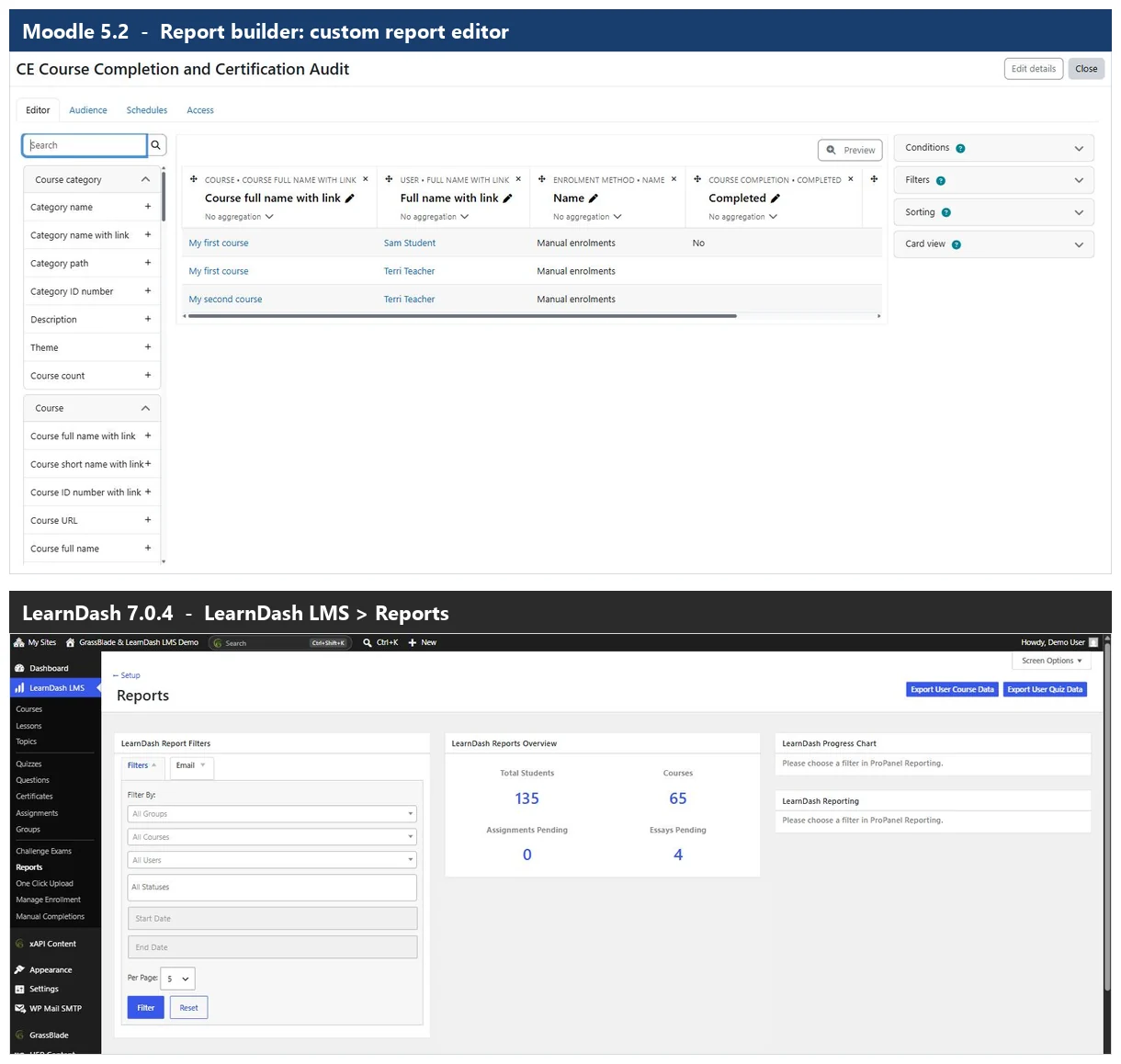
Piecing those add-ons together can be complex, and the result may still not meet stringent regulatory requirements. Comprehensive reporting therefore means exporting data to external tools for analysis.
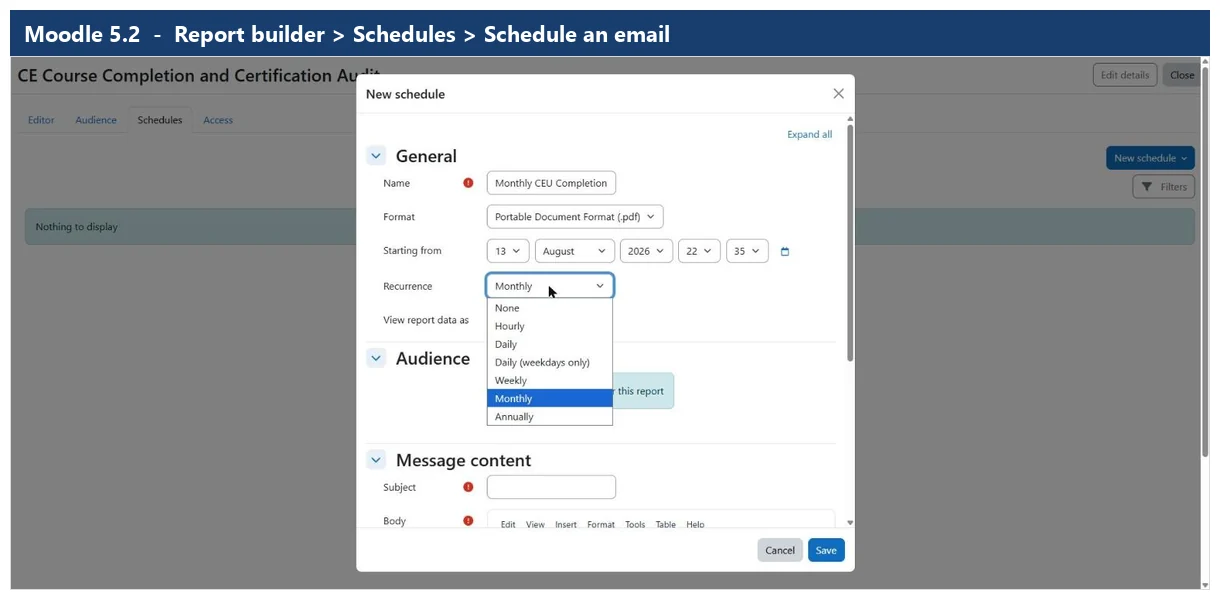
Moodle excels here. The Site administration > Reports > Report builder > Custom reports feature builds highly specific reports from virtually any data point in the LMS. Consequently it is invaluable for audit trails, CEU credits earned by cohort, and certification status for accreditation bodies. A custom report can show every user who completed a course with their grade and certificate issue date, giving an auditor direct evidence. Moodle’s open-source nature also means it can integrate with external compliance systems without proprietary vendor lock-in. That matters for regimes such as FIPPA, PIPEDA and HIPAA compliance in Moodle.
Scaling and Performance Under Real-World Enrollment

On LearnDash vs Moodle, nothing separates the two platforms as sharply as load. An LMS must stay stable under pressure, and continuing education traffic is rarely steady. Registrations and quiz attempts cluster hard against renewal deadlines, which is exactly where the two architectures separate.
Scalability and Performance
LearnDash ties its performance to the WordPress installation underneath it:
- Database bottleneck: WordPress was never designed as a high-transaction, multi-user learning platform.
- Query load: user tracking, quiz attempts and progress updates each generate queries that degrade response times.
- Concrete strain point: a quiz sat by a few hundred learners at once is where entry-level setups typically start to slow.
- Plugin overhead: every third-party plugin adds conflict risk and processing cost.
Moodle is engineered for enterprise load:
- Caching: Redis or Memcached support keeps frequently accessed data in memory and off the database.
- Throughput: thousands of quiz attempts process with minimal impact on responsiveness.
- Database layer: an abstraction layer tuned for PostgreSQL and MySQL/MariaDB under high-volume transactions.
Hosting for High Enrollment
- LearnDash: usually managed WordPress hosting, where shared plans become inadequate fast. Upgrading the plan or moving to a dedicated server helps, but the WordPress architecture still caps the ceiling.
- Moodle: thrives on a dedicated VPS or a cloud platform such as AWS or Azure. Specifically, that means a separate database server, caching layers and tuned PHP configuration.
Verdict on scale. LearnDash is built for casual learners and small cohorts moving through content at their own pace. Moodle is built for enterprise programs and higher-volume associations. Those programs need real capacity, because registrations flood in just before a CE deadline. Mindfield Consulting tunes Moodle hosting for precisely those peaks.
The True Cost of Ownership: Beyond the Sticker Price

Costing LearnDash vs Moodle properly means looking past the licence. Licensing is the smallest line in an LMS budget. Hosting, development, maintenance and support decide the real number. As a result, a low entry point can quietly become the more expensive option.
Where the Money Actually Goes
| Cost driver | LearnDash | Moodle |
|---|---|---|
| Core software licence | $ annual, per site | Free, open source |
| Reporting, CEU and payment features | $$ recurring, several vendors | Included in core |
| Hosting | $ managed WordPress | $$ dedicated or cloud |
| Setup and configuration | $ quick deployment | $$ one-time implementation |
| Ongoing maintenance | $$ many plugins to keep compatible | $$ scheduled upgrade cycle |
| Support model | Fragmented across plugin vendors | One partner or the community |
| Each additional learner | Pushes you up add-on tiers | No per-user licensing |
Relative scale only. Actual figures depend on your hosting, customization and user count.
Why the Gap Widens With Scale
- Add-ons compound: each LearnDash capability a growing program needs arrives as another annual subscription from another vendor.
- Maintenance is the hidden line: keeping WordPress core, LearnDash and every plugin compatible needs skilled developer time. Furthermore, updates can introduce breaking changes. Moodle maintenance follows a structured release cycle instead, which makes the work predictable.
- No per-user penalty: Moodle’s implementation cost is largely fixed, so cost per learner falls as enrollment grows.
- The crossover: past a few hundred learners with real compliance reporting, the recurring add-on and maintenance lines usually tip total cost in Moodle’s favour.
Verdict on cost. LearnDash is cheaper to start and stays cheaper for a small catalogue with light reporting. Moodle costs more upfront and wins on total cost of ownership once you add scale, accreditation reporting or integrations. Where you land depends on your setup, edition and user count, so contact Mindfield for a tailored quote.
Choosing the Right Platform: A Clear Verdict

LearnDash vs Moodle comes down to a continuing education provider’s needs, scale and vision. Both have advantages, but suitability varies with operational complexity.
LearnDash vs. Moodle for Continuing Education
Choose LearnDash if you already operate on WordPress and serve up to a few hundred learners with simple course structures. It suits teams that want rapid deployment and carry light compliance or reporting obligations. For that profile it is a cost-effective, easy-to-manage WordPress solution.
Choose Moodle if you face a large and growing user base, complex certification and CEU tracking, or stringent regulatory compliance. It also fits when you need advanced cohort management, deep integrations, or long-term scalability. Moodle provides the foundation for complex, high-volume continuing education.
Streamline Your CE Operations with Moodle Experts

Mindfield Consulting specializes in Moodle implementation, customization and optimization for continuing education. That work runs from intricate certification pathways through to comprehensive audit reporting. Our specialists help you transition smoothly, integrate with existing systems, and keep your Moodle environment robust, secure, and fast under load. The LearnDash vs Moodle choice comes down to architecture, scalability and compliance. We bring the expert insight to align that decision with your organizational goals.
Frequently Asked Questions (FAQs)
This article may contain conceptual illustrations to help support the article content.
