


Selling training to corporate clients on a multi-tenant LMS for external audiences introduces a unique set of challenges, particularly concerning checkout processes, tax compliance, and platform selection. Organizations aiming to deliver tailored educational content to diverse corporate partners must navigate complexities that extend beyond standard e-commerce. Understanding the specific requirements for per-tenant catalog management, varied payment methods, and intricate tax regulations is essential for successful implementation.
This article explores the strategic considerations for continuing education providers leveraging Moodle in such a demanding commercial environment. Furthermore, we will examine how to effectively manage a multi-tenant LMS for external audiences, ensuring seamless operations and compliance.
I recently migrated my site to Mindfield from another host, and the experience couldn’t have been better. Mindfield kept working until they were certain that my site was operating as well as it was before, and they even helped clean up a few issues to improve my site’s performance – issues my prior host never mentioned. I also found Mindfield’s communication to be excellent. Before the migration, they prepared me for what to expect, and during the migration they kept me well-informed.
Jim Benedek
review Source: Google Reviews
Outline
- Optimizing Checkout Flows for Corporate Clients in Multi-Tenant Environments
- Navigating Complex Tax Realities for Global Training Sales
- Strategic Platform Choices for Multi-Tenant Moodle Commerce
- De-Risking Investment in MuTMS: An Emerging Multi-Tenancy Option
- Reconciling Payments and Tax Across a Growing Client Portfolio
- Securing Your Multi-Tenant Moodle Commerce Strategy with Expert Support
- Frequently Asked Questions (FAQs)
Optimizing Checkout Flows for Corporate Clients in Multi-Tenant LMS for External Audiences

Delivering training to corporate clients within a multi-tenant Moodle setup requires a highly flexible and client-specific checkout experience. Each corporate client often expects a tailored catalog and pricing, along with diverse payment options. Therefore, a robust e-commerce strategy must account for these variations to ensure a smooth purchasing process.
Per-Tenant Catalogues and Custom Pricing in a Multi-Tenant LMS for External Audiences
Corporate clients typically require access to a curated selection of courses, often with negotiated pricing unique to their organization. A multi-tenant LMS must support this segmentation, implementing a system where each tenant sees only the courses relevant to their agreement. Managing this involves several key elements:
- Bespoke bundles and discounts: For example, a large enterprise client might have a bespoke training bundle at a discounted rate.
- Architecture and rules: The underlying architecture needs to manage these distinct course visibility and pricing rules.
- Custom extensions: This often involves custom development or specialized Moodle multi-tenancy plugins that extend Moodle’s core capabilities.
- Clear parameters: Administrators must define clear parameters for course assignment and pricing tiers per tenant. This ensures that the correct offerings and costs are presented to each corporate buyer.
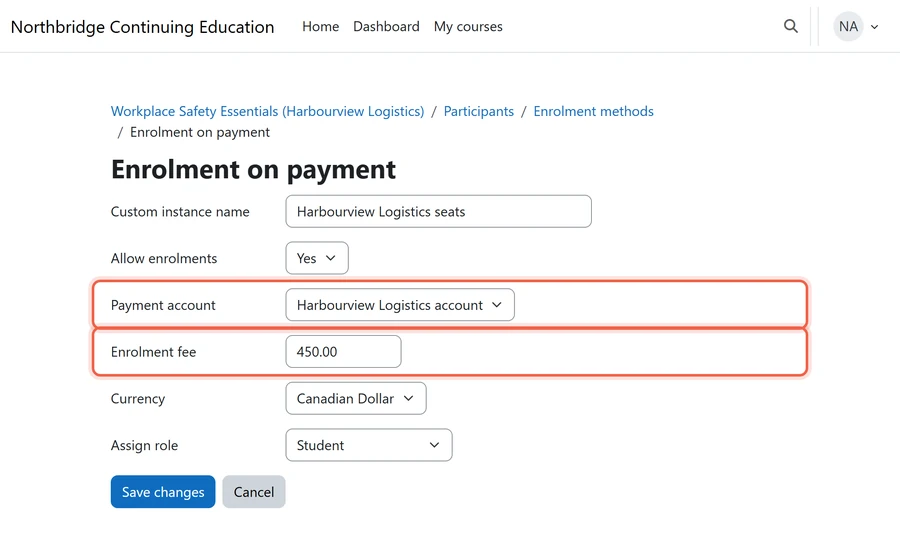
Invoicing versus Direct Card Payments
Corporate procurement processes frequently involve purchase orders (POs) and invoicing, rather than immediate credit card transactions. While individual learners might pay with a card, corporate accounts often require deferred payment terms. This distinction is crucial for a multi-tenant Moodle commerce solution.
Therefore, the system must support both direct payment gateways and an invoicing mechanism. Integrating with an accounting system for automated invoice generation and tracking is often necessary. This approach allows corporate clients to adhere to their internal purchasing policies.
Conversely, the system should also offer secure credit card processing for smaller, ad-hoc purchases or individual enrollments.
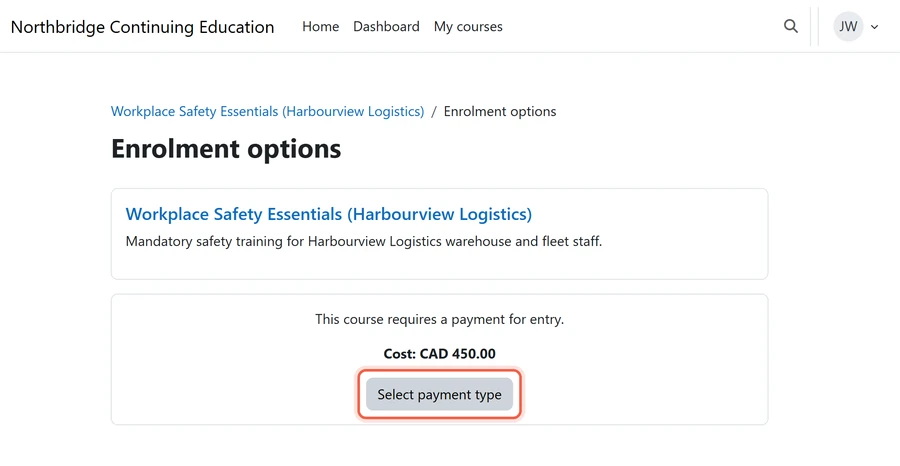
Managing Purchase Orders and Bulk Enrolments in a Multi-Tenant LMS for External Audiences
Corporate clients rarely purchase single course enrollments. Instead, they typically buy a block of seats for their employees. This requires a system that handles purchase orders, bulk license keys, or group enrollment features. Key aspects of this bulk purchasing flow include:
- Accommodating bulk orders: For instance, a client might buy 50 seats for a compliance training module. The checkout flow must accommodate this bulk purchasing.
- Seat distribution: It should allow an administrator from the corporate client to distribute these seats to their learners.
- Access methods: This process can involve generating unique access codes or providing a dedicated enrollment link for their team.
- Administrative benefits: Such functionality simplifies the administration for the corporate client and scales effectively with larger training programs.
Navigating Complex Tax Realities for Global Training Sales

Selling training to a diverse set of corporate clients across different geographical regions introduces significant tax complexities. Compliance requires understanding and accurately applying various sales taxes, Goods and Services Tax (GST)/Harmonized Sales Tax (HST), and Value Added Tax (VAT). Incorrect tax handling can lead to severe financial penalties and auditing issues.
Understanding Regional Sales Tax Obligations
In the United States, sales tax regulations vary significantly by state, and sometimes even by city or county, so online training providers face a complex landscape:
- Location: a client in California might have different tax obligations than one in Texas.
- What is taxable: in addition, the definition of a taxable service can differ.
- Calculation: the commerce setup has to apply the correct sales tax for the corporate client’s location, typically through a tax compliance service or a robust internal tax matrix. Consequently, the tax logic needs an owner.
- Change: it also has to keep up with changing nexus rules and tax rates to remain compliant.
Canadian GST/HST and Provincial Sales Tax
For Canadian corporate clients, a training provider selling across Canada must apply taxes correctly. The tax structure involves:
- The federal GST or the harmonized HST, which combines federal and provincial sales taxes.
- Provincial Sales Tax (PST) or Quebec Sales Tax (QST), which some provinces have on their own.
This means configuring the e-commerce system to identify the client’s province. It then applies the appropriate GST/HST rate or a combination of GST and PST/QST. For instance:
- A client in Ontario pays HST.
- A client in British Columbia pays GST plus PST.
Accurate geographical identification and rate application are paramount for Canadian sales.
VAT for International Clients
Selling to corporate clients in Europe and other regions often involves Value Added Tax (VAT). VAT is a consumption tax assessed on the value added to goods and services at each stage of production and distribution. The rates vary widely by country.
For example, a German client will pay a different VAT rate than a French client. As a result, the commerce component of a multi-tenant Moodle has to:
- Calculate and display VAT at the right rate.
- Handle reverse-charge mechanisms for business-to-business (B2B) transactions within the European Union (EU).
- Validate the corporate client’s VAT number so the tax is correctly accounted for.
Automating Tax Calculation and Reporting
Manually managing tax calculations for a growing list of corporate clients is unsustainable and prone to error. An effective strategy involves automating tax processes. This includes real-time tax calculation at checkout and generating accurate tax reports.
Integrating the LMS with specialized tax software or an enterprise resource planning (ERP) system is crucial. This integration ensures that all sales data, client locations, and tax categories are correctly mapped. Furthermore, it facilitates quarterly or annual tax filings by providing comprehensive reports.
This automation minimizes manual effort and reduces compliance risks significantly.
Strategic Platform Choices for a Multi-Tenant LMS for External Audiences

When planning to sell training to corporate clients on a multi-tenant LMS, the choice of platform significantly impacts commercial capabilities. Moodle offers several pathways to multi-tenancy, each with distinct features for managing commerce, user segregation, and content delivery. Understanding these options is critical for making an informed decision.
| Platform Option | Commerce Approach | Tenant Isolation | Customization Scope |
|---|---|---|---|
| IOMAD (multi-tenant Moodle-based LMS) | Built-in shop; card or invoice payment per tenant | Strong (companies separated within one Moodle site) | High (theme, plugins) |
| Standard Moodle (with the Moodle@Work theme) | Moodle enrolment-fee payments or an external store | Moderate (course categories, cohorts, roles) | Moderate (plugins, themes) |
| MuTMS (Emerging) | None built in; Moodle enrolment-fee payments or an external store | High (tenants partitioned within one Moodle site) | High (requires the MuTMS core patch) |
IOMAD: The Commercial Multi-Tenancy Solution
IOMAD is a Moodle-based enterprise learning platform specifically designed for multi-tenancy and corporate training. It provides robust features for managing multiple client organizations, each with its own branding, user base, and course catalog. A key strength of IOMAD is its integrated e-commerce functionality.
This includes capabilities for managing course purchases, generating invoices, and handling bulk enrollments directly within the platform. IOMAD allows for per-tenant pricing and reporting, making it well-suited for organizations focused on selling training to external audiences. Its comprehensive nature simplifies the integration of commercial operations with learning delivery.
Standard Moodle with the Moodle@Work Theme
Moodle@Work is Mindfield’s theme for standard Moodle. It also brings premium capability to regular Moodle users on standard core, without a jump to an expensive licensed LMS or a multi-tenancy rebuild. For a provider serving corporate clients, its manager and team views are therefore the relevant part:
- Manager assignment: each learner has a manager, set manually or from a human resources (HR) feed.
- HR hierarchy import: reporting lines load from a comma-separated values (CSV) file, with a preview first.
- Learning pathways: ordered courses with progress shown as a percentage.
- My team and team compliance: a client’s manager sees who is overdue on mandatory courses and, as a result, can chase them and export the list.
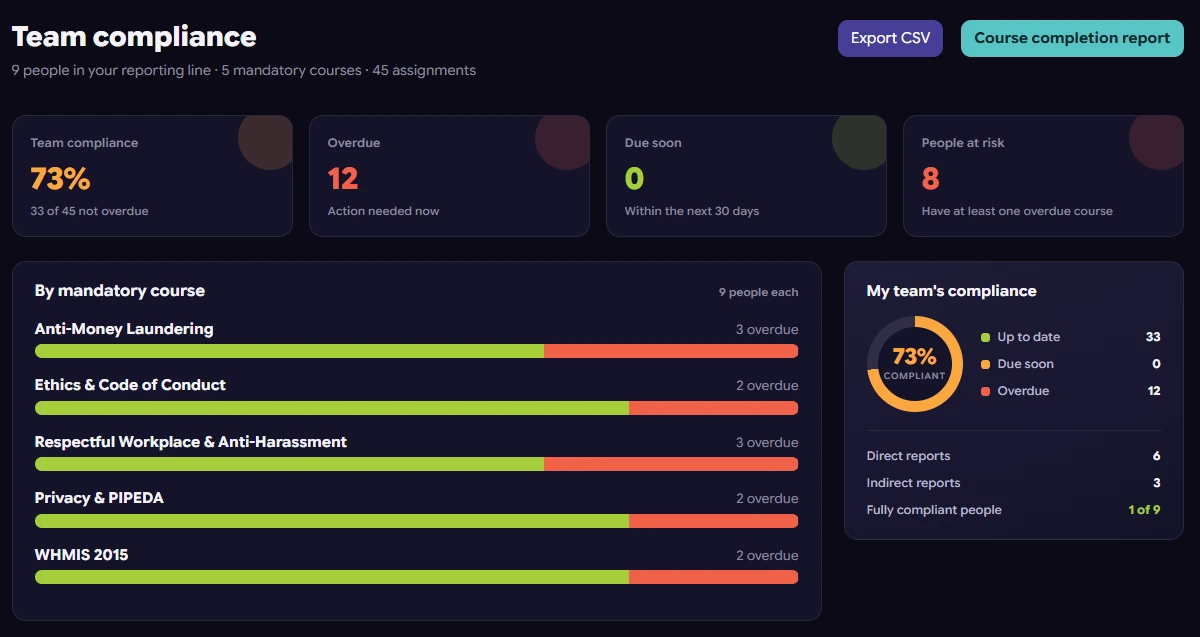
However, Moodle@Work adds neither multi-tenancy nor commerce. On this route, clients are kept apart with course categories, cohorts and roles, and checkout runs through Moodle’s enrolment-fee payments or an external store such as WooCommerce or Shopify. As a result, the trade-off is two systems to keep in step: user accounts, enrolments and payment status all have to sync.
MuTMS: An Emerging Multi-Tenancy Framework
MuTMS, the Multi-Tenant Management System, is an open-source suite of Moodle plugins and core patches, released under a free open-source licence and maintained independently of Moodle itself. What it gives a training provider:
- Tenants in one site: its multi-tenancy plugin partitions a single Moodle site into tenants, each with its own users, roles, courses and branding, and users only see their own tenant (tool_mutenancy).
- More than tenancy: the suite also adds programs, certifications and training credits.
However, MuTMS does not include commerce. Its documentation describes no checkout, payments, enrolment fees or invoicing, and a tenant-specific course catalogue is still on its roadmap. As a result, a provider selling to corporate clients on MuTMS would take payment through Moodle’s own enrolment-fee payment gateways or an external store (last verified October 2026).
Therefore, the platform choice is also a commerce choice. For example, IOMAD’s shop sells courses per tenant through Moodle’s core payment gateways, with a separate payment account per tenant if needed. In contrast, MuTMS leaves checkout to a payment setup you add yourself.
De-Risking Investment in MuTMS: An Emerging Multi-Tenancy Option

MuTMS represents an ambitious effort to bring robust, native multi-tenancy to Moodle, but as an emerging framework, it carries inherent risks. Organizations considering MuTMS for their client portals must adopt a cautious and strategic approach. Understanding its current state and planning for potential challenges is crucial to de-risk the investment.
Current State of MuTMS Development
So here is where MuTMS stands (last verified October 2026):
- Version: its multi-tenancy plugin targets Moodle 5.2; earlier builds targeted 4.5.
- Core patch: multi-tenancy needs the MuTMS core patch, which its full distribution ships already applied.
- Maturity: its maintainers describe it as production ready. However, the Moodle plugins directory lists it as Experimental because of that patch, and it is not sold through the Moodle Marketplace.
- Commerce: checkout, payment and tax handling sit outside the suite, so they need Moodle’s payment gateways, an external store or custom development.
Therefore, organizations must assess the specific features available in the current release against their immediate commercial requirements. It is important to monitor the project’s roadmap and community activity. This helps gauge the pace of development and the likelihood of future feature completion.
Assessing Stability and Support
The stability of an emerging platform like MuTMS is a primary concern, because production environments handle transactions and user data. Before going live:
- Test in staging first: early versions of any complex software can have bugs or performance limitations.
- Choose your support: MuTMS offers free community support through GitHub issues and paid priority support on request (mutms.org). Community support for open-source projects can be less formal than commercial support, so decide which one you rely on.
Organizations should evaluate their internal technical expertise or plan for external consulting support to manage potential issues.
Migration and Future Compatibility
Adopting a new framework always poses questions about future upgrades and compatibility. As MuTMS evolves, there may be breaking changes or complex migration paths between versions. This can impact the long-term maintainability of the multi-tenant Moodle instance.
- Upgrades: because multi-tenancy depends on the MuTMS core patch, plan each Moodle upgrade around a MuTMS release that supports the new Moodle version.
- Testing and budget: similarly, test every upgrade and allocate resources for potential custom development work.
- Lock-in: finally, weigh the risk of building significant customizations on an evolving framework.
Documenting all custom work and adhering to Moodle’s best practices for plugin development can mitigate some of these risks.
Reconciling Payments and Tax Across a Growing Client Portfolio in a Multi-Tenant LMS for External Audiences

As a provider expands its client list for a multi-tenant LMS for external audiences, the administrative burden of reconciling payments and taxes grows exponentially. Without clear processes and appropriate tools, financial reporting can become a complex and error-prone task. A strategic approach to reconciliation is vital for financial health and compliance.
Establishing Clear Reconciliation Workflows
Effective financial reconciliation starts with well-defined workflows. This involves clearly assigning responsibilities for payment collection, invoice generation, and tax reporting. For example, one team might handle incoming payments, while another verifies tax calculations.
Each transaction must be trackable from purchase to settlement. This also means establishing a regular schedule for reconciliation, whether weekly, bi-weekly, or monthly. The workflow should document how discrepancies are identified, investigated, and resolved.
Clear processes minimize errors and ensure that financial records are consistently accurate.
Leveraging Reporting Tools and Integrations
The multi-tenant Moodle’s commerce component should offer robust reporting capabilities. These reports need to provide granular data on sales per tenant, payment methods used, and taxes collected. For instance, an administrator should be able to pull a report detailing all sales for “Corporate Client A” in the last quarter.
Integration with accounting software (e.g., QuickBooks, Xero) or an ERP system is paramount. Such integrations automate the transfer of sales and tax data, reducing manual data entry and errors. This ensures that the financial system of record accurately reflects all transactions from the learning platform.
Auditing and Compliance for a Multi-Tenant LMS for External Audiences
Regular internal and external audits are essential to ensure financial and tax compliance. These audits verify that payments are correctly recorded, and taxes are accurately calculated and remitted. For example, an audit might check if the correct sales tax was applied to all purchases from a specific state.
This process involves reviewing transaction logs, tax reports, and reconciliation statements. It also ensures adherence to local and international tax regulations. Maintaining comprehensive audit trails within the LMS and integrated systems is critical for demonstrating compliance to regulatory bodies.
Securing Your Multi-Tenant LMS for External Audiences with Expert Support

Implementing a comprehensive commerce strategy for a multi-tenant LMS for external audiences involves navigating complex technical, financial, and regulatory landscapes. From custom checkout flows to intricate tax logic and platform selection, the strategic decisions are substantial. Relying on an experienced partner can ensure your Moodle environment not only functions flawlessly but also supports your business goals effectively.
Mindfield Consulting’s Moodle specialists possess the deep expertise required to design, implement, and maintain such sophisticated systems, ensuring your corporate training sales are streamlined and compliant.
Frequently Asked Questions (FAQs)
This article may contain conceptual illustrations to help support the article content.
