

Administrators must protect Moodle from PHP2Shell and similar underlying server vulnerabilities. So, they must understand the critical interplay between Moodle’s application layer and its foundational PHP environment. For example, a recent critical PHP vulnerability, dubbed “PHP2Shell,” demonstrated this interdependence sharply. In fact, it was serious enough that Moodle Headquarters (HQ) took moodle.org offline as a precaution on October 22. Indeed, this incident highlighted how even a well-maintained Moodle instance can be exposed. That happens when the PHP underneath it is not patched.
Therefore, understanding these risks is essential for maintaining a secure and reliable learning management system. Next, in this article, we will explore the PHP2Shell vulnerability, its implications for Moodle, and strategic approaches to mitigation.
I recently migrated my site to Mindfield from another host, and the experience couldn’t have been better. Mindfield kept working until they were certain that my site was operating as well as it was before, and they even helped clean up a few issues to improve my site’s performance – issues my prior host never mentioned. I also found Mindfield’s communication to be excellent. Before the migration, they prepared me for what to expect, and during the migration they kept me well-informed.
Jim Benedek
review Source: Google Reviews
Outline
- The PHP2Shell Vulnerability: A Critical Overview
- Moodle’s Exposure Beyond Its Version Number
- High Stakes: What a Compromised Moodle LMS Can Lose
- The Older Moodle Trap: Forced Upgrades and Compatibility Challenges
- Who Has to Protect Moodle from PHP2Shell: You or Your Host?
- Get Help to Protect Moodle from PHP2Shell
- Frequently Asked Questions (FAQs)
The PHP2Shell Vulnerability: A Critical Overview

The PHP2Shell vulnerability emerged as a significant threat to PHP applications, including Moodle. This happened because of its potential for remote code execution (RCE). Specifically, this exploit allowed attackers to execute arbitrary commands on a server. Furthermore, it essentially bypassed application-level safeguards by targeting the underlying language interpreter.
How the Leak Forced an Early Patch
PHP2Shell is the nickname for two flaws in PHP itself, tracked as Common Vulnerabilities and Exposures (CVE) entries CVE-2026-109618 and CVE-2026-109619. Each is rated 9.2 out of 10 on the Common Vulnerability Scoring System (CVSS) v4 scale. As a result, the timeline moved fast:
- October 17: Amazon saw an exploitation attempt on its honeypot network, four days before any fix existed.
- October 20: the CVE numbers leaked online ahead of the planned disclosure, and the PHP security team announced an emergency release.
- October 21: PHP shipped fixed versions a day earlier than planned, and Cloudflare reported early attacks against both flaws.
- October 22: Moodle HQ took its public sites offline, following guidance from CERT-EU and the Australian Cyber Security Centre.
What the Flaw Actually Does
PHP2Shell is not a bug in Moodle, and it doesn’t rely on a weak password or a missing plugin update. Instead, it sits in how PHP cleans up between web requests. When a request ends abnormally, through a fatal error, a timeout or running out of memory, PHP can leave behind state that points to memory already released. Then the next request on the same worker can reuse that stale memory, and a carefully prepared sequence of requests turns that into code running on your server.
Above all, three details make it serious for Moodle site owners:
- No login needed: the attacker doesn’t need a Moodle account.
- It can run before Moodle does: on Apache with mod_php, the setup PHP rates as highest risk, the attack can fire before any application code loads.
- It can leak secrets: researchers also showed it can expose memory contents such as passwords, tokens and application programming interface (API) keys.
Moodle’s Exposure Beyond Its Version Number

Even a Moodle installation updated to the latest stable version can remain vulnerable. This occurs because its underlying software stack is not equally secure. Moodle is an application built on PHP, which in turn runs on an operating system. Therefore, this layered architecture means a flaw at any level can impact the entire system.
The Interdependence of Software Stacks
Moodle relies heavily on its environment. This includes the PHP runtime, the web server (Apache or Nginx), and the database (MySQL, PostgreSQL, etc.). Each component has its own set of vulnerabilities and patch cycles.
Therefore, neglecting updates for any single element creates a weak link. A Moodle site might be perfectly secure at the application level. However, if the PHP version has a known RCE vulnerability, the entire system is at risk.
Why a Moodle Update Alone Won’t Protect It from PHP2Shell
An unpatched PHP vulnerability can allow attackers to bypass Moodle’s application-level security controls. Moodle’s robust role-based access, like Moodle course creation permissions, and secure coding practices protect against common exploits. However, if an RCE exploit directly targets the PHP interpreter, these Moodle-specific protections become irrelevant.
The attacker gains direct command execution privileges on the server. This allows them to read, modify, or delete any files accessible to the PHP process.
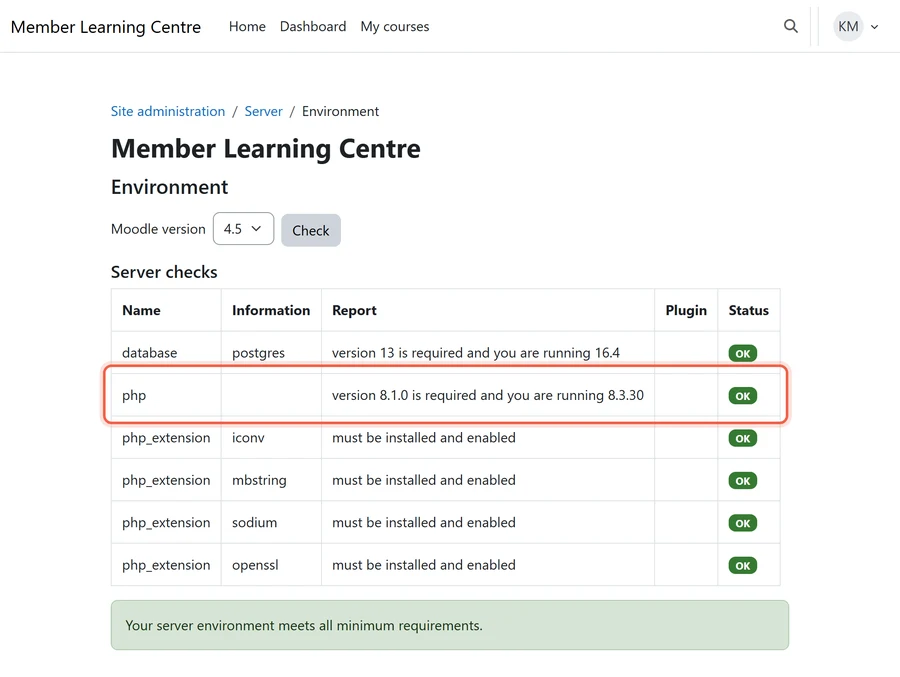
Also, Moodle’s own environment check won’t flag it. It confirms PHP meets Moodle’s minimum, not that the build carries the October 21 fix.
High Stakes: What a Compromised Moodle LMS Can Lose

A successful exploit, such as PHP2Shell, against a Moodle Learning Management System (LMS) can have devastating consequences. The nature of data stored within an LMS means a breach can impact individuals, institutions, and their reputation. The risks extend far beyond mere technical disruption.
Data Integrity and Privacy Breaches
Moodle LMS platforms store vast amounts of sensitive information, necessitating robust Moodle data retention strategies. This includes personally identifiable information (PII) for learners and instructors, plus records that matter most to each kind of organization:
- Professional associations: members’ continuing education credit history, the record behind every licence renewal.
- Private schools: student grades and report-card data.
- Continuing education providers: paid enrolments and the certificates learners rely on.
A compromise of this data can lead to:
- Learner Records Exposure: Personal details, academic performance, and progress data can be accessed or stolen.
- Stored Credentials Compromise: Usernames and hashed passwords could be harvested, along with the database password and the single sign-on and payment keys Moodle keeps in its configuration.
- Sensitive Communications Leakage: Private messages between learners and instructors, or group discussions, may be exposed.
In Canada, a breach involving personal information can trigger reporting duties under the Personal Information Protection and Electronic Documents Act (PIPEDA) or provincial privacy law, and learners in Europe bring the General Data Protection Regulation (GDPR) into play. These incidents carry significant legal and financial penalties.
System Compromise and Network Foothold
An RCE vulnerability allows an attacker to execute commands on the server. This grants them a powerful foothold. From there, they can:
- Install Backdoors: Persistent access can be established, making future re-entry easy even after initial patches.
- Lateral Movement: The compromised Moodle server can be used as a pivot point to attack other systems within the network. This includes administrative servers or other applications.
- Denial of Service (DoS) Attacks: Attackers can disrupt the Moodle service by consuming resources or deleting critical files. This prevents legitimate users from accessing learning materials.
- Malware Distribution: The LMS can be turned into a host for distributing malware to unsuspecting learners.
The integrity of the entire network could be at risk. This makes the LMS a critical security asset.
Reputational and Financial Damage
Beyond direct data loss and system compromise, the long-term effects of a breach are substantial. These can include:
- Loss of Trust: Learners, educators, and institutional partners may lose confidence in the platform’s security. This affects enrollment and engagement.
- Regulatory Fines: Non-compliance with data protection laws can result in hefty fines. Investigations can also be prolonged and costly.
- Forensic and Remediation Costs: Identifying the extent of the breach, patching systems, and restoring operations requires significant resources.
- Legal Liabilities: Affected individuals might pursue legal action, adding further financial burden.
The cumulative impact can severely damage an institution’s standing and financial health.
The Older Moodle Trap: Forced Upgrades and Compatibility Challenges

Addressing critical PHP vulnerabilities often requires upgrading PHP to a newer, patched version. This straightforward solution can create common challenges with Moodle for organizations running older versions. The problem lies in the strict compatibility requirements between Moodle and PHP.
PHP Version Requirements and Moodle
Each Moodle version supports a fixed range of PHP versions, according to Moodle’s PHP requirements. The fixed PHP releases are 8.2.35, 8.3.36, 8.4.27 and 8.5.12. PHP 8.1 and older get no official release, only minimal source backports and whatever patched packages a Linux distribution or long-term support (LTS) vendor ships. That splits Moodle sites into two groups:
- Moodle 4.2 and later: these versions run on PHP 8.2 or newer, so the fix is a PHP update the site already supports. A Moodle 4.5 LTS site, for example, moves to 8.3.36.
- Moodle 4.1 and older: Moodle 4.1 tops out at PHP 8.1, so a fully supported fix means upgrading Moodle first. Sites still on 4.0 or 4.1 can start with our guide on how to upgrade Moodle from 4.0 to a 4.x LTS version.
In other words, for those older sites patching PHP forces a Moodle upgrade, and it is often an unplanned, urgent project.
Either way, retest the site before it goes back to users if it runs more than five plugins and the update moves it to a new PHP version, such as 8.1 to 8.3, rather than a security patch within the same version like 8.3.30 to 8.3.36. Third-party plugins are usually where a PHP version change breaks first.
Strategic Upgrade Planning to Protect Moodle from PHP2Shell
When a PHP patch necessitates a Moodle upgrade, organizations face a critical decision point. They must either risk running an unpatched PHP version, or embark on an immediate Moodle upgrade. The latter requires careful planning and automated testing strategies for Moodle upgrades, even under pressure.
The upgrade still needs the usual groundwork:
- Compatibility: check every plugin and custom theme against the target Moodle and PHP versions.
- Staging: test the full upgrade on a copy before it touches the live site.
- Resources: budget for custom work on plugins that have no update.
Four points make the decision concrete:
- The rule: if the site can’t reach a patched PHP this week, choose this week between an emergency upgrade and going offline.
- The trap: “we’re patched” may mean a backported PHP 8.1 package, which closes this flaw but not the next one.
- The backstop: PHP 8.1 stopped receiving security fixes on December 31, 2025, and Moodle 4.1’s security support ended December 8, 2025.
- The owner: whoever signs the hosting or support contract, usually the operations or technology lead, owns the decision. The host or your Moodle developer owns the work.
Who Has to Protect Moodle from PHP2Shell: You or Your Host?

Determining who is responsible for applying critical PHP patches, like those for PHP2Shell, depends heavily on your Moodle hosting model. This ownership clarity is crucial for rapid response and maintaining security. Both self-hosted and managed hosting environments have distinct responsibilities.
Self-Hosted Moodle: The Patch Is Yours
If Moodle runs on your own servers or virtual machines, patching PHP lies entirely with your internal Information Technology (IT) team or designated administrator. That means:
- Confirm the running version: check the PHP build actually serving Moodle, not just the one installed.
- Patch and restart: move to a fixed release, then restart the web server and PHP workers, because the old build keeps serving until they do.
- Treat stopgaps as stopgaps: PHP has published temporary configuration changes and firewall vendors have added rules, but PHP’s own guidance is that only an update closes the hole.
- Keep Moodle on a supported version: so the next PHP fix lands on a version Moodle can run.
Managed Hosting: Confirm Rather Than Assume
Your Moodle might be hosted by a managed service provider or on a cloud platform. So, a portion of the patching responsibility shifts to them. However, the extent varies based on your Service Level Agreement (SLA). It is important to clarify this explicitly.
Managed hosts typically handle the underlying operating system and PHP patching. They maintain the server infrastructure. However, you remain responsible for your Moodle application. So if your host can’t say when PHP will be patched, that is a reason to migrate Moodle to a new host.
Questions to Ask Your Host This Week
Ask your managed hosting provider, and get the answers in writing:
- Running version: “Which PHP version is serving our Moodle site right now, and does it include the October 21 fix?”
- Backports: “If we’re on PHP 8.1 or older, is that a backported package, and who supplied it?”
- Restarts: “Were all PHP workers restarted after patching?”
- Exposure: “Was our server reachable while it was vulnerable, and will you keep the web server and PHP logs if we need to investigate?”
- Service Level Agreement (SLA): “What turnaround does our SLA promise for critical security patches?”
After You Protect Moodle from PHP2Shell, Check for Signs of a Breach
Patching stops new attacks. However, it doesn’t undo one that already happened, so a site that was reachable while vulnerable deserves a check. Signs to look for:
- Files in the web directories nobody on the team added.
- Unexpected processes, outbound connections or crashes on the web server.
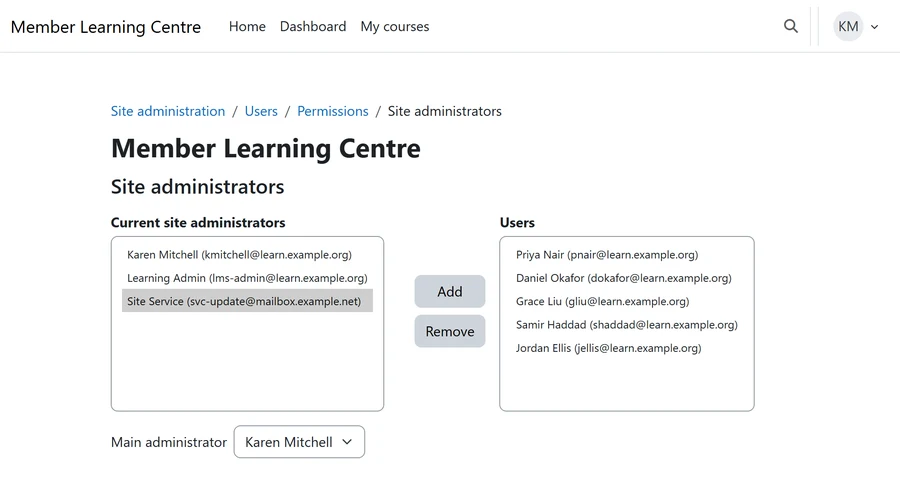
- New accounts, including a Moodle site administrator nobody recognises.
If anything looks wrong, preserve the web server, PHP and system logs, and don’t rebuild the server before someone has looked at it, because a rebuild destroys the evidence of what was taken. Our guide to defending Moodle against hackers covers the hardening that should follow.
Get Help to Protect Moodle from PHP2Shell

Not sure which PHP version your Moodle runs on, or whether your host has actually patched it? Mindfield’s Moodle specialists can confirm your exposure, apply the fix or plan the upgrade an older site needs, and check whether the server was touched while it was vulnerable. If your site holds member credits, student grades or paid enrolments, that check is worth doing this week.
Frequently Asked Questions (FAQs)
This article may contain conceptual illustrations to help support the article content.
