


When professional associations run their credentialing on Moodle, the Moodle plugins they approve stop being an IT preference and become a strategic decision. Each of those potential Moodle plugins ends up underneath the association’s continuing education management in Moodle. So the evaluation criteria extend far beyond basic functionality, to audit defensibility, long-term data integrity, and member retention.
A misstep in plugin choice can jeopardize a CE audit or the work of maintaining SOC 2 compliance with Moodle. It can also complicate accreditation and even impact member loyalty. This guide will explore the unique considerations associations must address when approving Moodle plugins, focusing on the strategic implications for credentialing, revenue, and operational continuity.
Engaged the team for a global retailer application development project. Schedules were consistently met with flexibility to changing scope. Was always impressed with Mindfield’s responsiveness and ability to quickly grasp the problem while offering creative solutions. Applications were of high quality and I wouldn’t hesitate to recommend Mindfield Consulting for any custom development.
Grant R
review Source: Google Reviews
Outline
- Selection Criteria for Audit-Defensible Moodle Plugins
- Managing Vendor Dependency for Critical Association Plugins
- Framing Plugin ROI for Member Retention and Non-Dues Revenue
- Ensuring Plugin Performance During Peak Renewal Periods
- Establishing Clear Ownership for Moodle Plugin Approval
- Key Moodle Plugins for Professional Associations
- How Our Moodle@Work Theme Tracks Compliance and Professional Development
- Strategic Moodle Plugin Guidance from Experts
- Frequently Asked Questions (FAQs)
Selection Criteria for Audit-Defensible Moodle Plugins

Professional associations often rely on Moodle to provide the verifiable evidence required for continuing education (CE) audits. So when associations evaluate Moodle plugins, the primary question shifts:
It is no longer “does it offer the desired feature?” but “what record does it leave, and for how long will that record be defensible?”
Auditors expect that record to answer four questions. It also has to answer them years later, even for members whose status has lapsed:
- Who completed the requirement
- What they completed, and when
- How many credit hours it was worth
- What evidence the credit rests on
Ensuring Data Persistence and Integrity
A plugin’s ability to retain historical data is paramount for audit purposes. Many Moodle activities, by default, might clear user attempt data or completion records during a course reset or recompletion cycle. Before approval, put two questions to the plugin’s data model:
Does the data sit in Moodle’s core tables, or in custom tables that standard Moodle operations might overlook?
If an auditor asks for a member’s transcript from five years ago, will this plugin still return a complete record?
Routine maintenance is where records quietly disappear. Before approval, confirm the plugin’s data survives each of these:
- Course backups: a backup that includes user data carries the plugin’s records, not just its configuration.
- Course restores: a restored course brings member records back with it.
- Moodle upgrades: the data carries forward when Moodle and the plugin both move to a new version.
Facilitating Data Export and External Verification
Beyond storage, the ease and format of data export are critical. CE and completion evidence leaves Moodle for three different audiences, and each one needs something different:
| Who asks | What they need from the record |
|---|---|
| CE auditor | Completion, date and credit hours per member, in the shape the accrediting body specifies |
| Association Management System (AMS) | Structured data it can import and cross-reference against the member file |
| Employer or regulator | A way to confirm a credential is genuine without needing a Moodle account |
The last row is the one most often missed at approval time. That is why certificate verification belongs in the evaluation rather than being treated as a design detail.
Managing Vendor Dependency for Critical Association Plugins

Not all Moodle plugins carry the same level of strategic importance for an association. Some offer mere convenience, while others sit directly under a core credential, such as those handling AMS connectors, certificate issuance, or CEU tracking. For these critical plugins, the maintainer transitions from being a casual contributor to a vital supplier. Therefore, associations must proactively assess the vendor dependency risk before installation.
Evaluating Maintainer Reliability via the Moodle Marketplace
The Moodle Marketplace provides concrete, checkable evidence regarding plugin maintainers. It is not the whole catalogue, though, because some plugins were not migrated to the Moodle Marketplace, and a missing listing is itself worth a question. When assessing a plugin, decision-makers should scrutinize several key indicators available on the listing:
- Maintainer Information: Identify who maintains the plugin. Is it a single individual, a community group, or a commercial entity?
- Version Support Range: Check the range of Moodle versions the plugin officially supports. A plugin that lags behind current stable releases (like Moodle 5.2) can signal future compatibility issues.
- Last Release Date: A recent release indicates active development and responsiveness to Moodle updates and bug fixes. Older release dates suggest potential abandonment or neglect.
- Install Count: A higher install count often implies broader community usage and testing, which can correlate with stability.
- Pricing Model: Understand if the plugin is free, paid, or has a subscription model. This directly impacts budget and support expectations.
A single-maintainer plugin directly supporting a credential raises continuity questions that the association must answer before it becomes an incident. The Course recompletion plugin is one example. It is maintained by Dan Marsden and installed on around 2,000 sites, and it is listed as a paid yearly subscription rather than a free download. While reviewed annually for quality, its commercial dependency and smaller install base highlight the need for a clear strategy.
Developing a Continuity Strategy for High-Stakes Plugins
For plugins deemed critical to an association’s credentialing or revenue, a proactive continuity plan is essential. Therefore, associations should consider one of the following approaches:
- Formal Support Contract: Secure a support contract with the plugin’s developer or a Moodle partner that covers dedicated assistance, bug fixes, and upgrade compatibility. Our comprehensive Moodle support guide sets out the options.
- Partner Maintenance: Engage a Moodle consulting firm like Mindfield Consulting to take responsibility for maintaining the plugin. This can include monitoring, custom development, and ensuring compatibility with Moodle upgrades.
- Funded Fork: If the plugin is open source and critical, the association might fund a developer or team to maintain its own version. That fork is shaped to the association’s needs.
- Strategic Decision to Do Without: If the risks outweigh the benefits and no support strategy is viable, the association may decide to forgo the plugin altogether. A built-in Moodle alternative or a change to the process takes its place.
Framing Plugin ROI for Member Retention and Non-Dues Revenue

When presenting a business case for Moodle plugins to an association’s board, focusing solely on “administrator hours saved” is often the wrong approach. While efficiency gains are valuable, the hours typically belong to a small team. The financial saving is rarely material enough to impress next to the association’s overall dues revenue. Instead, the business case that resonates at a board level centers on member retention and non-dues revenue.
Connecting Plugins to Member Renewal Rates
A well-chosen Moodle plugin can directly influence a member’s decision to renew their membership. For instance, a robust Moodle certificate plugin that makes it easy for members to access and verify their credentials contributes to a positive experience.
If a member’s complete transcript of CE activities lives securely and accessibly with the association, it creates a powerful incentive for them to maintain their membership. This reduces friction during renewal season, as members can easily demonstrate compliance or progress towards their professional goals.
Conversely, a clunky or unreliable system for tracking CE credits or issuing certificates can lead to frustration. Such issues often result in members calling staff for assistance, which, while resolvable, adds friction to the renewal process.
Driving Non-Dues Revenue Opportunities
Beyond retention, certain plugins can unlock new non-dues revenue streams. For example, a plugin that facilitates selling courses to non-members, or provides a clear path for them to earn credentials, expands the association’s market reach. Moreover, features like automated invoicing, payment gateway integration, or streamlined course enrollment for guests directly support revenue generation.
When evaluating a plugin, ask: what does this change about the renewal decision for members? How does it enable us to attract and convert non-members into paying customers for our educational offerings?
Ensuring Plugin Performance During Peak Renewal Periods

Unlike academic institutions with relatively steady weekly traffic throughout a term, professional associations experience highly concentrated load spikes. A significant portion of members typically complete their CE requirements in the final days or weeks leading up to a reporting or renewal deadline. This unique usage pattern means that the Moodle plugins that matter most are precisely those that must perform robustly under extreme concurrency.
Assessing Concurrency Handling and Load Resilience
During these peak periods, several jobs run at once for hundreds or thousands of members. Certificate generation, compliance report queries, renewal payments and AMS synchronization all land together.
Asking a vendor about a plugin’s performance under load is a necessary step, and it works best next to your own plan for detecting and anticipating Moodle performance issues. However, accepting “it works fine for us” as a definitive answer is insufficient. Associations need to understand the underlying architecture.
Does the plugin perform heavy, resource-intensive operations on demand? Or can its most demanding work be scheduled as background tasks during off-peak hours? For example, generating complex reports that query live tables can severely impact performance if run by many users concurrently.
Optimizing for Scheduled and Asynchronous Operations
To mitigate the risks of load spikes, associations should prioritize plugins that support asynchronous operations or allow for scheduled tasks. Examples include:
- Background Certificate Generation: The system queues certificates for a cron job instead of issuing them the instant a member completes.
- Scheduled Report Generation: Complex compliance reports can be pre-generated overnight, the same way teams already schedule Moodle custom reports in core. Users then open static, high-performance versions during peak times.
- Batch AMS Syncs: Rather than real-time, one-off synchronization requests, changes can be batched and processed during periods of low Moodle usage.
Establishing Clear Ownership for Moodle Plugin Approval

Typically, IT, Education, and Membership teams evaluate the same plugin against different failure modes. Without a named, accountable owner, the plugin that ultimately gets installed might simply be the one whose sponsor pushed hardest. This siloed approach often leads to significant problems at upgrade time or when issues arise, as accountability is diffused.
Distinct Departmental Stakes in Plugin Approval
Each department brings a crucial perspective to plugin evaluation:
- IT: The IT department focuses on technical stability, security, and the upgrade path. Their primary concerns include whether the plugin introduces vulnerabilities, its compatibility with future Moodle versions, and its impact on system uptime.
- Education: The education department is concerned with the defensibility of the credential and the integrity of the learning design. They evaluate whether the plugin accurately tracks learner progress, supports required assessment methods, and ensures that the evidence for certification is robust and auditable.
- Membership: The membership department prioritizes the member experience and the renewal number. They assess how the plugin affects member engagement and ease of access. They also ask whether it removes a reason to call staff during renewal season.
Implementing a Workable Plugin Approval Model
To ensure responsible plugin management and long-term sustainability, associations should implement a structured approval model. Key components include:
- Single Accountable Owner: Assign a single individual or department as the accountable owner for each plugin. This owner is responsible for the plugin’s lifecycle, from initial evaluation through maintenance and eventual retirement.
- Standing Review Committee: Establish a standing committee or review process that includes representatives from IT, Education, and Membership. This committee collectively evaluates new plugins and reviews existing ones regularly.
- Written Statement of Purpose: Document what every approved plugin is for. Name the problem it solves, its value to the association, and how long it is expected to last.
- Explicit Retirement Decision: Just as plugins are approved, there must be an explicit process for their retirement. This includes data migration plans, communication strategies, and a timeline for deprecation.
Approving a Moodle plugin is not a one-time event; it is a commitment to maintain that plugin through every future Moodle upgrade.
Key Moodle Plugins for Professional Associations

For professional associations managing continuing education and credentialing, specific Moodle plugins offer functionalities that address unique needs related to compliance, member services, and administrative efficiency.
Custom certificate (mod_customcert)
Associations that issue their own branded credentials usually start with Custom certificate. Maintained by Mark Nelson, it provides a web-based designer for dynamically generated PDF certificates. Association logos, custom text and member data can all go on the certificate, alongside a certificate code, a QR code and an expiry date.

Verification is the feature that matters most to an association. Each certificate can be set to let anyone with its verification link confirm it, including people who are not logged in. An employer or regulator can therefore check a credential without needing a Moodle account. The plugin is free, supports Moodle 2.9 to 5.2 and has around 31,800 installations, with its latest release on 23 August 2026.
Completion Progress (block_completion_progress)
Completion Progress gives members a colour-coded view of the activities they still have to complete. Maintained by Jonathon Fowler, it also shows combined progress on the Dashboard and gives staff an overview that identifies learners at risk. It only tracks activities that have completion settings, so it is only as accurate as the course set-up behind it.

For an association, it answers the most common renewal-season question before a member picks up the phone: how much is left before the deadline? The plugin is free, supports Moodle 3.9 to 5.2 and has around 17,400 installations, with its latest release on 30 August 2026.
Course recompletion (local_recompletion)
Course recompletion is specifically tailored for annual recertification or recurring training requirements. Maintained by Dan Marsden, it clears course and activity completion on a schedule, requiring a member to re-complete a requirement. It also offers the option to archive prior attempts rather than deleting them, preserving historical records for audit purposes.

This plugin supports Moodle 3.3 to 5.2 and has approximately 2,000 installations, with its latest release on 16 August 2026. It is listed on the Marketplace as a paid standard yearly subscription at 25 US dollars per year. The listing also carries a “reviewed annually for quality” line.
Configurable Reports (block_configurable_reports)
For associations needing to extract specific CEU and completion evidence, Configurable Reports is invaluable. It is maintained by Sara Arjona and Juan Leyva. The free plugin builds custom reports, including reports written in SQL. This capability is critical for shaping data into the format an auditor or AMS requires.

It supports Moodle 1.9 to 5.2 and has around 16,000 installations, with its latest release on 4 May 2026. While Moodle’s core custom reports now cover some of this ground, the evaluation question becomes which tool best serves the association’s specific reporting needs.

Attendance (mod_attendance)
Attendance addresses the need to award credit for physical presence, such as conference sessions, chapter meetings, or live webinars. Maintained by Dan Marsden, it provides a digital record for credit types that typically lack one. This free plugin has around 23,000 installations and supports Moodle 2.3 to 5.2. That 5.2 support only arrived with its 10 September 2026 release. A week earlier the listing stopped at 5.1, which is exactly why version support should be re-read at approval time rather than remembered.

SAML2 Single sign on (auth_saml2)
SAML2 Single sign on is the critical link between an association’s AMS or member portal and Moodle, ensuring that membership status dictates course access. Maintained by Catalyst IT, this free plugin has around 4,700 installations. Its listed support runs to Moodle 5.1, one release behind current stable, and its latest release was on 2 April 2026. This is arguably the highest-consequence item on this list, as a failure in this plugin stops everyone at once.
This list provides a starting point for associations to consider Moodle plugins that align with their specific operational and compliance needs. Each plugin’s details, including maintainer, supported versions, and installation counts, were read from the Moodle Marketplace in September 2026 and should be re-verified there before approval.
How Our Moodle@Work Theme Tracks Compliance and Professional Development
That said, each plugin above covers only one piece of the credential record. Moodle@Work, the Moodle theme Mindfield built, pulls those pieces into one view. It shows who is current, who is due and who has fallen behind. Crucially, it runs on standard Moodle core. As a result, an association gets dashboards usually sold with licensed LMS platforms. There is no platform switch and no multi-tenancy rebuild.
What matters for an association is what each person sees:
- Members open a dashboard with their compliance percentage and anything overdue. It also shows their learning hours for the year and every certificate they have earned, ready to download. That covers continuing professional development (CPD) tracking without a spreadsheet on the side.

- Anyone who oversees a group gets a team view. That could be a chapter chair, an employer sponsoring several members or the association’s own CE staff. The view lists direct and indirect reports, a compliance bar per person and how many people have an overdue requirement.
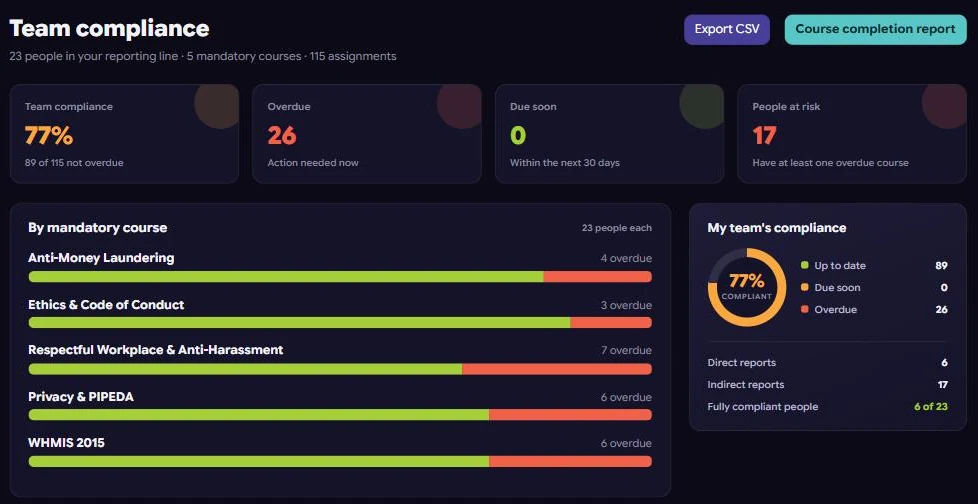
- Program administrators see compliance by required course and the people at risk. They can export it as a comma-separated values (CSV) file for an auditor or the AMS.
The test for any credential setup is not whether Moodle stores the completion. It is whether someone sees the lapse before the renewal deadline does.
In addition, two settings carry the policy. A grace period gives new members time to finish required training before it counts as overdue. Likewise, a due-soon window flags a deadline before it passes. Reporting lines can also be imported from a member or human resources system’s CSV export. Finally, learning pathways put required courses in order and show progress against each one.
Strategic Moodle Plugin Guidance from Experts

Navigating the complexities of Moodle plugin selection, especially when compliance, member retention, and revenue are at stake, requires specialized expertise. Mindfield Consulting’s Moodle specialists possess a deep understanding of these nuanced requirements, from audit-proof data retention to performance under peak load. We can help your association evaluate, implement, and maintain the right plugins, ensuring your Moodle platform consistently supports your strategic goals and credentialing integrity.
Frequently Asked Questions (FAQs)
This article may contain conceptual illustrations to help support the article content.
