


Take the week after a big member webinar. The continuing education (CE) team is not designing learning. It is matching attendance lists to member numbers and answering “where is my certificate”. It is also checking outside credit claims and fixing members whose association management system (AMS) status disagrees with Moodle. That chasing and matching is the work Moodle AI agents for professional associations are built for.
None of it is writing, so the AI writing tools the team has tried do not touch it. This article covers where agents fit, what they may touch, what they cost and which one to try first.
I recently migrated my site to Mindfield from another host, and the experience couldn’t have been better. Mindfield kept working until they were certain that my site was operating as well as it was before, and they even helped clean up a few issues to improve my site’s performance – issues my prior host never mentioned. I also found Mindfield’s communication to be excellent. Before the migration, they prepared me for what to expect, and during the migration they kept me well-informed.
Jim Benedek
review Source: Google Reviews
Outline
- How an AI Agent Differs from an AI Plugin in Moodle
- Six Time-Saving Use Cases for Moodle AI Agents for Professional Associations
- Guardrails for Giving Moodle AI Agents Access to Member Data
- What Moodle AI Agents for Professional Associations Cost to Run and Maintain
- Picking Which Moodle AI Agents for Professional Associations to Pilot First
- How Mindfield Builds Moodle AI Agents for Professional Associations
- Frequently Asked Questions (FAQs)
How an AI Agent Differs from an AI Plugin in Moodle

An AI plugin or core Moodle AI feature waits for a person to ask. An agent is given a job and gets on with it. The difference shows up in six places:
| AI Plugin or Core Moodle AI | AI Agent | |
|---|---|---|
| Starts when: | A person clicks or asks on a Moodle page | On a schedule or an event (a webinar ends, a form arrives) |
| Works on: | The page or text in front of the person | Records across Moodle, the AMS, email, and event platforms |
| Output: | Text a person reads and uses | Changes made, messages sent, and a list of exceptions for staff |
| Steps: | One | Several, checking its own results between steps |
| Access it needs: | The person’s own session | Its own account with a defined role |
| Who answers for it: | The person who used it | A named staff owner who reviews its work |
Since Moodle 4.5, core Moodle has included an AI subsystem that connects to an AI provider and lets a person generate or summarise text where they are working. That is useful, but it is a writing tool. An agent, by contrast, works from outside the page. It reaches Moodle through an application programming interface (API), the Moodle web API that an AMS integration also uses.
The Work Between Systems
Single-task AI use cases for associations are already covered in Leveraging Moodle and AI for professional associations and in strategic planning for Moodle AI integration. This article picks up the work those leave alone: the work between systems.
An AI plugin helps a person do a task. An agent does the task and hands a person the exceptions.
Six Time-Saving Use Cases for Moodle AI Agents for Professional Associations

Every use case below has the same shape: high volume, a written rule and a person doing it by hand. For each one, here is the grind, what the agent does, and where a person still signs off.
Checking Claims for CE Credits Earned Outside Moodle
The grind: Members upload certificates from conferences, other providers and self-study. A staff member reads every one against the eligibility rules.
What the agent does: The agent reads each certificate and pulls out the provider, date, hours and topic. Next, it checks them against the association’s written rules. It then sorts the claim into likely approve, needs a question or likely reject, with its reasons attached.
Where a person signs off: Staff approve or reject every claim. At the start, the agent never grants credit on its own.
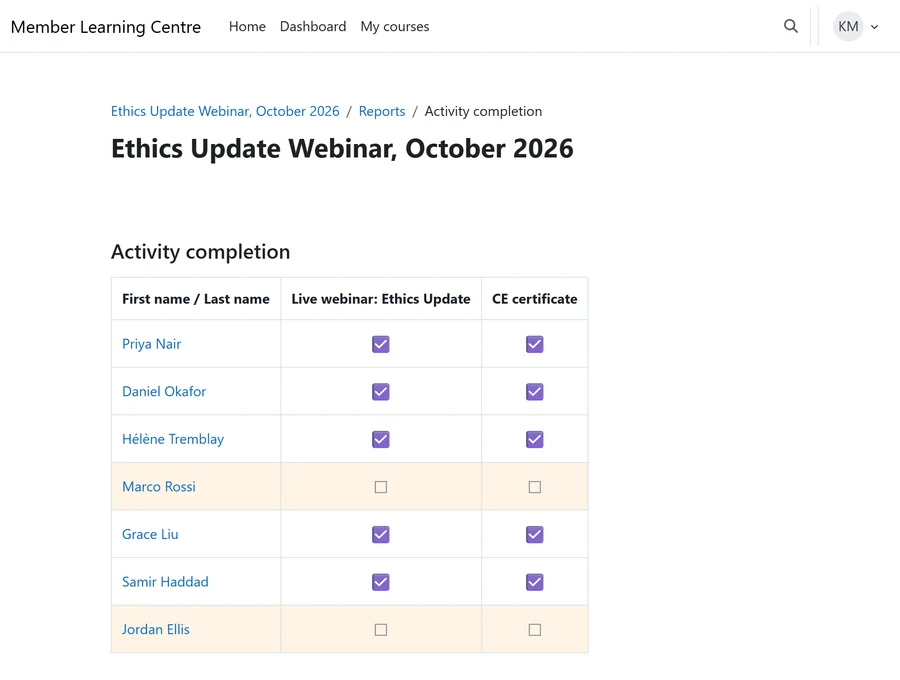
Posting Attendance and Credit After a Live Webinar or Conference Session
The grind: The attendance export never matches member records cleanly: personal email addresses, nicknames, people who joined for five minutes. Whichever of the Moodle video conference integration options the association runs, someone still reconciles that list by hand.
What the agent does: The agent matches attendees to member records and applies the minimum attendance rule. Then it records completion in Moodle so the certificate can issue. It also lists everyone it could not match.
Where a person signs off: Staff resolve the unmatched list and spot-check the first few runs.
Resolving Routine Support Tickets
The grind: “Where is my certificate” and “I can’t see my course” fill the CE inbox around every deadline.
What the agent does: The agent looks up the member’s enrolment, completion and certificate status in Moodle. It drafts a reply with that status filled in. For cases staff have approved, it fixes the problem itself, such as re-sending a certificate.
Where a person signs off: A person approves replies until each routine category has earned automatic handling. Money and complaints always go to a person.
Reconciling AMS Membership Status with Moodle Enrolments
The grind: Members lapse, renew or join, and the AMS sync misses some of them. As a result, a lapsed member keeps member pricing, or a new member cannot reach a paid course. Every bridge has these gaps, and the iMIS Moodle bridge pros and cons show where they tend to open.
What the agent does: On a schedule, the agent compares both systems. It fixes what a written rule covers and queues the rest.
Where a person signs off: Staff work through the queue. Removing a member’s access is always held for a person.
Checking a Course Before It Opens to Members
The grind: Broken links, a quiz with no grade to pass, an unset certificate, missing credit hours. Members usually find these first, and each one becomes a ticket.
What the agent does: The agent walks every course due to open. It returns a short pre-launch report against the association’s own checklist.
Where a person signs off: The course owner fixes or accepts each item. The agent changes nothing in the course.
Chasing Volunteer Subject-Matter Reviewers
The grind: Volunteer committee members review new and revised courses. Staff spend weeks sending reminders and tracking who has signed off.
What the agent does: The agent sends each reviewer their material and follows up on a schedule. It collects every comment in one place. Meanwhile, it tells staff who is late and which course is blocked.
Where a person signs off: Staff decide when a course has had enough review to publish.
Guardrails for Giving Moodle AI Agents Access to Member Data

An agent that acts on member records is closer to a new hire than to a software feature. So give it what you would give a new hire, and no more:
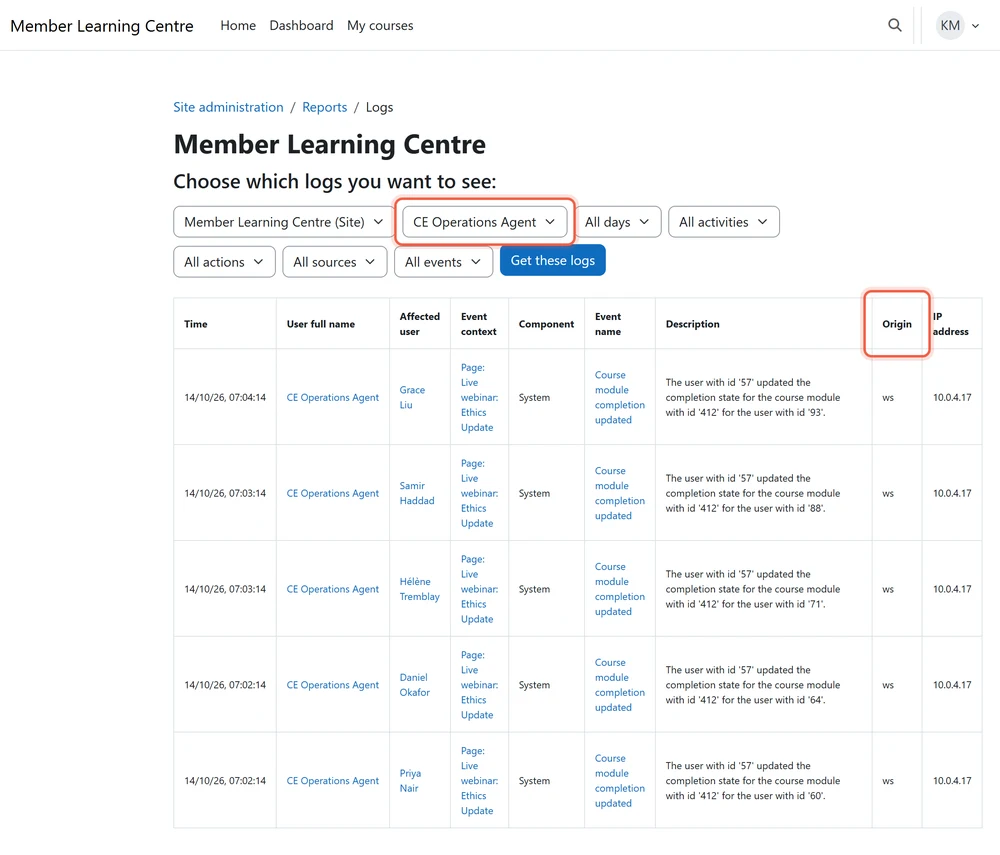
- Its own account and role. Never an administrator’s login. Instead, a dedicated account whose role carries only the permissions the job needs, and a web service token limited to the functions that job uses. As a result, every action shows up in the Moodle logs under the agent’s own name. Roles drift over time, which is why Moodle roles and permissions stop working is worth a read before one is handed to an agent.
- Read, draft, then act. Every agent starts in draft mode, where it proposes and a person approves. It acts alone only on the categories where its drafts have matched staff decisions for an agreed period.
- Actions that always stay with a person. Granting or removing credit, removing access, anything to do with payment, and anything touching a complaint or a discipline matter.
What the Agent Sees and Who Watches It
- The least member data that does the job. Send the model a member number and course status, not the full profile. Before the pilot, record where the AI provider processes the data, how long it keeps it and whether it trains on it. That record belongs beside the association’s policy on Moodle data retention for professional associations.
- Member submissions are data, never instructions. A claim form or a ticket can contain text that tries to tell the agent what to do. The limits on its account are what make that harmless, which is the real reason for the first guardrail.
- An owner and an off switch. One named staff member owns each agent, reads its exception list and can switch it off by revoking its token.
The trap: giving the pilot an administrator’s token “just for testing”. That token tends to survive into production, so set up the agent’s own account on day one.
If you cannot explain an agent’s permissions to your board in one sentence, it has too many.
What Moodle AI Agents for Professional Associations Cost to Run and Maintain

Budget an agent as a service the association runs, not a one-off build. Five things drive the cost:
- The build. Connecting the agent to Moodle, the AMS and the event platform, and writing the association’s rules down clearly enough for software to follow. The rules are often the bigger job, because they live in staff members’ heads.
- Model usage. AI providers charge by the volume of text processed, so cost follows how many items the agent handles and how much of each it reads. For example, a claims agent reading long certificates costs more per item than a reconciliation agent comparing two short lists.
- Hosting. The agent runs on a schedule somewhere outside Moodle, and that server or cloud service is its own line.
- Upkeep. Moodle ships a major release about every six months, around April and October (last verified October 2026). AI providers also retire models, and the AMS changes too. After each change the agent is re-tested against a set of known cases before it acts alone again, so that re-test belongs in the site’s Moodle maintenance strategy.
- Staff time. It never drops to zero, because someone reads the exceptions every day the agent runs.
So ask for three numbers: the build, the yearly running cost and the staff hours still needed. Then compare them with the hours the task takes today.
Picking Which Moodle AI Agents for Professional Associations to Pilot First

Score each candidate against five tests:
- Volume. The task happens weekly or more, not twice a year.
- A written rule. Staff can write down how they decide.
- Low harm if it is wrong. A wrong draft gets caught; a wrong credit removal may not.
- Reversible. Anything the agent changes can be undone.
- A baseline. The team can count how long the task takes today.
Of the six, the course pre-launch check and the AMS reconciliation queue are usually the safest first pilots. One only reports, and the other only fixes what a written rule covers. The claims agent saves the most time, but it touches credit, so it comes once the team trusts the pattern.
The trap: piloting the most impressive agent first, which is usually the one that touches credit or money. The backstop: run the pilot in draft mode beside the person who does the task now, and compare decisions. The owner: the CE manager who does the task today, not the technology team.
Pilot the boring agent first. Trust built on a report is what lets the claims agent follow.
How Mindfield Builds Moodle AI Agents for Professional Associations

Mindfield works with association CE teams on the whole path from the first task to a running agent:
- Choosing the first agent. A review of the team’s tasks against the five pilot tests.
- Writing the rules down. Working with the CE team until each decision is clear enough for software to follow.
- Connecting Moodle and the AMS. Web services with a least-privilege account and a token limited to the job.
- Draft mode first. The agent proposes, staff approve, and results are measured against the baseline.
- Upkeep. The agent re-tested and kept working through Moodle and model upgrades.
Get Help Running Moodle AI Agents for Professional Associations
Mindfield helps association CE teams pick the first agent worth running and write down its rules. We connect it to Moodle and your AMS with limited permissions. It runs in draft mode beside your staff and is measured against the hours the task takes today. Then we keep it working through every Moodle and model upgrade. Talk to us about which task your team should hand over first.
Frequently Asked Questions (FAQs)
This article may contain conceptual illustrations to help support the article content.
