


For professional associations relying on iMIS for membership management, integrating with Moodle for continuing education often leads to a search for an iMIS-Moodle bridge. Understanding the pros and cons of such a solution is crucial before committing to a purchase. Registrants expect a seamless experience, where course purchases in iMIS translate directly into Moodle enrolments, and earned CE credits appear automatically on their member records.
This article provides an honest assessment of the ATS Moodle Bridge, detailing its capabilities and the essential integration work that remains for associations. We will explore the iMIS Moodle bridge pros and cons, helping you make an informed decision.
I recently migrated my site to Mindfield from another host, and the experience couldn’t have been better. Mindfield kept working until they were certain that my site was operating as well as it was before, and they even helped clean up a few issues to improve my site’s performance – issues my prior host never mentioned. I also found Mindfield’s communication to be excellent. Before the migration, they prepared me for what to expect, and during the migration they kept me well-informed.
Jim Benedek
review Source: Google Reviews
Outline
- Understanding the iMIS-Moodle Bridge: Core Capabilities
- Advantages: Streamlined Member Experience
- Challenges: Building Beyond the Bridge
- Budgeting for a Successful iMIS-Moodle Integration Project
- Expert Support for Your iMIS-Moodle Bridge Implementation
- Frequently Asked Questions (FAQs)
Understanding the iMIS-Moodle Bridge: Core Capabilities

The ATS Moodle Bridge connects an association’s iMIS to its Moodle site. As a result, a purchase in one becomes a course in the other. For a general overview of this integration, you can refer to our iMIS Moodle plugin review.
Real-Time Enrolment and Account Creation
The core plumbing works well, and it removes staff from the purchase-to-access step entirely.
- Real-time enrolment: when a member buys a mapped product in iMIS, the bridge creates their Moodle account if needed and enrols them in the matching course straight away.
- Product mapping: products are linked to Moodle courses in a table on the iMIS side, so a product that is not mapped enrols no one.
- Initial load: at go-live, a task pushes every existing unsynced order to Moodle, creating the accounts and enrolments for past purchases.
Managing Purchases and Cancellations
Two purchase behaviours are worth knowing before you plan your CE catalogue.
- Duplicate purchases: according to the vendor, Moodle refuses a second enrolment in the same course. The sync reports the error to association staff, who cancel the redundant order in iMIS. Confirm this on your install, because it decides how repeat purchases behave when you sell access windows.
- Cancellations: these are not real-time. A scheduled task driven by an iMIS query processes them, typically once a day, so access can remain for up to a day after a refund.
Completion and CE Credit Write-Back
The bridge includes a write-back service that Moodle calls to record a completion and its credit hours against the member’s record in iMIS.
- Flexible credits: it takes a credit type, which is any label the association chooses, and a credit value at any decimal precision.
- Safe retries: re-sending the same completion updates the record instead of creating a duplicate.
- Separate credit types: a different credit type creates its own activity record, so ethics hours and general hours from one course can report as two rows.
- Immediate, one at a time: a successful call is recorded straight away, with one call per completion and no batch option.
Advantages: Streamlined Member Experience

The biggest advantage of the iMIS-Moodle bridge is the one members notice. They sign in once, and the course is waiting for them after they buy it. Staff are taken out of the purchase-to-access step.
Single Sign-On for Simplified Access
The bridge ships with SAML single sign-on (SSO), which is a major convenience for members. They sign in once using their iMIS credentials and land directly in Moodle. There is no second password and no second account to support.
For more information on Moodle SSO options, refer to our guide on single sign-on for Moodle. Our recent implementation for a professional association confirmed the efficiency of this feature. The Moodle-side SSO work was small. About 6 hours were budgeted, and partway through it was projected at roughly 5 to 7.
Maintaining iMIS as the Source of Truth
Because members sign in through iMIS, iMIS stays the authoritative record. Name, email and member category can refresh from iMIS on every login, which fits good practice for Moodle user provisioning and the system of record. There are two limits worth knowing before you buy:
- No per-course landing: the SSO link lands members on their Moodle dashboard, not on the course they just bought. Associations coming from a custom course portal will notice the change.
- An intermittent sign-in error: in our testing, members who stayed on the iMIS sign-in page for a while could hit an error page. It is not a lockout, since signing in again works, but it generates helpdesk calls and its behaviour is not documented.
Challenges: Building Beyond the Bridge

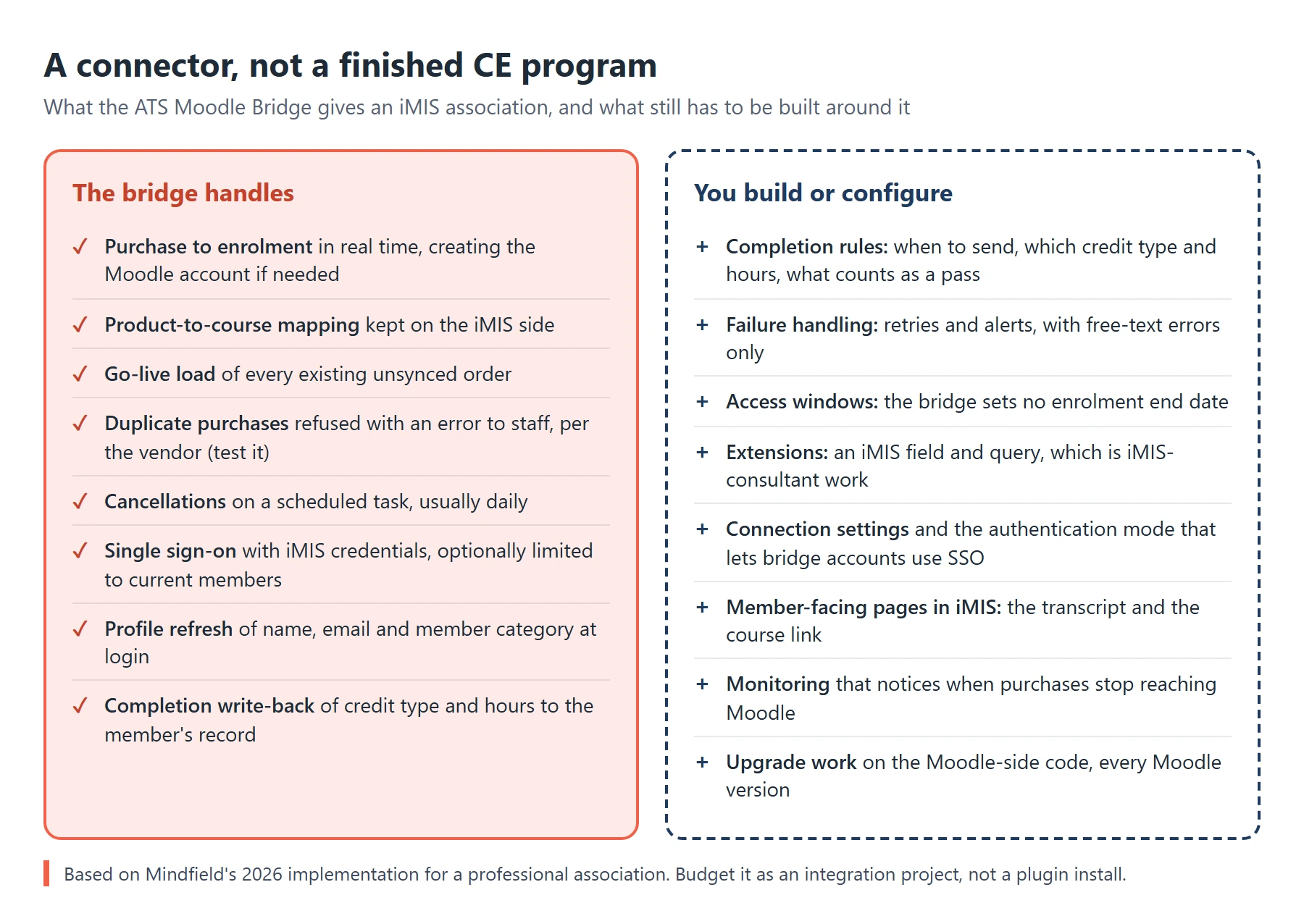
The iMIS-Moodle bridge does the core plumbing well, but it is a connector, not a complete solution. The parts that make a CE program work are left to the association and its Moodle developer. Budget for them from the start.
Navigating Completion Write-Back Complexities
The write-back is a listener: it records whatever Moodle sends and makes no decisions of its own. That leaves a real list of work on the Moodle side, built by the association’s developer:
- The business rules: when a completion is sent, which credit type and hours it carries, and what counts as a pass.
- Error handling: there is no documented list of error codes. Failures come back as free-text messages, so retry and alerting logic cannot branch on a code. Errors can also be emailed to addresses the association supplies.
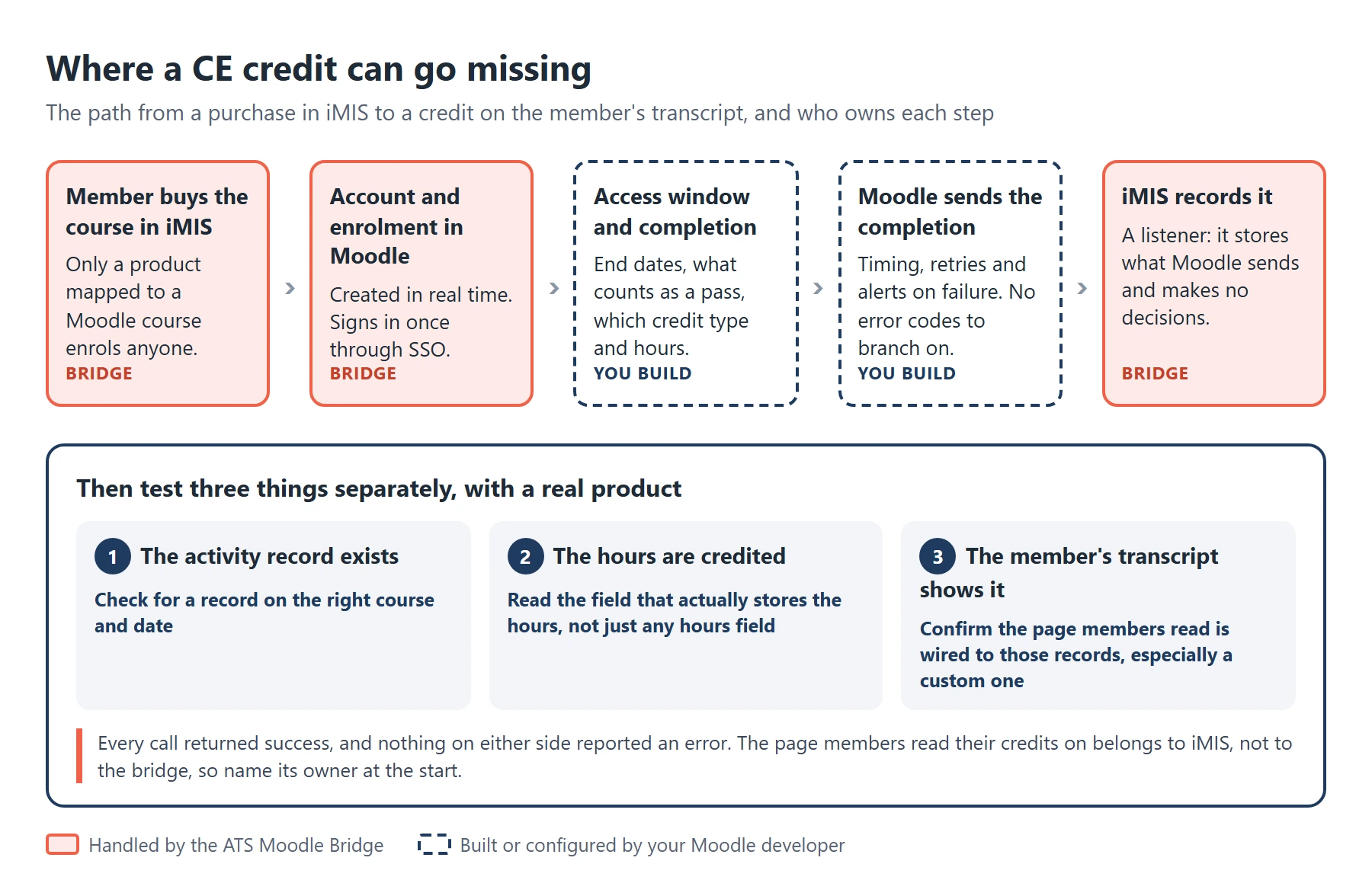
- Proof that credits landed: in our first end-to-end test, iMIS accepted the completion, created an activity record for the right course and date, and stored the hours correctly. The course still did not appear on the member’s professional development transcript, and nothing on either side reported an error.
The lesson is that a successful write-back is not the same as credits on the member’s transcript. That transcript was a custom iMIS page, and nothing had wired it to the new records. The bridge knows nothing about pages like that. So identify at requirements time which page members will read their credits on, and who owns it. Then test three things separately, with a real product: the activity record exists, the hours are credited, and the transcript shows it. Also confirm iMIS-side credit constraints directly with the bridge vendor before you scope around them. In our project, the guidance we received from different parties conflicted.
Customizing Enrolment Access Windows
If you sell time-limited access, such as a 90-day window, plan for it on both sides of the bridge. See our article on limited-time Moodle course enrolment access for the wider picture.
- No end dates: the bridge does not set an end date on the Moodle enrolment. In our implementation that took a custom enrolment function.
- Suspend, not unenrol: pairing it with Moodle’s enrolment expiry set to suspend keeps course progress. We designed a repeat purchase to extend access, which only works if that purchase reaches Moodle, so test it against the duplicate-purchase behaviour above.
- Expiry is Moodle’s job: a window running out never triggers the bridge’s cancellation task, which only fires when an order is cancelled in iMIS.
- Extensions need iMIS work: extending access takes a custom field and an iMIS query, which is iMIS-consultant work rather than bridge configuration.
Managing Member Profile Synchronization
The bridge does not sync member profile changes on its own. The recommended approach is to refresh member attributes from iMIS during each SSO login. An optional setting can refresh contact details only when a member purchases a second course.
Essential Moodle-Side Configuration
The association, in practice its Moodle developer, supplies the settings the bridge needs:
- Connection details: the Moodle web service endpoint and token, the student role and the course URL pattern.
- Functions: which Moodle functions the bridge calls, core or custom. Do not point the bridge at a custom function before it is deployed, or enrolments fail in the gap.
- Authentication mode: the setting most likely to catch you out. Left blank, Moodle defaults to manual authentication and bridge-created accounts cannot sign in through SSO.
Ongoing Maintenance and Documentation Gaps
The Moodle-side code needs updating on every Moodle version upgrade for as long as the bridge runs. That work falls to the association, so budget it as a recurring line in your Moodle maintenance strategy.
- Monitoring: in our project, purchases stopped reaching Moodle for about three weeks. Orders completed in iMIS and receipts went out, but no enrolment was created and nothing reported an error. Ask the vendor what schedules the inbound sync, and have your developer alert when no enrolment has arrived for a set period.
- Discovery: the vendor documentation describes fields rather than behaviour. Matching keys, retries, cancellations and error handling were established by asking the vendor, one question at a time, so budget discovery time.
Budgeting for a Successful iMIS-Moodle Integration Project

Budget the iMIS-Moodle bridge as an integration project, not a plugin install. The hours below cover the Moodle side. However, most of the calendar risk sits with the vendor and the iMIS side.
Estimating Moodle-Side Development Hours
Mindfield Consulting’s experience in a recent implementation provides realistic estimates for the Moodle-side effort. These figures are specific to one project and should be used as guidance, not guarantees.
| Work Item | Estimated Hours | Notes |
|---|---|---|
| Moodle-side SSO | ~6 hours | Projected at roughly 5 to 7 hours partway through. |
| Enrolment & Completion Write-back (including custom end-date function) | ~40-44 hours | Revised from 20-36 hours once end-date functionality was confirmed as client scope. |
| Sync Flows (profile refresh, member category, access lapse) & Testing | ~40 hours | Includes a buffer for bug fixes. |
Accounting for Calendar Time and Discovery
Calendar time, not hours, was the bigger risk in our implementation:
- Vendor lead times: getting API credentials issued took about five weeks, and scheduling the vendor kickoff took about four.
- Discovery: several estimates only firmed up after vendor calls, because the behaviour was not documented.
- Joint testing: the end-to-end run with the vendor, from purchase to sign-in to completion to write-back, is its own phase.
Treat it as a multi-week integration project with a named Moodle developer, a named iMIS-side owner and time for joint testing, plus a recurring line for Moodle upgrades. Building on automated testing strategies for Moodle upgrades keeps that recurring work predictable.
Expert Support for Your iMIS-Moodle Bridge Implementation

Mindfield has implemented the ATS Moodle Bridge for a professional association, so we know where the work sits once the install is done. We can scope and build the Moodle side of your integration: single sign-on, access windows and extensions, and the completion and CE credit write-back to iMIS. We also run the end-to-end test with the bridge vendor before your members see it. Use the form below to get our iMIS-Moodle bridge planning guide, with the vendor questions and go-live tests we use. If you are weighing the bridge, talk to us before you set the budget.
Get the iMIS-Moodle Bridge Planning Guide
Tell us where to send it, and the guide arrives in your inbox as a PDF.
Frequently Asked Questions (FAQs)
This article may contain conceptual illustrations to help support the article content.
