


Moodle single sign-on (SSO) for private schools is usually pitched as a login fix: one button, one password, fewer help desk tickets. However, the harder half sits behind the button. SSO decides how people get in. It does not decide who should have an account, which role they get, or what happens to that account when a student graduates or a teacher resigns.
As a result, schools that treat it as a login project end up with former staff who can still open a gradebook, or graduates whose records disappear because someone deleted their accounts to tidy up. This guide covers what a private school settles before switching SSO on. For the protocols themselves, see our overview of single sign-on (SSO) for Moodle and our strategies to use Moodle SSO options.
Since Mindfield was involved I’ve been able to sleep easier at night because I know they have it handled.
Tara, Green Education
review Source: Mindfield Consulting
Outline
- Choosing the Right Moodle SSO Protocol for Private Schools
- Integrating Moodle SSO With Your Identity Provider and Student Records
- Provisioning and De-provisioning: What Moodle SSO for Private Schools Won’t Do
- Planning the Moodle SSO Sign-In Experience for Private Schools
- Maintaining Moodle SSO for Private Schools Long Term
- Getting Moodle SSO for Private Schools Right With Mindfield
- Frequently Asked Questions (FAQs)
Choosing the Right Moodle SSO Protocol for Private Schools

Most private schools already run student and staff accounts in Google or Microsoft. The protocol follows from where those accounts live. So start there rather than with a comparison of acronyms:
| Where your accounts live | Moodle route | What to know |
|---|---|---|
| Google Workspace for Education, Google’s suite for schools | Moodle’s built-in OAuth 2 services Google service, or Security Assertion Markup Language (SAML) through a Google custom SAML app | The built-in route needs no extra plugin. Google blocks embedded browsers, so the Moodle app must open sign-in in a browser window. |
| Microsoft 365 with Microsoft Entra ID (formerly Azure Active Directory) | OpenID Connect (OIDC) through Microsoft’s Moodle plugins, or the built-in Microsoft service | Microsoft’s plugins add a user sync that can also suspend leavers. |
| Clever, a K-12 sign-in and rostering platform | The built-in Clever service, in Moodle core since Moodle 4.1 | A natural fit if students already sign in to other apps through Clever. |
| Veracross, a school management platform for private and independent K-12 schools | A custom OAuth 2 service, using a Veracross OAuth application with the SSO scope | Veracross becomes the sign-in source, so its accounts must be complete for staff and students. |
| On-premises Active Directory only | Lightweight Directory Access Protocol (LDAP), built into Moodle | Users type their school password into Moodle: one password, but not true single sign-on. |
Security and Privacy Requirements That Shape the Choice
- Multi-factor authentication (MFA): enforce it at the identity provider (IdP), where staff already use it. Moodle has had core multi-factor authentication since 4.3, and its Authentication type factor lets SSO users skip a second prompt.
- Privacy law: the US Department of Education says private and parochial K-12 schools generally fall outside the Family Educational Rights and Privacy Act (FERPA), because they don’t take its funding. A school that does, or a Canadian school under provincial privacy law, has its own obligations to map.
- Central Authentication Service (CAS): it left Moodle core in 5.0 (MDL-78778) and now ships as a separate plugin, so don’t start a new build on it.
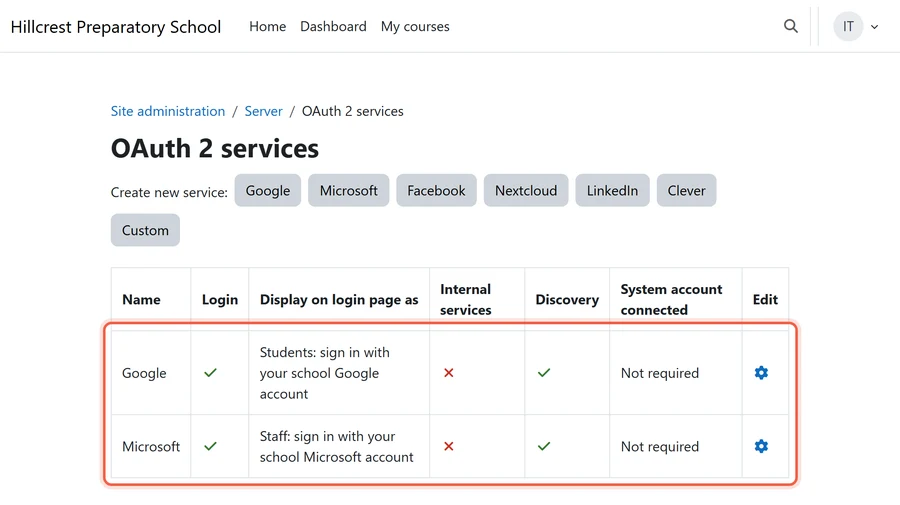
- Two providers: Moodle can show several sign-in buttons, so Google for students and Microsoft for staff can run side by side.
Integrating Moodle SSO With Your Identity Provider and Student Records

Two systems meet here. First, the IdP proves who someone is. The student information system (SIS) knows who belongs in which class. Keep those jobs separate, and decide how a sign-in finds the right Moodle account:
- Email address: easy to set up, but it changes when a teacher changes their name or a student’s address is reissued, and the match breaks.
- A stable student or staff number: survives name changes, and it is the same number the SIS uses.
- Account creation: the auth_saml2 plugin from the open-source firm Catalyst and Moodle’s OAuth 2 login both create an account on first sign-in when allowed (OAuth 2 creates an account on first sign-in by default). Switch it off if accounts should only come from the SIS.
- Roles: the auth_saml2 plugin does not map IdP groups to Moodle roles, per the plugin’s own documentation. Course roles come from enrolment, which is where why Moodle roles and permissions stop working usually starts.
Blackbaud and Veracross: What Connects to What
Blackbaud sells a suite, and each part plays a different role in sign-in:
- Blackbaud Student Information System: the roster source for accounts and enrolments, covered in integrating Blackbaud with Moodle for private schools.
- Blackbaud ID: signs people into Blackbaud’s own products and can trust Google Workspace or Entra ID. For other apps it passes its own sign-in token, not SAML or OIDC, so point Moodle and Blackbaud ID at the same Google or Microsoft accounts instead.
- Blackbaud Learning Management System: does Moodle’s job, so running both means two gradebooks. That is a separate decision to migrate Blackbaud LMS to Moodle.
- Veracross: can act as an OIDC sign-in source itself, so a Veracross school may not need Google or Microsoft in the middle.
The Matching Policy to Settle First
- Your checklist: one student, one teacher, one parent and one administrator account, each tested on a staging site.
- The trap: matching on email, then a teacher’s name change creates a second, empty account.
- The rule: match on one stable number, and keep one manual administrator login that doesn’t depend on the IdP.
- The backstop: rerun the four test sign-ins two weeks before each term starts.
- The owner: the technology director, with the registrar confirming the SIS numbers.
Provisioning and De-provisioning: What Moodle SSO for Private Schools Won’t Do

SSO creates accounts. It never removes them. Neither the auth_saml2 plugin nor Moodle’s OAuth 2 login notices that a student has left. Instead, removal has to come from a sync:
| Sync source | What happens when someone leaves |
|---|---|
| Microsoft’s user sync (local_o365) | Suspends accounts deleted or disabled in Entra ID, or removed from a chosen sync group. Deletion after a delay is optional. |
| Moodle’s LDAP sync | The Removed ext user setting keeps, suspends or fully deletes the account. Suspended users come back if they reappear. |
| The SIS roster | Accounts and enrolments follow the SIS, as covered in Moodle user provisioning and its system of record. |
| Google or OAuth 2 sign-in alone | Nothing. Someone suspends leavers by hand or by upload. |
Suspend, Never Delete
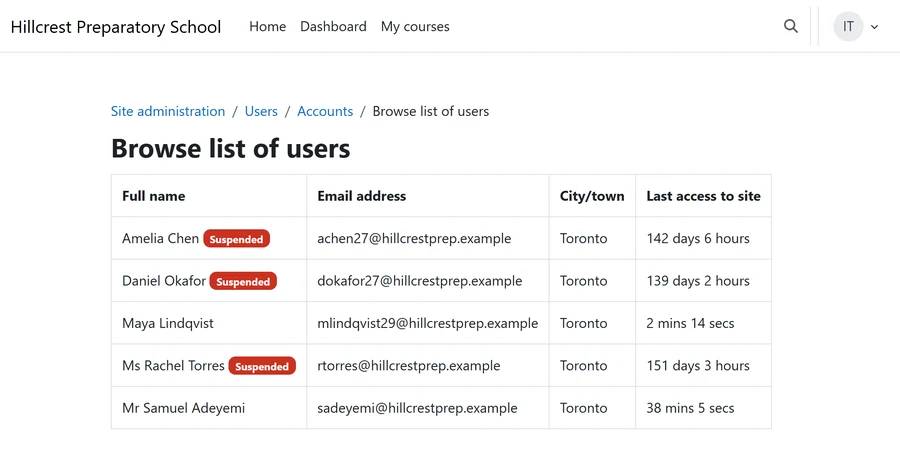
A suspended account cannot log in or use web services, but its grades, submissions and logs stay. That matters for transcripts, appeals and returning students. In other words, deleting is a retention decision, made later under your Moodle data retention strategies for private schools.
- Your checklist: graduates, staff who resign mid-year, students who withdraw, and families who leave over the summer.
- The trap: deleting June’s graduates to tidy up, which removes their grade history with them.
- The rule: suspend on leaving, and delete only when the retention schedule says so.
- The backstop: on the last school day of June, compare Moodle’s active accounts against the SIS roster.
- The owner: the registrar owns the roster; the technology team runs the sync.
→ Book an integration scoping call: 30 minutes to map the data flow and the risks.
Planning the Moodle SSO Sign-In Experience for Private Schools

Good SSO is invisible on the first day of term. These are the choices that decide whether it is:
- One button per group: label each sign-in button by audience, such as “Students: sign in with your school Google account”, so nobody guesses.
- Parents: they often have no school account. Decide up front whether they get manual Moodle accounts, a separate sign-in, or no access.
- Shared devices: signing out of Moodle doesn’t always sign a student out of Google or Microsoft. On lab and cart devices, end the browser session too, or the next student lands in the last one’s account.
- The Moodle app: its Type of login setting chooses the app, a browser window or an embedded browser, and Google sign-in needs the browser window, per the Moodle app guide for admins.
- Exams: an SSO redirect can drop students on the Dashboard instead of the quiz, a problem covered in Safe Exam Browser with SSO in Moodle.
- The help desk: brief staff on the usual failures: the wrong account open in the browser, an expired password at the IdP, or an account not yet created. Our guide to Moodle login issues and how to fix them covers the rest.
The Launch Policy
- Your checklist: button labels, the parent decision, shared-device sign-out, the app’s login type, and one exam test.
- The trap: launching on the first day of term, when every help desk ticket arrives at once.
- The rule: switch SSO on with staff first, then students a week later.
- The backstop: keep password sign-in open for staff until the first two weeks of term pass cleanly.
- The owner: the technology director, with the head of each division briefing families.
Maintaining Moodle SSO for Private Schools Long Term

In practice, SSO tends to break on dates you can predict. So put them in a calendar now:
- Moodle upgrades: the auth_saml2 plugin’s current branch supports Moodle 5.0 to 5.3. Confirm every sign-in plugin supports the target version before booking an upgrade.
- Removed sign-in methods: CAS left core in 5.0, so check older methods before upgrading past 4.5.
- Expiring secrets and certificates: OAuth client secrets and SAML signing certificates expire. When one does, everyone is locked out at once.
- Changes at the IdP: renaming a Google organizational unit or an Entra group can drop users from a sync group, and the sync may then suspend them.
The Maintenance Rule
- Your checklist: a one-page SSO map listing the IdP, each Moodle plugin and version, the matching field, the sync source, expiry dates and owners.
- The trap: an expired secret discovered by students at 8 a.m. on a Monday.
- The rule: every expiry date gets a calendar reminder 30 days ahead.
- The backstop: the four test sign-ins after every Moodle upgrade and every IdP change.
- The owner: the technology director, with the head of school signing off the leaver policy.
Getting Moodle SSO for Private Schools Right With Mindfield
Mindfield’s Moodle specialists set up and maintain SSO for private schools, from the Google, Microsoft or Veracross sign-in to the SIS sync that suspends leavers. We help you choose the route, settle the matching field and leaver policy, and test it on a staging site before term starts. Then we keep it working through Moodle upgrades and expiring certificates. Book a Moodle SSO scoping call, and we will map your accounts, roles and leavers before anything changes.
Frequently Asked Questions (FAQs)
This article may contain conceptual illustrations to help support the article content.
