


Some private schools need families to see Moodle grades and due dates inside an app the school already runs, and the standard Moodle app cannot put them there. It’s not currently possible to view a child’s activities with the parent role in the app. See MDL-65984. The app is built for students doing coursework, not for families checking on it. To close that gap, a school has to develop a custom Moodle school app connector that reads from Moodle and can never write to it. The decisions that protect student records are which integration route to use, how the app is authorized, and where the data goes once it leaves Moodle. This article sets out when a read-only app is worth building, why the standard app cannot do the job, and how to plan a connector without putting student data at risk.
I recently migrated my site to Mindfield from another host, and the experience couldn’t have been better. Mindfield kept working until they were certain that my site was operating as well as it was before, and they even helped clean up a few issues to improve my site’s performance – issues my prior host never mentioned. I also found Mindfield’s communication to be excellent. Before the migration, they prepared me for what to expect, and during the migration they kept me well-informed.
Jim Benedek
review Source: Google Reviews
Outline
- When to Develop a Custom Moodle School App Connector Instead of Using the Standard App
- The Strategic Value of Read-Only Moodle Data in School Apps
- Navigating Moodle Integration Routes for School Apps
- Authorizing Data Access: Tokens vs. OAuth
- Moodle API Bridge Tools and Data Privacy
- Expert Guidance for Secure Moodle App Integration
- Frequently Asked Questions (FAQs)
When to Develop a Custom Moodle School App Connector Instead of Using the Standard App
The standard Moodle app does its intended job well: a student or teacher signs in and takes part in courses. A read-only connector serves a narrower need, where someone has to see Moodle information without taking part, or has to see it somewhere other than Moodle. If none of the circumstances below applies, the standard app is the cheaper answer and a connector is not worth building.
Circumstances That Justify a Custom Moodle School App Connector
- The school already has a parent app. Families open one app from the school’s student information system (SIS) or communications vendor for announcements and report cards. A second app for Moodle splits that routine, so grades and due dates need to appear where families already look.
- Parents have nothing to do in Moodle. A parent wants to know what is due and how a child is doing, with no work to submit. In the junior grades, the parent may be the only person in the family who would open a mobile app at all.
- One family has several children. Siblings in junior, middle and senior school call for one family view, not a separate trip through each child’s record and each course.
- Staff oversee students they do not teach. Boarding house parents, advisors and learning support staff need a view across a group of students, without being enrolled in their courses and without any route to change a grade.
- Moodle is only part of the picture. Timetables and tuition usually sit in the SIS. Families get a clearer view when Moodle due dates appear beside them.
- Policy says the app must be unable to change records. A privacy officer or board may want assurance that a lost phone or stolen login cannot alter a grade or submit work.
Why the Standard Moodle App Cannot Do This
- Parents cannot see their child in it. Moodle’s parent role documentation confirms that viewing a child’s activities with that role is not possible in the app (last verified November 2026). In a browser the role works, but the parent moves through the child’s profile one course at a time.
- It cannot live inside another app. The Moodle app is a standalone app that shows one Moodle site’s content. It cannot appear as a panel in the school’s parent app or show SIS information beside Moodle grades.
- It has no read-only mode. Students submit assignments, post to forums and attempt quizzes through it, so the web service behind it includes write functions. A connector runs on its own service, limited to the read functions it needs.
- Hiding features does not close the gap. Administrators can remove features from the app, depending on the school’s app subscription. The setting covers the whole site, so hiding assignments from parents hides them from students too. It changes what the app displays, not what the account is allowed to do.
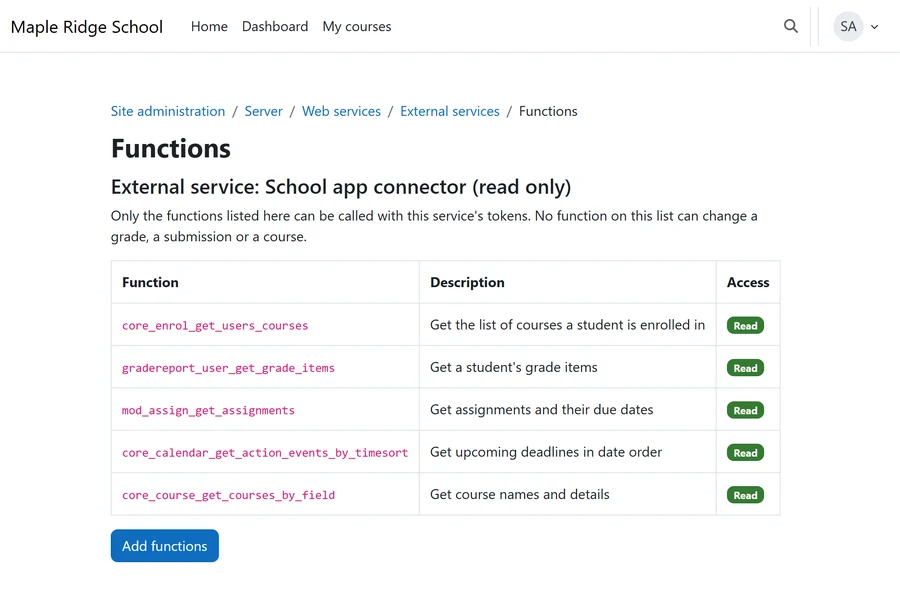
A simple test: if the person reading the information also does coursework in Moodle, use the standard app. If they only need to see it, or need to see it inside another system, build a read-only connector.
The Strategic Value of Read-Only Moodle Data in School Apps

Ultimately, integrating Moodle data into parent-facing mobile applications offers private schools a powerful way to enhance communication and transparency. Furthermore, this capability allows parents to access critical information quickly, fostering a stronger partnership between home and school. Furthermore, providing secure, read-only access ensures that sensitive academic data remains protected while still being readily available.
Enhancing Parent-School Communication
Private schools thrive on strong community engagement. Therefore, a dedicated school app connected to Moodle can significantly streamline communication channels. For example, parents gain immediate access to essential academic information, which includes grades, assignment due dates, and attendance records. As a result, this reduces the need for manual inquiries and improves overall satisfaction.
For example, a parent can check their child’s progress in a biology class directly from their phone. They can also see upcoming events or school announcements. Moreover, this direct, centralized access supports informed parental involvement in their child’s education journey. It also ensures that communication is consistent across all academic areas.
Ensuring Data Security and Privacy
While sharing data offers clear benefits, maintaining stringent data security and privacy is paramount for private schools. Read-only access specifically limits the app’s ability to alter or delete any information within Moodle. This design principle minimizes the risk of accidental data corruption or malicious attacks to protect Moodle course content.
Adhering to privacy regulations is also critical. For example, this includes the Family Educational Rights and Privacy Act (FERPA) in the United States. Additionally, a read-only connector ensures that only authorized information is exposed to the app. Therefore, schools must implement robust authentication and authorization mechanisms to protect student records. This approach safeguards sensitive data while providing necessary transparency to parents.
Navigating Integration Routes to Develop Custom Moodle School App Connector Solutions

When connecting a school app to Moodle, several technical routes are available, each with distinct advantages and disadvantages. Choosing the right method depends on factors like desired functionality, security requirements, development resources, and budget. Therefore, evaluating these options carefully is crucial for a successful integration.
Standard Moodle Web Services API
Moodle includes a robust Moodle Web API, providing a native method for external applications to interact with the platform. This API offers extensive functionality, allowing for granular control over what data can be accessed and by whom. It supports various protocols, including REST and XML-RPC.
Using the Moodle API requires custom development to build the connector logic. Developers must handle authentication, request formatting, and response parsing. While this route offers maximum flexibility, it demands significant technical expertise. The security configuration can also be complex, requiring careful management of user tokens and permissions.
Learning Tools Interoperability (LTI)
Learning Tools Interoperability (LTI) is an educational technology standard developed by IMS Global Learning Consortium. It enables seamless integration between learning platforms like Moodle and external tools. When evaluating this route to develop custom Moodle school app connector solutions, consider the following points:
- LTI is primarily designed for embedding external content or activities within Moodle courses, or for Moodle to act as a tool provider to another system. This means it can sometimes be adapted for data exchange.
- While LTI provides a standardized, secure communication protocol, its primary focus is often on launching tools rather than broad data exports.
- For read-only data access to a mobile app, LTI might be less direct than a custom API integration.
- Additionally, it may require LTI Advantage for deeper, more secure data-sharing capabilities.
- The cost often involves licensing and configuration, which can be moderate.
Existing Moodle Plugins
The directory of must have Moodle plugins offers existing solutions that might facilitate data export or integration. Some plugins are designed for specific reporting needs or to bridge Moodle with other systems. These off-the-shelf options can accelerate deployment and reduce initial development costs.
However, relying on existing plugins carries inherent risks. They may not precisely match a school’s unique requirements, necessitating customization. Furthermore, plugin security and ongoing maintenance vary significantly, requiring Moodle plugin cleanup strategies.
A poorly maintained plugin could introduce vulnerabilities or become incompatible with future Moodle plugin updates. Thorough vetting is essential to ensure reliability and security.
Direct Database Access
Accessing the Moodle database directly from an external application is a method strongly discouraged for integration. While it might seem like a simple way to retrieve data, it bypasses Moodle’s application logic and security layers. This approach introduces severe security vulnerabilities and data integrity risks. It can also lead to unpredictable behavior or data corruption if not handled precisely.
Direct database access circumvents Moodle’s robust permission system and makes auditing nearly impossible. Any changes to Moodle’s database schema could break the integration, leading to significant maintenance overhead. Therefore, this method should be avoided in favor of official API pathways for secure and stable integration.
| Integration Method | Cost & Complexity | Security Posture | Flexibility |
|---|---|---|---|
| Moodle Web Services API | Moderate to High | Strong (if configured well) | Very High |
| Learning Tools Interoperability (LTI) | Moderate | Good (standardized) | Limited for data export |
| Existing Moodle Plugins | Low to Moderate | Varies (plugin dependent) | Limited (may need customization) |
| Direct Database Access | Low (initial) / Very High (long-term) | Very Weak (not recommended) | High (but risky) |
Authorizing Data Access: Tokens vs. OAuth

Securing the connection between Moodle and a school app requires careful consideration of authentication and authorization mechanisms. The choice between a single shared administrator token and student-authorized OAuth 2.0 access is important. Because of this, it has significant implications for security, auditability, and user experience. Private schools must prioritize the most secure and manageable approach.
Single Shared Administrator Token
A single shared administrator token involves generating an API token with broad Moodle permissions. Then, you embed it within the mobile application or the connector service. This approach simplifies initial development because the app always uses the same credentials to access Moodle data. The token typically grants extensive access, mirroring the permissions of an administrator.
However, this method presents significant security risks. If the token is compromised, an attacker gains wide-ranging access to Moodle data. Auditing specific user actions within the app becomes challenging, as all requests appear to originate from the same administrative user. This “all or nothing” access model offers poor granularity. So, it is generally not recommended for sensitive student data in production environments.
Student-Authorized OAuth 2.0 Access
OAuth 2.0, an open standard for access delegation, provides a far more secure and flexible framework for authorizing third-party applications. With OAuth, the mobile app never directly handles user credentials. Instead, it obtains an access token after a student explicitly grants permission through a secure Moodle login process. Also, a parent acting on behalf of a student can do this.
This approach offers granular control over permissions. For example, the token can be scoped to specific read-only data points like grades or attendance. Tokens also have limited lifespans, requiring periodic renewal, which reduces the impact of a compromised token. Moodle can be configured as an OAuth provider, or a custom bridge can manage the OAuth flow. This significantly enhances security, auditability, and user trust compared to shared tokens.
Moodle API Bridge Tools and Data Privacy

Implementing a Moodle app connector often involves an intermediary layer, or “bridge,” between Moodle and the mobile application. These bridge tools can enhance functionality and security, but they also introduce new considerations, particularly regarding data privacy. Schools must carefully evaluate how data flows through these systems and where it is stored or processed.
Leveraging API Bridge Tools to Develop Custom Moodle School App Connector Solutions
An API bridge acts as a middleware, sitting between Moodle’s Web Services API and the school’s mobile application. This architectural layer can perform various functions:
- It can standardize data formats for consistency.
- It can implement caching to improve performance.
- It can enforce rate limits to protect Moodle from excessive requests.
- It can also handle complex authorization logic, translating Moodle’s internal permissions into simpler roles for the app.
Assessing Privacy Risks of Data Leaving School Systems
Any time Moodle data is transmitted to or processed by an external service, privacy risks increase. Private schools must meticulously assess several factors:
- Where data is stored and processed.
- Who has access to the data.
- What data processing agreements are in place.
This means understanding the data flow. For example, is the API bridge hosted locally, on a school-controlled server, or by a third-party cloud provider? Clear data flow diagrams are essential. Furthermore, schools must ensure that any external service provider adheres to the school’s own stringent privacy standards. That is, they need robust encryption, access controls, and transparent data handling policies.
A custom-built, self-hosted bridge often offers the highest level of control over data sovereignty. It is also custom software development, so budget for its upkeep as well as its build.
Expert Guidance to Develop Custom Moodle School App Connector Integrations

Developing a secure, custom Moodle app connector for a private school’s parent-facing mobile application involves intricate technical challenges and critical security considerations. Navigating API complexities, implementing robust authentication like OAuth, and ensuring data privacy requires specialized expertise. Mindfield Consulting’s Moodle specialists possess the deep knowledge and experience to design, develop, and deploy these custom solutions effectively, ensuring seamless communication and unwavering data integrity for your institution.
Frequently Asked Questions (FAQs)
This article may contain conceptual illustrations to help support the article content.
