


An endless Moodle file picker spin looks like a small technical fault. The community reports describing it, in a June forum thread and a September one, are meticulous about the symptom. Yet they are silent about what it costs. It is not an ordinary upload problem either. The Moodle file upload errors with well-documented fixes are a different thing entirely. In fact, nothing here is wrong with uploading at all. Instead, the picker never opens. What is lost while it spins: a submission window, an assessment record, a learner’s standing.
I recently migrated my site to Mindfield from another host, and the experience couldn’t have been better. Mindfield kept working until they were certain that my site was operating as well as it was before, and they even helped clean up a few issues to improve my site’s performance – issues my prior host never mentioned. I also found Mindfield’s communication to be excellent. Before the migration, they prepared me for what to expect, and during the migration they kept me well-informed.
Jim Benedek
review Source: Google Reviews
Outline
- The True Cost of an Endless Moodle File Picker Spin
- Why Shared Hosting Complicates Moodle 5.1+ Diagnostics
- Strategic Workarounds Versus Root Cause: A Moodle Administrator’s Dilemma
- Rebuilding Trust After a Moodle Platform Outage
- Expert Support for Moodle Platform Stability
- Frequently Asked Questions (FAQs)
The True Cost of an Endless Moodle File Picker Spin

When a student meets an endless Moodle file picker spin, the immediate loss is obvious. The work cannot be handed in. Yet the durable loss is not obvious at all. Many organisations depend on certifications and continuing education management in Moodle. For them, the record the platform writes during that outage does more damage than the outage.
The Default Submission Path and Its Failure
Out of the box, a Moodle assignment has no separate submit step. The “Submission drafts” setting gives students a distinct submit button. However, it is off by default. So uploading the file is the submission.
A learner who cannot open the picker has no submission path inside the activity. There is no draft to fall back on. There is also no partial credit for having tried.
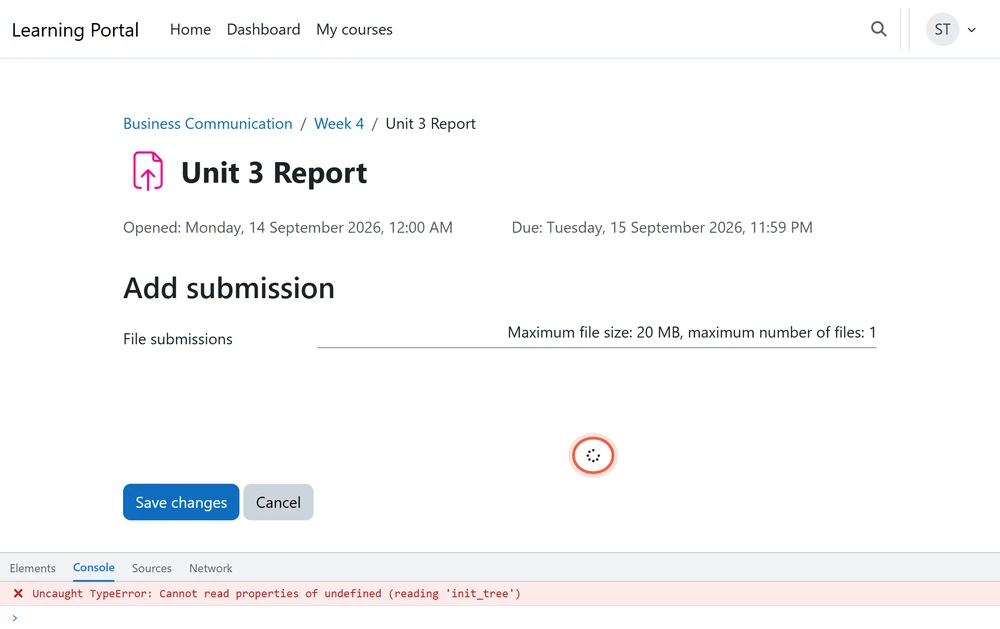
Moodle’s Misleading Record of Non-Submission
Moodle raises one event when a student views the submission form. It also raises a separate event, but only when a submission is created. During this failure the first fires and the second never does.
So the log is not blank. It says the learner arrived at the submission page and left without submitting. That is indistinguishable from a learner who thought better of it. Meanwhile the activity shows “No submission” and the gradebook shows nothing. Every downstream artefact then inherits that reading: completion tracking, progress reports, the certificate behind them.
The system’s record of the incident is therefore not merely incomplete. It is wrong, and it is wrong against the learner.
Deadline Implications and the Extension Trap
The defaults cut both ways. A due date is enabled by default and set to one week. A cut-off date, however, is not. So on a default site, submissions keep being accepted after the due date. They are merely flagged late, and the damage is recoverable if somebody decides to recover it.
Where an administrator has set a cut-off date, submissions stop at that moment. That happens regardless of whether the platform was working. Moodle’s only remedy is then a per-user extension.
Identifying Affected Learners
An extension is granted to named individuals, one at a time. That is, it is granted by someone who knows who was affected. Nobody knows who was affected.
The failure happened in the browser and left no server-side trace. So the only learners you can identify are the ones who wrote in. They are, by definition, the confident ones. Meanwhile the rest stay indistinguishable from non-performers.
Nor does monitoring close that gap. Availability checks pass throughout, because the site loads, the course opens and the assignment page renders. An organisation whose only detector for this fault is a learner complaint will always hear about it after the window has closed.
Our guide to common Moodle assignment problems covers the ordinary cases. Why Moodle assignment deadline reminders are not sent is another layer of the same picture.
Why Shared Hosting Complicates Moodle 5.1+ Diagnostics

The console message reported in the September thread is precise. A property could not be read because the object holding it was undefined. In other words, the small legacy script defining the assignment’s tree function never reached the browser.
Nothing is wrong with the assignment, the submission plugin or the file repository. Instead, what failed is the delivery of a static asset. That sits one layer below Moodle’s application code. Since Moodle 5.1, that layer has become much harder for an LMS owner to reason about.
Moodle’s Evolving Architecture and Hosting Contracts
Moodle recently added three contracts between the application and its hosting environment. Shared hosting is the arrangement in which no single party owns all three.
- The public directory, in Moodle 5.1. Most of the codebase moved into a new /public directory. The release notes state that the document root must now point there. It can no longer point at the main Moodle folder. Meanwhile, plugins installed before the upgrade stay in their old locations. Moodle’s own notice warns that some sites will stop loading correctly and show directory listings instead. The same restructure is why some plugins were not migrated to the Moodle Marketplace.
- The routing engine, also in Moodle 5.1. It is strongly recommended but not compulsory, with a compatibility layer for older behaviour. Moodle also ships a check for it. The failure message is simply that the router is not configured. That is a statement about the web server, surfaced inside Moodle. Yet no Moodle setting can fix it.
- Composer support, in Moodle 5.2. The application now carries build-time dependencies installed as a deployment step. Moodle’s environment message is explicit. If you are not using Composer, the vendor directory must exist and contain the necessary files. A site can pass every Moodle-level check a non-technical administrator knows to run. Still, it can be missing that directory.
The Strategic Point: Divided Ownership and Diagnostic Asymmetry
All three are decided outside Moodle. They belong to whoever controls the web server configuration and the deployment process. On managed or self-hosted infrastructure, that is one accountable party.
Shared hosting installed through a control-panel auto-installer splits it. The host supports the panel. The administrator owns the application. The seam between them is exactly where these three contracts live.
The community threads on the endless Moodle file picker spin show what that costs. The administrator can only relay findings, and the host can only rule things out. That is because neither party can see the whole system.
Diagnostic Challenges
In a June forum reply, one administrator documented what makes this class of fault so slippery. The failing requests were for Moodle’s combined JavaScript and theme assets. They returned HTTP 500 only when fetched in the background with an authenticated session. Yet opened directly, the same addresses returned normally. The 500 responses still carried complete, valid content and correct headers.
A fault that will not reproduce by hand defeats every support process built to reproduce faults. Our coverage of detecting and anticipating Moodle performance issues and improving uptime in Moodle deals with the visible kind.
Which release a site runs decides how many of those three contracts it inherits. A long-term support release exists for organisations that would rather not meet a structural change on their own site first. Our comparison of the latest Moodle versus Moodle LTS covers that choice, alongside our guides to how to fix Moodle upgrade issues and automated testing strategies for Moodle upgrades.
Strategic Workarounds Versus Root Cause: A Moodle Administrator’s Dilemma

The choice is not between fixing it properly and fixing it quickly. A workaround that lets learners submit buys the time to find the root cause. Without one, the investigation runs against a deadline and gets rushed. The real trade-off is narrower. What does each workaround cost while in place, and what stops it becoming permanent?
Lever 1: Disabling JavaScript Delivery Optimisations
Moodle exposes a combined-file loading option for its legacy libraries. It also exposes a JavaScript caching option. Disabling either changes how those assets are served. Both exist for performance, and Moodle says so. Combined loading “should be enabled for performance reasons”. JavaScript caching is “strongly recommended for production sites”.
So this trades measurable site-wide performance for the function of one activity. It is cheap and reversible. So it is a reasonable thing to do on a deadline morning. However, somebody has to write down that it is temporary, and what would let it be reversed. Settings changed during an incident are almost never changed back. Two years later, nobody remembers why the site is slow.
Lever 2: Utilising the Mobile Web Services Path
The more interesting lever degrades nothing. A Moodle assignment can be submitted through a channel that never touches the browser’s picker. Moodle exposes web service functions for uploading a file, saving a submission and submitting it for grading. Those are what the official mobile app uses. Moodle’s own setting description is clear. Mobile web services are required for the app, and are enabled by default on an HTTPS site.
So on most sites a second submission path already exists. It does not share the failing component. The cost is real, though. It moves the burden onto learners, who have to install and use the app. It is also not equivalent for every assignment type. Then it has to be communicated clearly. But it keeps an assessment window open while the fault is still open. That beats degrading the whole site.
The Purpose of Root Cause Analysis
Root cause analysis here is not intellectual completeness. The same symptom appeared on three different sites. Each one followed an upgrade to the same major version. That is the signal that this is not one misconfigured server. If it is not, a workaround on one site fixes nothing for the next. The same outage then waits at the organisation’s next upgrade. That is a business argument rather than an engineering one. It belongs in the Moodle maintenance strategy.
Both levers need the same discipline: an owner, a written reason and a review date. The incident is not closed when the symptom stops.
Rebuilding Trust After a Moodle Platform Outage

Nobody in this failure sees the same event. That asymmetry is what does the lasting damage.
The Asymmetry of Experience
The learner experiences an LMS that broke at the exact moment their work was due. The instructor sees an empty submission column. So there is no way to tell an outage from non-performance. The administrator sees a site that is up, monitored and passing its checks. The hosting provider sees nothing worth escalating.
Four true accounts of one incident. Meanwhile the only person carrying a consequence is the one with the least power to fix it.
The Durable Damage to Trust
The lasting damage is not the outage. It is that the learner now knows the platform can fail silently at a deadline. Yet no announcement removes that.
Behaviour changes accordingly. People submit days early. They also keep their own screenshots. They email work to instructors outside the system. Every one of those responses is rational. Every one erodes the reason the organisation bought an LMS. Ultimately the record of record stops being the record.
Strategic Steps to Rebuild Trust
Three actions do the repair. Each should be decided in advance rather than improvised.
- Extend the affected deadline before anyone asks. Waiting to be petitioned makes the learner argue for something they are already owed.
- Say in writing that the failure was the platform’s, not the learner’s. This is not a courtesy. The platform’s own record says otherwise, and somebody has to overrule it.
- Give people a route to report a broken interaction. It should not depend on guessing whether the problem is their own device. A spinning picker looks exactly like a personal browser problem. So the reasonable learner assumes it is theirs and says nothing.
Accountable Ownership for Platform Stability
The assessment deadline belongs to the institution. The Moodle configuration belongs to its administrator. The web server and deployment belong to whoever hosts it. The code belongs to an upstream project on its own release calendar. Those are almost never the same party. Meanwhile no monitoring spans them. None is watching the one thing that matters: whether a learner can hand in work today.
The fix is an accountable owner for that question. It also needs Moodle support that reaches across the hosting seam. And it needs a standing decision, made in advance. What happens to a deadline when the platform is the reason it was missed?
Expert Support for Moodle Platform Stability

Moodle’s newer releases moved real responsibility into the web server and the deployment process. A failure that lands there does not look like a Moodle problem from inside Moodle. Mindfield Consulting’s Moodle specialists work across both sides of that seam. We diagnose the elusive faults and weigh the workaround against the fix. And we keep assessment windows open while the root cause is found.
Frequently Asked Questions (FAQs)
This article may contain conceptual illustrations to help support the article content.
