


Building a comprehensive Moodle learner achievement overview is crucial for institutions to track progress, ensure compliance, and make informed pedagogical decisions. Without a clear, consolidated view, administrators can struggle to identify at-risk learners, evaluate program effectiveness, or generate the detailed reports required by accreditation bodies. These Moodle student engagement report examples show what that visibility looks like in practice. Therefore, understanding how to aggregate and present diverse achievement data from Moodle’s various components is essential for gaining actionable insights. This article will guide Moodle administrators and LMS consultants through the process of constructing a robust learner achievement overview.
Engaged the team for a global retailer application development project. Schedules were consistently met with flexibility to changing scope. Was always impressed with Mindfield’s responsiveness and ability to quickly grasp the problem while offering creative solutions. Applications were of high quality and I wouldn’t hesitate to recommend Mindfield Consulting for any custom development.
Grant R
review Source: Google Reviews
Outline
- Understanding Moodle Achievement Data and Prerequisites
- Configuring Core Moodle Features for Achievement Tracking
- Building Custom Reports for a Holistic Overview
- Presenting and Verifying Your Achievement Overview
- Accelerate Your Moodle Achievement Overview with Moodle Expert Support
- Frequently Asked Questions (FAQs)
Understanding Moodle Achievement Data and Prerequisites

Creating an effective Moodle learner achievement overview starts with a clear understanding of the data Moodle collects and the administrative access required. Moodle offers several built-in mechanisms to track learner progress and success. These components, when properly configured, form the foundation of any comprehensive achievement report.
Key Moodle Achievement Components
Moodle’s architecture allows for detailed tracking of various learner activities and outcomes. These components collectively contribute to a holistic view of a learner’s journey and achievements within the platform. Therefore, understanding each element is critical before attempting to build an integrated overview.
- Activity Completion: This tracks whether a learner has met specific criteria for a Moodle activity, such as viewing a page, submitting an assignment, or achieving a certain grade. It is a fundamental building block for sequential progression, which is the basis of how to enable Moodle learning paths.
- Course Completion: Building on activity completion, this feature tracks whether a learner has fulfilled all requirements for an entire course. It often involves completing a set percentage of activities or achieving specific grades.
- Grades: The Moodle Gradebook records scores from quizzes, assignments, and other graded activities. It provides a quantitative measure of performance in specific tasks and overall course performance.
- Badges: Digital badges serve as visual recognition for achieving specific milestones or demonstrating particular skills. They can be awarded automatically based on activity or course completion.
- Competencies: Moodle’s competency framework allows institutions to define skills, knowledge, and abilities learners should acquire. Progress towards these competencies can be tracked and linked to activities or courses.
- Certificates: While often a separate plugin, certificates formally acknowledge the completion of a course or program, and the top Moodle certificate plugins and customization strategies differ in how much of that criteria logic they expose. They typically require specific completion criteria to be met before issuance.
Administrative Prerequisites and Considerations
Before you begin building your achievement overview, ensure you have the necessary permissions and a clear understanding of your organizational goals. Proper preparation prevents issues and ensures the accuracy of your data. This includes reviewing Moodle settings and understanding data privacy requirements.
- Administrator Access: You need full administrative access to Moodle to configure completion settings, manage competencies, create custom reports, and install any necessary plugins.
- Moodle Version Compatibility: Ensure your Moodle instance is up-to-date or compatible with any reporting tools or plugins you plan to use. Newer Moodle versions often include enhanced reporting capabilities.
- Data Retention Policies: Understand your institution’s data retention policies and any regulatory requirements regarding learner data, including FIPPA, PIPEDA, and HIPAA compliance in Moodle. This impacts how you store and report achievement information.
- Backup Strategy: Always have emergency backup and migration strategies for Moodle in place before making significant changes to Moodle’s configuration or database. This safeguards against data loss during complex operations.
- Reporting Requirements Definition: Clearly define what constitutes “achievement” for your institution. This includes identifying key performance indicators (KPIs) and the specific data points you need to collect for your overview.
Configuring Core Moodle Features for Achievement Tracking

Effective tracking of learner achievement relies heavily on the correct setup of Moodle’s built-in features. These configurations ensure that data is captured accurately and consistently across all courses. Proper setup at this stage simplifies the aggregation of data into a comprehensive overview later on.
Setting Up Activity and Course Completion
Activity and course completion are foundational for tracking learner progress. They provide clear indicators of whether a learner has engaged with content and met specific requirements. These settings are configured at both the activity and course levels.
- Enable Activity Completion: Navigate to Site administration > Advanced features and ensure Enable activity completion is checked. This global setting allows individual activities to track completion.
- Configure Individual Activity Completion: For each activity (e.g., Assignment, Quiz, Forum), open its settings. Under the Activity completion section, select the desired tracking method.
- Choose Show activity as complete when conditions are met for automated tracking.
- Specify conditions, such as “Student must view this activity,” “Student must receive a grade,” or “Student must submit.”
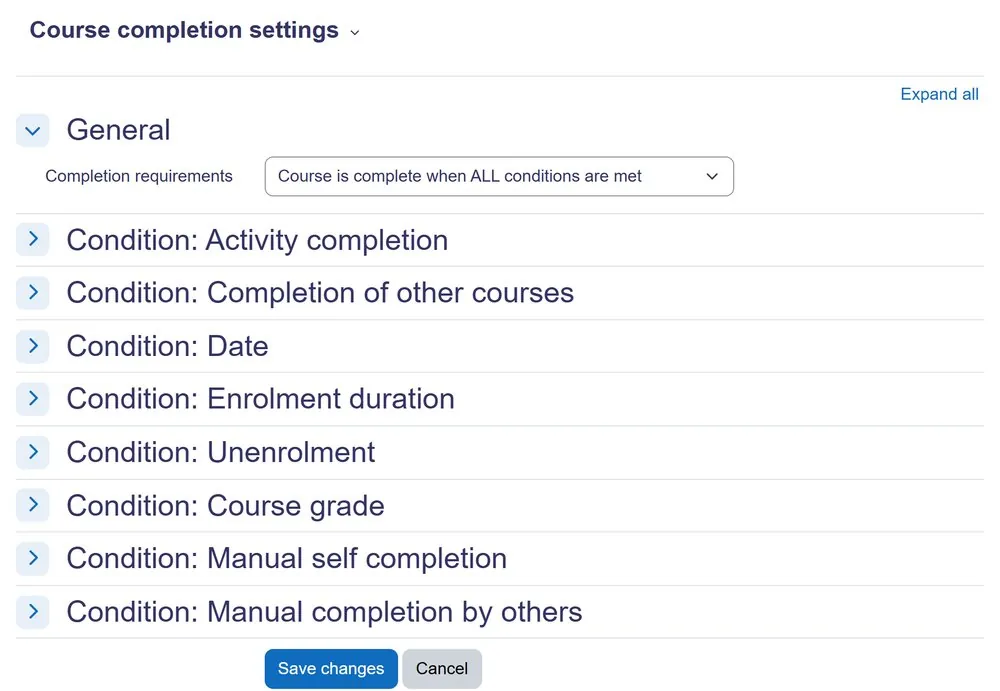
- Set Up Course Completion: In your course, go to Course administration > Course completion.
- Define the criteria for course completion, which can include activity completion, grade conditions, or manual enrolment status.
- Select which activities must be completed, or specify a percentage of all activities.
- Consider using the Completion tracking default setting in Site administration > Courses > Course default settings to apply standard completion rules across new courses.
Implementing Badges and Competencies
Badges and competencies add layers of recognition and skill tracking to the achievement overview. They provide qualitative and structured insights into learner development. These features enhance the richness of the data collected beyond simple pass/fail metrics.
- Enable Badges: Access Site administration > Badges > Badge settings and ensure site badges are enabled. This allows administrators to create and issue badges.
- Create Course Badges: Within a course, navigate to Course administration > Badges > Manage badges.
- Click Add a new badge to define its name, description, and image.
- Set the criteria for earning the badge, which can be linked to course completion, activity completion, or manual award.
- Enable Competencies: Go to Site administration > Competencies > Competency settings and enable the competency framework. This allows you to define and manage competencies.
- Create Competency Frameworks: In Site administration > Competencies > Competency frameworks, create a new framework (e.g., “Digital Literacy,” “Project Management”).
- Define Competencies and Link to Courses: Within your framework, add individual competencies (e.g., “Understand basic coding principles”).
- Link these competencies to specific courses in the course settings under Competencies.
- Align activities within the course to specific competencies, allowing Moodle to track progress automatically.
Building Custom Reports for a Holistic Moodle Learner Achievement Overview

While Moodle’s default reports offer basic information, a true Moodle learner achievement overview often requires custom data aggregation. The Custom Reports Builder is a powerful tool for combining data from various Moodle sources. This enables administrators to generate tailored reports that meet specific institutional needs and demonstrate comprehensive learner progress, and it pairs with how to automatically send Moodle reports so stakeholders receive them without asking.
Leveraging the Moodle Custom Reports Builder
The Moodle Custom Reports Builder allows you to design and generate reports based on various data sources within your Moodle instance. This is essential for pulling together disparate achievement metrics into a single, cohesive view. Furthermore, it provides flexibility beyond standard Moodle reports.
- Access the Custom Reports Builder: Navigate to Site administration > Reports > Custom reports.
- Create a New Report: Click Add a new custom report.
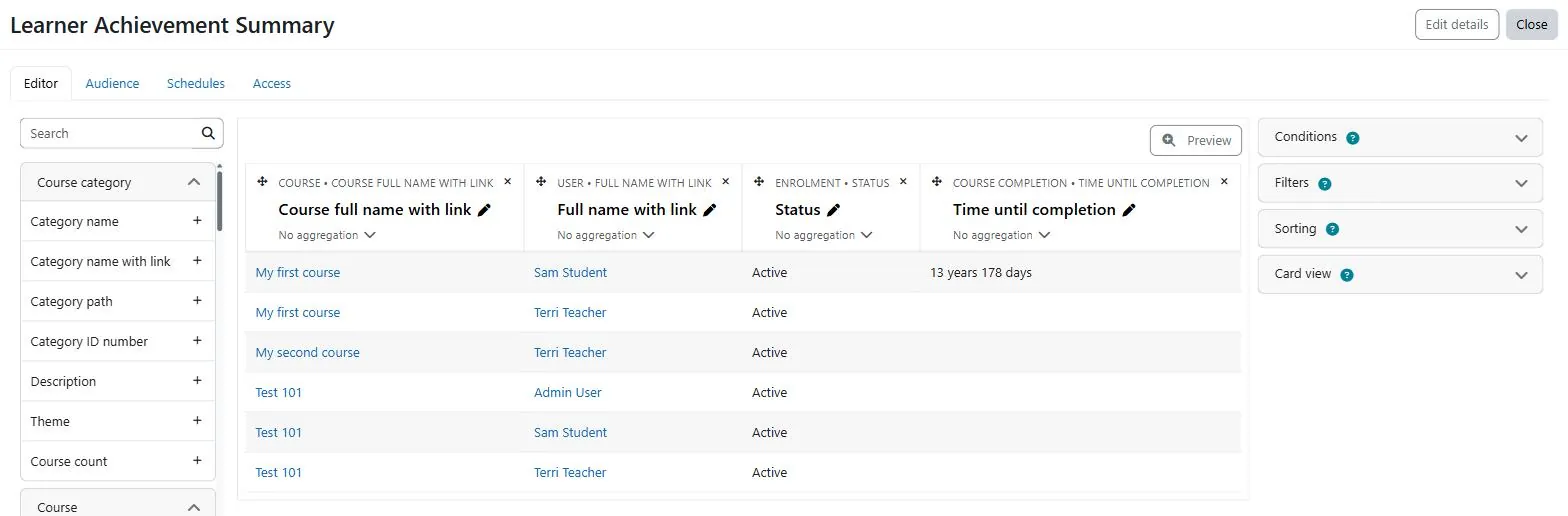
- Give your report a descriptive name (e.g., “Learner Achievement Summary”).
- Select the relevant Source for your report. For a comprehensive overview, you will need to start with “Course completions” or “Activity completions” and then add other data via joins.
- Add Fields and Conditions:
- In the Columns tab, add fields such as “User full name,” “Course name,” “Activity name,” “Completion status,” “Grade,” “Badge name,” or “Competency status.”
- Use the Conditions tab to filter your data (e.g., by date range, course category, or user group).
- Define Joins for Integrated Data: This is critical for an “overview.”
- To include badge data, add a join to the “Badges” source.
- For competency information, join to the “Competencies” source.
- Ensure the join conditions are correct, typically linking by user ID or course ID.
- Set Aggregations and Groupings: In the Aggregations tab, choose how data should be summarized (e.g., count of completed activities, average grade).
- Use the Groupings tab to organize your report by user, course, or other relevant categories.
- Preview and Refine: Regularly preview your report to ensure it displays the desired data accurately. Adjust columns, conditions, and joins as needed until the overview is clear and comprehensive.
Advanced Reporting with External Tools and APIs
For highly complex or large-scale achievement overviews, Moodle’s Custom Reports Builder reaches its limits. In such scenarios, integrating Moodle data with external business intelligence (BI) tools offers greater flexibility and analytical power. This method allows for sophisticated data visualization and cross-platform reporting.
- Moodle’s External Database Feature: Moodle can connect to external databases, allowing you to pull data into custom reports or push Moodle data out. This is configured in Site administration > Plugins > Authentication > Manage authentication (for external database authentication) or through custom database connections for reporting.
- Moodle Web Services API: Moodle provides a comprehensive Web Services API that allows external applications to access and manipulate Moodle data programmatically; this Moodle Web API review and examples of use covers what it can reach. This is ideal for connecting Moodle to a dedicated BI platform like Tableau, Power BI, or a custom data warehouse.
- Create a new web service in Site administration > Server > Web services > External services.
- Enable specific functions (e.g.,
core_completion_get_course_completion_status,core_user_get_users_by_field) to retrieve achievement data. - Generate a security token for authentication with your external application.
- Custom Plugins or Blocks: For specific, recurring overview needs, developing a custom Moodle plugin or block can provide a tailored solution. This approach allows for direct integration into the Moodle interface, offering a personalized dashboard experience for administrators. Custom development ensures the overview is precisely aligned with unique institutional requirements.
Presenting and Verifying Your Achievement Overview

Once you have configured Moodle and built your custom reports, the next step is to present this data effectively and ensure its accuracy. A well-presented Moodle learner achievement overview is not just a collection of data; it is an actionable tool for decision-makers. Verification is crucial to maintain trust in the data.
Visualizing the Overview with Dashboards and Custom Blocks
Presenting achievement data in an easily digestible format significantly enhances its utility. Moodle offers several ways to visualize this information, making it accessible to administrators and stakeholders. Visual dashboards can quickly highlight trends and areas requiring attention.
- Site-Wide Administrator Dashboard: Utilize Moodle’s default dashboard or customize it to include blocks that display key achievement metrics. For instance, a custom HTML block can embed snippets from your custom reports.
- Custom Dashboard Blocks: Develop or install custom blocks that specifically aggregate and display achievement data. These blocks can pull information from your custom reports or directly query the Moodle database.
- A block can show a summary of course completion rates across categories.
- Another one displays the number of badges awarded in the last month.
- Exporting Data for External Visualization: Export your custom reports in CSV or Excel format; there are many ways to use Excel with Moodle once the data is out. These files can then be imported into external BI tools (like Microsoft Excel, Google Sheets, or dedicated dashboard software) for more advanced data visualization. This provides flexibility for complex analytical needs.
Verification and Maintenance of Achievement Data
Ensuring the accuracy and reliability of your learner achievement overview is paramount. Regular verification and maintenance prevent data discrepancies and build confidence in the insights derived. An inaccurate overview can lead to incorrect decisions or compliance issues.
- Regular Data Audits: Periodically audit a sample of learner records to cross-reference reported achievements with actual activity in courses. This helps identify any configuration errors or data inconsistencies.
- Review Completion Conditions: Frequently review activity and course completion conditions, especially after course updates or Moodle upgrades. Outdated conditions can lead to incorrect completion statuses.
- Monitor System Logs: Check Moodle’s system logs (Site administration > Reports > Logs) for any errors related to activity completion, badge issuance, or competency updates. This can help pinpoint underlying technical issues.
- Schedule Report Updates: For custom reports, ensure they are scheduled to run regularly, or that the data sources they rely on are refreshed. This ensures the overview remains current and reflects the latest learner progress.
- User Feedback Loop: Establish a process for instructors or learners to report discrepancies in their achievement records. This provides an additional layer of verification and helps identify edge cases or bugs.
Accelerate Your Moodle Achievement Overview with Moodle Expert Support

Implementing a comprehensive Moodle learner achievement overview can be a complex undertaking, particularly for organizations with unique reporting requirements or large user bases. Configuring Moodle’s various achievement components, building sophisticated custom reports, and ensuring data integrity often require specialized knowledge and experience. Furthermore, navigating Moodle’s database structure and API for advanced integrations can be challenging without expert guidance. Mindfield Consulting’s comprehensive Moodle support team possesses deep expertise in Moodle’s architecture and reporting capabilities. We can assist your team in defining clear achievement metrics, optimizing Moodle’s configuration, developing custom reports, and integrating Moodle data with external BI tools. Our consultants ensure your achievement overview is accurate, actionable, and aligned with your organizational goals, freeing your internal teams to focus on education and training delivery.
