

As learning platforms mature from internal training tools into revenue-generating systems, eCommerce in Moodle has become a practical requirement rather than a “nice to have.” Whether you are selling individual courses, bundled certifications, memberships, or corporate training packages, Moodle offers multiple ways to accept payments and manage enrolments.
This article explains the eCommerce options available for Moodle, reviews the most commonly used Moodle eCommerce plugins, and provides clear guidance on when plugins are sufficient versus when a more advanced integration with platforms like WordPress or Shopify makes sense.
I recently migrated my site to Mindfield from another host, and the experience couldn’t have been better. Mindfield kept working until they were certain that my site was operating as well as it was before, and they even helped clean up a few issues to improve my site’s performance – issues my prior host never mentioned. I also found Mindfield’s communication to be excellent. Before the migration, they prepared me for what to expect, and during the migration they kept me well-informed. No small feat considering that changing hosts is inherently stressful! They also provided clear and concise explanations when required. I’d highly recommend Mindfield if you’re looking for an IT consultant, developer, or host.
Jim Benedek
Owner, Student First Media Inc.
review Source: Google Reviews
Outline
Why Add eCommerce to Moodle?

Moodle can support everything from a simple paid course enrolment to a broader commerce architecture involving storefronts, memberships, corporate purchases, CRM data, and automated enrolment.
Organizations commonly need eCommerce in Moodle to:
- Sell individual courses directly to learners
- Package multiple courses into certifications or bundles
- Offer memberships or recurring access
- Process corporate and bulk training purchases
- Connect learning purchases with CRM, association management, finance, or marketing systems
The right solution depends on where the transaction should live. A simple course purchase can remain close to Moodle, while a larger commercial operation benefits from a dedicated commerce or training-management platform.
Native Moodle eCommerce Capabilities
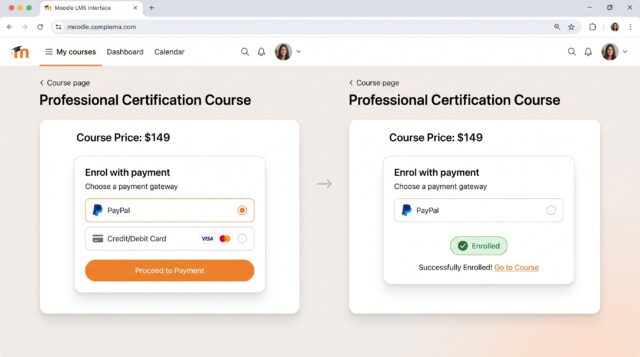
Moodle includes an Enrolment on payment method that allows a learner to pay through an enabled payment gateway and then receive course enrolment. Moodle includes PayPal as a standard payment gateway, while additional payment gateways can be added through plugins.
View Moodle’s Enrolment on payment documentation
When to use native Moodle payments
Use Moodle’s native payment approach when:
- Courses are purchased individually
- Pricing is straightforward
- You do not require a full shopping cart
- Marketing promotions and complex discounts are limited
- Moodle can remain the primary customer-facing system
- You want the lowest integration overhead
Native Moodle payments are less suitable once the purchasing process requires advanced product catalogues, bundles, subscriptions, sophisticated promotions, B2B purchasing workflows, or deep CRM integration.
Moodle eCommerce Technologies and Integrations
There is no single eCommerce architecture that works best for every Moodle site. The following technologies serve different business models.
1. Moodle Enrolment on Payment
Best for: Simple direct-to-learner course sales
Moodle’s built-in Enrolment on payment workflow connects a successful payment with course enrolment. This keeps the entire process close to Moodle and avoids maintaining a second commerce platform.
When to use it: Choose this approach when you sell a limited number of courses individually and do not require a sophisticated storefront, cart, membership model, or promotional engine.
Links:
2. WooCommerce + Edwiser Bridge
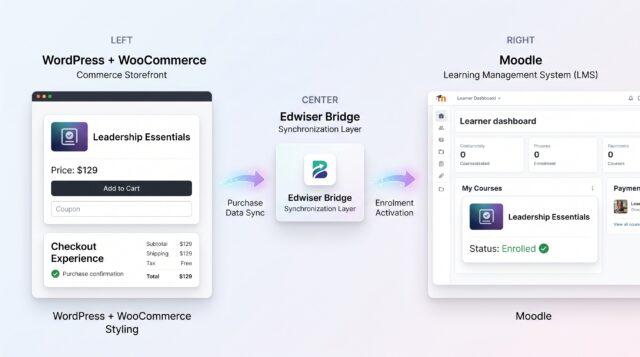
Best for: Organizations already using WordPress or requiring a flexible course storefront
WooCommerce provides the commerce layer while Moodle continues to manage learning. Edwiser Bridge connects WordPress and Moodle, and its WooCommerce integration supports selling Moodle courses through WooCommerce.
This architecture gives organizations access to the broader WooCommerce ecosystem for products, coupons, checkout workflows, payment gateways, and other commerce extensions while synchronizing course access with Moodle.
When to use it: Choose WooCommerce + Edwiser Bridge when WordPress is already central to your website, when marketing teams need control over landing and product pages, or when your sales model requires more flexibility than Moodle’s direct payment workflow.
Links:
- Mindfield: Integrating WordPress/WooCommerce with Moodle
- Mindfield: WordPress-Moodle Course Enrolment Issues
- Edwiser Bridge
- Edwiser Bridge WooCommerce Integration
3. Shopify + Moodle
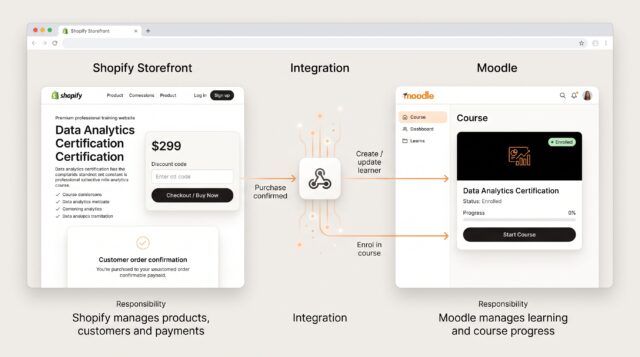
Best for: Commercial training businesses that want a polished, scalable commerce-first storefront
Shopify provides a dedicated commerce environment for managing products, orders, customers, discounts, checkout, and sales operations. Moodle remains responsible for courses, learning activities, grades, and completion.
A Moodle-Shopify architecture normally connects purchase events with Moodle enrolment through integration logic using APIs, webhooks, or middleware.
When to use it: Choose Shopify when eCommerce is a major part of the business, the sales and marketing experience needs to be managed independently from Moodle, or the organization expects its commerce operation to grow significantly.
Links:
- Mindfield: Integrating Shopify with Moodle
- Mindfield: Comparing WooCommerce, Shopify and Joomla for Moodle
- Shopify API Documentation
- Shopify Webhooks
4. iMIS + Moodle
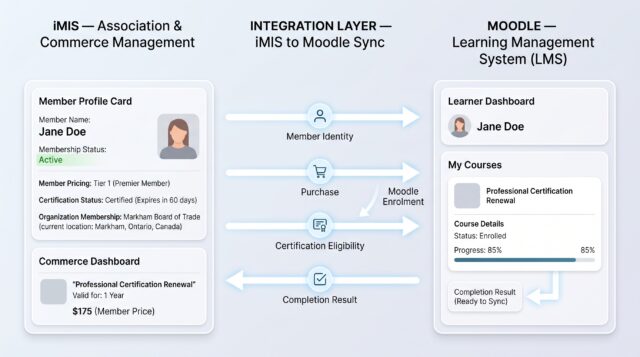
Best for: Associations, professional bodies, and membership-driven training organizations
iMIS is especially relevant when course purchases form part of a broader member or constituent relationship. Instead of treating the LMS purchase as an isolated transaction, an iMIS-based architecture can connect commerce and learning with membership, certification, contact, and organizational data.
iMIS provides a REST API and data models that include areas such as Cart, Certification, Accounting, and Commerce System Setup, allowing a Moodle integration to be designed around the organization’s existing iMIS data and business processes.
When to use it: Choose an iMIS-centred approach when iMIS is already the organization’s system of record and Moodle training needs to connect with memberships, member pricing, certification programs, organizational accounts, or existing commerce workflows.
Unlike Edwiser Bridge or Arlo, this should generally be approached as an integration architecture, rather than assuming a simple Moodle eCommerce plugin will cover every workflow.
Links:
- iMIS REST API
- iMIS Developer Documentation
- Planned Mindfield article: iMIS eCommerce with Moodle: Architecture, Payments, Enrolment and Member Training
5. Arlo + Moodle
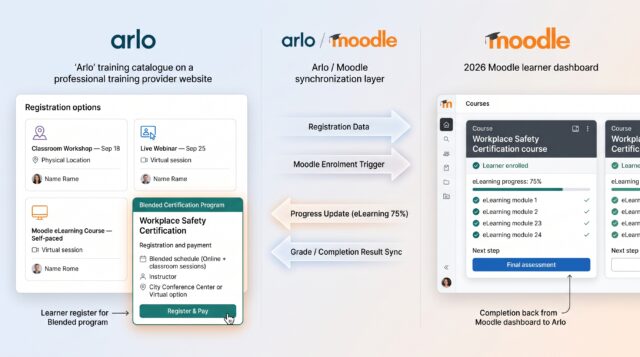
Best for: Commercial training providers selling instructor-led, virtual, blended, and online training
Arlo is different from a general-purpose online store. It is designed around training registrations and course operations. Arlo provides an official Moodle integration that links Arlo courses and eLearning offerings to Moodle courses.
Once connected, organizations can sell access through Arlo and use Moodle for the learning experience. The integration handles registrations and can also synchronize learning information such as grades, results, progress, and last-access information back into Arlo.
When to use it: Choose Arlo when your organization manages a substantial training operation that combines scheduled courses, webinars, classroom training, registrations, payments, and Moodle-based eLearning.
Links:
The ratings below are an editorial decision guide, not vendor benchmarks. Five stars indicate a stronger fit for that specific requirement.
| Feature | Moodle Native Payments | WooCommerce + Edwiser Bridge | Shopify + Moodle | iMIS + Moodle | Arlo + Moodle |
|---|---|---|---|---|---|
| Best For | Simple course sales | WordPress-based training sites | Scalable online course sales | Associations and membership organizations | Blended and instructor-led training |
| Ease of Setup | ★★★★★ | ★★★★☆ | ★★★★☆ | ★★☆☆☆ | ★★★★☆ |
| eCommerce Capabilities | ★★☆☆☆ | ★★★★☆ | ★★★★★ | ★★★★☆ | ★★★★☆ |
| Moodle Enrolment Automation | ★★★★★ | ★★★★★ | ★★★★☆ | ★★★☆☆ | ★★★★★ |
| Shopping Cart & Product Management | ★☆☆☆☆ | ★★★★★ | ★★★★★ | ★★★★☆ | ★★★★☆ |
| Subscriptions & Memberships | ★★☆☆☆ | ★★★★☆ | ★★★★★ | ★★★★★ | ★★★★☆ |
| CRM / Member Management | ★☆☆☆☆ | ★★★☆☆ | ★★★☆☆ | ★★★★★ | ★★★★☆ |
| Marketing & Promotions | ★☆☆☆☆ | ★★★★☆ | ★★★★★ | ★★★☆☆ | ★★★★☆ |
| Customization & Scalability | ★★☆☆☆ | ★★★★☆ | ★★★★★ | ★★★★★ | ★★★★☆ |
| When to Use | For simple, individual course purchases. | When WordPress and WooCommerce power your website. | For advanced storefronts, marketing, and scalable sales. | When training connects with membership and certification data. | For classroom, virtual, blended, and online training. |
Quick selection guide
Use Moodle native payments when course sales are simple and minimizing integration complexity is the priority.
Use WooCommerce + Edwiser Bridge when WordPress already drives your website and you need a flexible storefront with automated Moodle enrolment.
Use Shopify + Moodle when your learning business needs a dedicated commerce platform with strong sales, marketing, and growth capabilities.
Use iMIS + Moodle when training is part of a larger association or membership ecosystem and iMIS needs to remain the authoritative member and commerce system.
Use Arlo + Moodle when you operate a training business that sells and administers classroom, virtual, blended, and self-paced learning from the same commercial platform.
Choosing the Right Moodle eCommerce Architecture
The decision should start with where the business wants to manage customers, products, orders, and financial transactions.
For a small training catalogue with individual purchases, keeping payments directly in Moodle reduces technical overhead.
When WordPress already supports the organization’s website and marketing operation, WooCommerce with Edwiser Bridge provides a practical path to a richer storefront without moving the learning experience out of Moodle.
When online sales operate as a major standalone business channel, Shopify provides a stronger separation between commerce and learning. Shopify manages the customer purchase lifecycle, while integration logic creates and manages Moodle access based on order events.
For associations and professional bodies, iMIS becomes the stronger architectural centre when member status, member pricing, certifications, organizational relationships, and purchases need to remain connected.
For dedicated training businesses, Arlo fits environments where registrations, scheduled training, instructors, webinars, payments, and eLearning all need to operate as one training-management workflow.
The best Moodle eCommerce architecture therefore depends less on which platform has the longest feature list and more on which system should own the commercial relationship with the learner or customer.
Related Articles on Moodle eCommerce & Integrations
The existing related-article section should be replaced with content directly connected to Moodle eCommerce:
- Integrating Shopify with Moodle — How Shopify can act as the storefront while Moodle manages course delivery and enrolment.
- Integrating WordPress/WooCommerce with Moodle — A deeper look at using WooCommerce for Moodle course sales.
- WooCommerce vs Shopify vs Joomla for Moodle eCommerce — Comparison of different external commerce architectures.
- WordPress-Moodle Course Enrolment Issues — Troubleshooting WooCommerce and Edwiser Bridge enrolment workflows.
- Coming next: iMIS eCommerce with Moodle: Architecture, Payments, Enrolment and Member Training
- Coming next: Edwiser Bridge with Moodle: WooCommerce Integration, Course Sync and Enrolment Automation
These articles create a clearer content cluster around Moodle eCommerce, rather than linking to general Moodle API or multi-tenancy articles.
Turning Payments Into a Scalable Learning Business

Hiring Moodle experts goes far beyond technical setup. In the context of eCommerce, the real value lies in designing an architecture that supports growth without constant rework. An experienced Moodle expert understands how enrolment methods, roles, completion rules, and integrations interact with payment logic, and how small decisions early on can create long term constraints later. Moodle experts help organizations choose the right approach at the right stage. They can assess whether plugins are sufficient for your current revenue model or whether you should design for an external commerce platform from the start. This prevents common mistakes such as overloading Moodle with payment logic, relying on fragile plugins, or hard coding business rules that become difficult to change as sales increase.
Beyond architecture, Moodle experts bring operational foresight. They design enrolment workflows that handle edge cases such as refunds, access revocation, subscription lapses, and corporate purchases. They also ensure that reporting, security, and upgrade paths are considered, so your eCommerce setup remains stable through Moodle version changes and business expansion.
Ultimately, working with Moodle experts turns eCommerce from a tactical add on into a strategic capability. Instead of simply accepting payments, your learning platform becomes a reliable revenue engine that aligns with marketing, finance, and long term growth goals.
