


Moodle offers a robust set of tools that can dramatically enhance the learner experience—without relying on third-party plugins. Many organizations overlook the capabilities already embedded within Moodle, assuming they need external apps or advanced coding to improve engagement. In reality, when configured and styled properly, Moodle’s native features can provide a clean, focused, and structured learning experience.
Engaged the team for a global retailer application development project. Schedules were consistently met with flexibility to changing scope. Was always impressed with Mindfield’s responsiveness and ability to quickly grasp the problem while offering creative solutions. Applications were of high quality and I wouldn’t hesitate to recommend Mindfield Consulting for any custom development.
Grant R
review Source: Google Reviews
Outline
Focus Mode: Clean Interface for Better Concentration
Focus Mode refers to the practice of simplifying the Moodle interface by removing unnecessary navigation blocks and emphasizing the central course content. While Moodle does not label this feature explicitly, its layout and theming tools support the creation of distraction-free environments.
Benefits include:
-
A cleaner interface that minimizes distractions
-
Improved readability, especially on mobile devices
-
Enhanced learner concentration during assessments or guided activities
Challenges to consider:
-
Essential navigation tools may be hidden if not configured properly
-
It may require theme-level customization using CSS or JavaScript
-
Learners unfamiliar with Moodle might need orientation
Before and After: A More Focused Moodle Layout
A standard Moodle course can display navigation, blocks, the course index, and learning content at the same time. A more focused layout reduces non-essential interface elements so learners can concentrate on the activity or content in front of them.
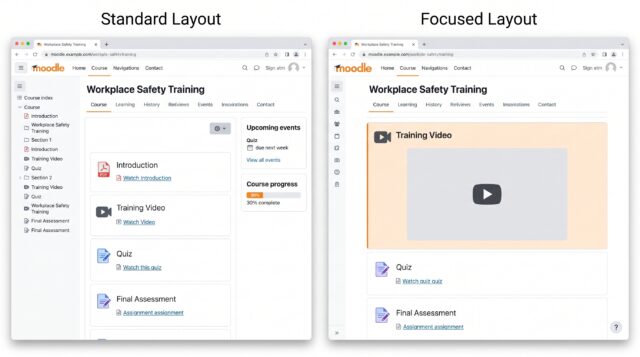
Before: Show the standard course page with the course index, navigation, blocks, and course content visible.
After: Show the same course with unnecessary navigation collapsed and the main learning content given more screen space.
The exact result depends on the Moodle theme and course design, but the goal is the same: reduce visual distractions without removing essential navigation.
Activity Completion and Conditional Access

Two of the most impactful yet underutilized features in Moodle are activity completion tracking and conditional access settings. Together, these features create a more personalized and structured learning experience.
With proper configuration, learners can be guided through course material in a specific sequence. For example, completing a video can unlock a quiz, and passing a quiz can reveal the next activity.
Key steps include:
-
Enable completion tracking in course settings
-
Set activity-based completion rules (such as viewing, submitting, or receiving a grade)
-
Use access restrictions to control when each activity becomes available
-
Create visual indicators of progress using progress bars or dashboards
Before and After: Guided Learner Progress
Activity completion and access restrictions make the intended learning path clearer.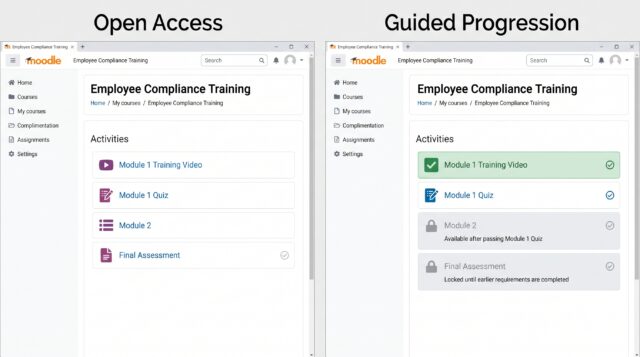
Before: All course activities are available at once, leaving learners to determine the sequence themselves.
After: Completed activities are clearly identified, while later activities remain restricted until the required conditions are met.
For example:
- Complete the learning video
- Unlock the quiz
- Achieve the required quiz grade
- Unlock the next module
This creates a guided learning journey without requiring instructors to release each activity manually.
Choosing the Right Course Format

Course format determines how learners navigate and understand the structure of a Moodle course. Start with Moodle’s built-in formats, then consider additional format plugins only when they provide a clear learner-experience benefit.
Custom Sections
Best for: Self-paced, modular, topic-based, and competency-based courses.
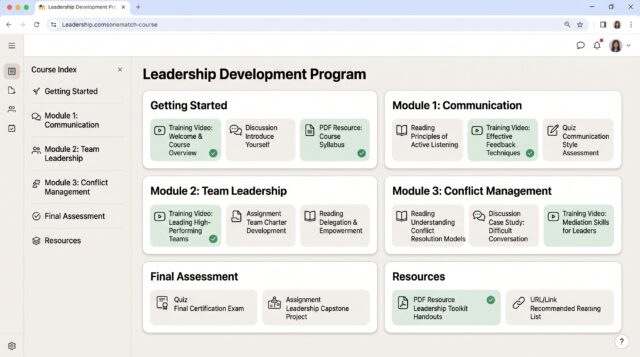
Custom Sections organizes learning into named sections such as Getting Started, Module 1, Module 2, Final Assessment, and Resources.
Use this format when learning is organized primarily by topics or modules rather than dates.
Weekly Sections
Best for: Semester courses, instructor-led programs, and date-driven learning.

Weekly Sections organizes course content around the course calendar, making it easy for learners to see what readings, activities, and assessments belong to each week.
Use this format when learners are expected to progress through the course on a shared schedule.
Single Activity
Best for: Courses built around one main learning activity.
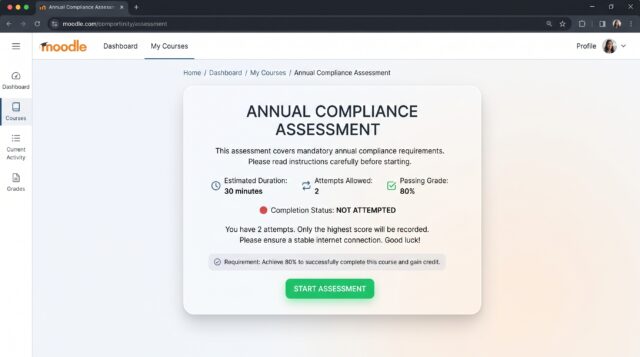
Single Activity takes the learner directly to one activity instead of presenting a multi-section course page.
Common examples include:
- One quiz
- One SCORM package
- One forum
- One primary learning activity
Use this format when the entire course exists mainly to deliver one activity or assessment.
Grid Format — Plugin Option
Best for: Highly visual courses and short modular learning.
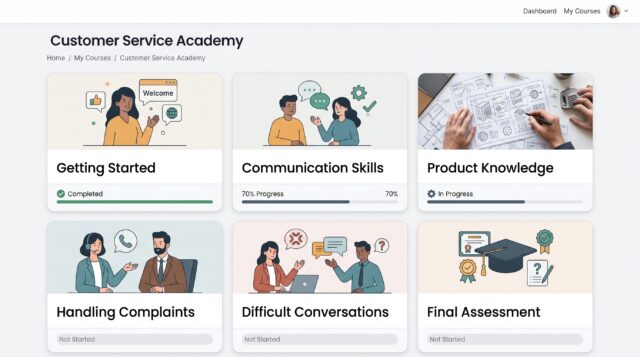
Grid Format displays course sections as visual tiles, giving learners an image-based way to choose a module or topic.
Use Grid when:
- Modules have clear visual identities
- A card-style layout improves navigation
- Your organization is comfortable maintaining an additional course-format plugin
Grid is an additional Moodle plugin rather than a standard Moodle course format.
Using Notifications and Reminders Effectively

Moodle includes a range of messaging and reminder tools that can boost learner engagement without the need for external services. These include:
-
Notifications for upcoming due dates
-
Forum digest summaries via email
-
Custom alerts using Moodle’s event monitoring tools
For organizations with disengaged learners, properly configured reminders can re-engage users and improve completion rates. Advanced implementations may include integration with third-party platforms using webhooks or custom scripts, which our technical team can support.
Why Built-in Features Are Often the Better Option

While there are many excellent plugins available for Moodle, relying on them too heavily can introduce maintenance overhead, compatibility issues, and unnecessary complexity.
Built-in Moodle features already offer:
-
-
Structured learning sequences through completion tracking and access restrictions
-
Customizable interfaces using CSS and layout settings
-
Communication tools for learner engagement
-
-
Clean, mobile-responsive theming options
Before turning to third-party plugins, our consulting team helps clients evaluate what is achievable using native tools. In many cases, the results match or exceed expectations without the added complexity.
Built-In Power, Expert Precision

Hiring expert Moodle developers offers a clear advantage when it comes to unlocking the full potential of Moodle’s built-in features. While many tools like Focus Mode, activity completion, and access restrictions are available out of the box, configuring them effectively—and customizing them for your organization’s needs—requires deep familiarity with Moodle’s structure, theming, and logic. Expert developers ensure that changes are made safely, align with accessibility standards, and remain upgrade-friendly, reducing long-term maintenance costs.
Moreover, experienced consultants can help avoid common pitfalls such as broken layouts, misconfigured roles, or inconsistent user experiences. They bring strategic insight to course structure, performance optimization, and user interface customization—helping organizations achieve a polished, branded, and learner-friendly environment without relying on excessive plugins. In short, expert support turns Moodle from a generic platform into a tailored, scalable learning solution.
