


AI tools are now part of everyday learning. Students may use AI assistants such as Claude, browser tools such as Comet, agent tools such as Claude CoWork, ChatGPT Atlas, or Moodle extensions that can work directly inside quizzes and course pages.
For instructors and educators, this creates a practical challenge. How do you tell the difference between genuine learning, acceptable AI support, and AI driven activity that undermines assessment integrity?
This article explains what AI assisted activity can look like in Moodle, what instructors can watch for in quizzes and assignments, and what Moodle administrators or developers can do to support detection with reports, plug ins, and custom monitoring tools.
I am Director of Rahab Ministry (a program of Youth Unlimited). We are impressed with Mindfield’s IT specialists in helping us redesign a website (Rahab.yugta.ca) and their ongoing support. They were responsive and helped us think ahead instead of waiting for us to tell them what needed to be done. We will continue to look forward to their support.
Joanna Yee
Director, Rahab Ministry.
review Source: Google Reviews
Outline
-
-
What AI Assisted Activity Looks Like in Moodle
-
Common AI Tools Educators Should Know About
-
Key Warning Signs in Quizzes and Assignments
-
What Instructors Can Check Without Being Moodle Admins
-
What Moodle Admins and Developers Can Help Detect
-
Tools That Can Support AI Detection and Proctoring
-
How Custom Moodle Plugins Can Help
-
Staying Ahead of AI Driven Learning Shortcuts
-
Frequently Asked Questions(FAQs)
-
What AI Assisted Activity Looks Like in Moodle

AI assisted work does not always look suspicious at first. In many cases, it looks like normal student activity. A student logs in, opens a quiz, answers questions, submits an assignment, or posts in a forum.
The difference is often found in the pattern. Instructors may notice signs such as:
- Extremely fast quiz completion with unusually high scores
- Long written answers submitted almost immediately
- Very polished writing that does not match the learner’s previous work
- Similar structure or wording across multiple students
- Quiz attempts with little hesitation, revision, or review
- Students skipping readings or resources but still scoring highly
- Answers that are correct but generic, with limited reference to course materials
One signal alone does not prove misconduct. A strong student may complete a quiz quickly. A student may write clearly. A student may already know the material. The concern appears when several signals happen together.
For example, if several students complete the same quiz in a very short time, receive similar scores, and submit answers with nearly identical structure, that is worth reviewing.
Common AI Tools Educators Should Know About

AI misuse in Moodle can happen in different ways. Some tools simply help students draft or understand content. Others can operate more like agents, reading the page, suggesting answers, or completing actions.
Claude and Other AI Assistants
Claude, ChatGPT, Gemini, and similar tools are commonly used by students to generate written content. These tools are not automatically agents just because students use them. In most cases, they are AI assistants that respond to prompts.
Students may use them for:
- Assignment drafts
- Short answer quiz responses
- Forum posts
- Reflection activities
- Summaries of course content
- Rewriting or polishing their work
Detection signs may include:
- Writing that is more polished than the student’s usual work
- Balanced paragraph structure across many submissions
- Generic phrasing without personal insight
- Limited reference to lectures, readings, or class discussion
- Very similar tone across different students
Using an AI assistant does not automatically mean an agent completed the activity. In this scenario, the student still transfers information between Moodle and the AI tool.
Claude in Chrome and Claude Cowork
For browser-based agent behavior, Claude in Chrome is a more precise example than simply saying Claude.
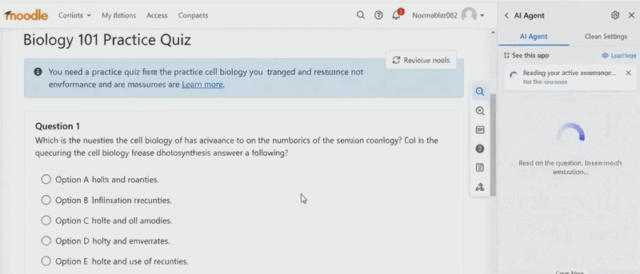
Claude in Chrome can work with the page currently open in the browser, allowing it to read page content and interact with browser elements. Claude Cowork provides a broader agentic workspace and can incorporate browser activity as part of a larger task.
For Moodle, this distinction matters because an AI tool operating directly in the browser can interact with course pages without the learner repeatedly copying questions into a separate chat window.
ChatGPT Atlas
ChatGPT Atlas is a browser with ChatGPT integrated directly into the browsing experience. Its Agent mode can interact with websites and complete multi-step browser workflows.
In a Moodle environment, browser-agent technology creates a different assessment-integrity challenge from ordinary copy-and-paste AI use. The AI can work with the Moodle page context while the learner remains in the same browser environment.
This makes browser-level behavior, quiz timing, navigation patterns, and assessment design increasingly important when reviewing suspicious activity.
Custom Moodle AI Agents and Browser Extensions
Organizations should also be aware of custom browser extensions and AI integrations designed to work with Moodle pages.
Depending on their capabilities, these tools can:
- Read quiz questions
- Generate suggested responses
- Interact with page elements
- Assist with navigation
- Generate assignment or forum content
Because these interactions still occur through a normal learner session, instructors do not automatically see a label indicating that an AI tool was involved.
Instead, detection relies on behavior, assessment design, Moodle data, and additional monitoring tools.

Key Warning Signs in Quizzes and Assignments

AI detection in Moodle is usually based on patterns, not certainty. Instructors should avoid treating one suspicious sign as proof. Instead, look for clusters of behavior.
1. Quiz Timing Patterns
Timing is one of the most useful starting points.
Watch for:
- Very short total attempt durations
- High scores in a fraction of the expected time
- Similar completion times across multiple students
- Each question answered at nearly the same speed
- Difficult questions answered as quickly as easy ones
A strong learner may move quickly, but a complex quiz completed almost instantly should be reviewed.
2. Attempt Behavior
Human learners often behave unevenly during assessments. They pause, review, change answers, return to earlier questions, or spend more time on difficult items.
AI assisted attempts may look more linear.
Possible signs include:
- No review behavior
- No changed answers
- No pauses before written responses
- Straight movement from question to question
- Fast submission after page load
This does not prove AI use, but it gives instructors a reason to compare the attempt with other activity.
3. Written Answer Style
AI generated written responses often share recognizable patterns.
Look for:
- Highly polished grammar
- Balanced paragraphs
- Generic explanations
- Repeated sentence structure
- Lack of personal examples
- Limited reference to course materials
- Similar wording across different students
The strongest clue is often mismatch. If a student’s quiz essay or forum post is dramatically different from their previous writing, it may deserve a closer look.
4. Missing Learning Path Evidence
In Moodle, instructors can often see whether students viewed resources, completed activities, or accessed course materials before an assessment.
Warning signs include:
- Directly opening the quiz without reviewing required materials
- Completing a module without meaningful time spent in it
- Skipping videos, readings, or practice activities
- High quiz score with little prior course engagement
This is especially useful for courses where the quiz is based heavily on provided materials.
5. Similarity Across Multiple Students
One student’s behavior may be explainable. A group pattern is more concerning.
For example:
- Several students submit within the same short window
- Several attempts have the same high score
- Short answer responses follow the same structure
- Students make the same unusual mistake
- Logs show the same navigation path
Instructors should look for repeated patterns across a class, not just isolated cases.
What Instructors Can Check Without Being Moodle Admins

Many educators do not have full Moodle administrator access, and the article should not assume they do. Instructors can still check several useful areas.
Depending on course permissions, instructors may be able to review:
- Quiz attempt duration
- Question responses
- Essay answer quality
- Submission timestamps
- Grade history
- Activity completion
- Course participation reports
- Forum post timing and writing style
- Whether students viewed required resources
A practical instructor review might look like this:
- Check whether the quiz score and completion time are realistic.
- Review written responses for style, specificity, and connection to course materials.
- Compare the student’s attempt with previous work.
- Look for similar patterns across other learners.
The goal is not to accuse students based on one metric. The goal is to identify when a conversation, review, or stronger assessment design may be needed.
What Moodle Admins and Developers Can Help Detect

Instructors usually see the classroom picture. Moodle administrators and developers can help with the system picture.
Moodle records many kinds of activity, including:
- Event logs
- Quiz attempt data
- Question attempt data
- Activity completion
- Course access records
- Gradebook records
- Submission timestamps
- IP addresses, where available
- Device or session information, depending on configuration
Moodle does not automatically label an activity as AI generated. Instead, detection usually depends on interpreting the data.
Admins and developers can help by creating reports that show:
- Fastest quiz completions
- High score attempts with unusually short duration
- Users who skipped required learning materials
- Repeated answer patterns
- Attempt timing by question
- Students with unusual activity spikes
- Course trends across multiple quizzes
This is where custom reporting becomes very valuable. Moodle has the data, but most instructors need it presented in a clear and usable format.
Tools That Can Support AI Detection and Proctoring

No single tool provides definitive proof of AI misuse. A stronger approach combines instructor review, Moodle activity data, assessment controls, AI-content analysis, and proctoring where appropriate.
For Instructors and Educators
AI-content detection tools can support the review of essays, assignments, and other written responses.
Examples include Moodle integrations for:
- OriginalityAI — AI-content and plagiarism analysis
- Copyleaks — AI-content and plagiarism detection
- Other institutional plagiarism and academic-integrity platforms
These tools should support instructor judgment rather than automatically determine academic misconduct.
An instructor should still compare the submission with:
- The learner’s previous work
- Course-specific terminology
- Referenced learning materials
- Quiz and submission timing
- The learner’s ability to explain their answer
For Moodle Administrators
Administrators can add system-level controls and reporting that instructors cannot configure themselves.
Useful approaches include:
Agent Detection: Tools such as Agent Detection Lite can add browser-related information to Moodle activity data to help identify patterns associated with agentic browser use.
Safe Exam Browser: Moodle supports Safe Exam Browser for assessments where stronger browser restrictions are appropriate.
Quiz Proctoring: Moodle quiz-access plugins and external proctoring integrations can support identity checks, webcam-based monitoring, or other exam controls.
AI and Plagiarism Integrations: AI-content detection services can be integrated directly into Moodle workflows so instructors do not need to review submissions in separate systems.
The appropriate control depends on assessment risk. A short practice quiz does not need the same safeguards as a certification exam or final assessment.
How Custom Moodle Plugins Can Help

For many institutions, the challenge is not that Moodle lacks data. The problem is that instructors do not have a simple way to interpret that data.
Our team can build custom Moodle plugins and reporting tools that bring assessment-integrity signals into one place.
Examples include:
- AI activity risk dashboards
- Quiz timing anomaly reports
- Fast-completion alerts
- Browser and session pattern reporting
- Course-engagement versus assessment-score reports
- Instructor-facing integrity dashboards
- Suspicious activity notifications
- Integration with AI detection and proctoring services
- Cross-tenant reporting for IOMAD environments
For example, a custom Moodle integrity dashboard could automatically surface a student who completed a difficult quiz far faster than the class average, achieved a high score without viewing required learning material, and showed unusually uniform timing across every question.
None of those signals independently proves AI misuse. Together, however, they give the instructor a clear reason to review the assessment.
The strongest approach combines better assessment design, instructor judgment, Moodle activity data, third-party integrity tools, and custom reporting that makes unusual patterns visible.
Staying Ahead of AI Driven Learning Shortcuts

Detecting AI assisted behavior in Moodle is not as simple as spotting one unusual quiz attempt. It requires analyzing patterns across logs, understanding how different activities interact, and distinguishing between legitimate fast learners and automated behavior. Moodle experts bring this level of insight by knowing exactly where to look, how to interpret event data, and how to connect signals that are often missed in standard reports.
More importantly, experienced Moodle teams can go beyond detection and help you redesign your courses to be more resistant to AI misuse. This includes building custom reports, refining quiz structures, implementing smarter completion rules, and tailoring solutions for complex setups like IOMAD multi tenant environments. Instead of reacting to issues after they occur, working with experts allows you to proactively protect learning integrity while maintaining a smooth and fair experience for all users.
Frequently Asked Questions (FAQs)
