


Managing access and offering flexible pricing for specific assessments can be a complex task for Moodle administrators. When a course requires offering Moodle exam coupons or unique access codes, the challenge lies in seamlessly integrating these mechanisms with Moodle’s robust enrolment and activity settings without compromising security or data integrity. Understanding how to implement and manage these ‘coupon’ systems is essential for institutions running promotional campaigns, offering re-takes, or providing specific grants for certification exams. In this article, we’ll explore the underlying Moodle capabilities and practical steps to set up coupon-like access for your online examinations.
Engaged the team for a global retailer application development project. Schedules were consistently met with flexibility to changing scope. Was always impressed with Mindfield’s responsiveness and ability to quickly grasp the problem while offering creative solutions. Applications were of high quality and I wouldn’t hesitate to recommend Mindfield Consulting for any custom development.
Grant R
review Source: Google Reviews
Outline
- Setting the Stage for Moodle Exam Coupons and Access Codes
- Core Moodle Methods for Controlled Exam Access
- Implementing Coupon-Like Functionality with Enrolment Keys
- Enhancing Access Control with External Integrations and Verification
- Optimizing Your Moodle Exam Access Strategy with Expert Support
- Frequently Asked Questions (FAQs)
Setting the Stage for Moodle Exam Coupons and Access Codes

Effectively managing Moodle exam coupons or access codes requires a clear understanding of Moodle’s enrolment architecture and the specific needs of your assessment. Before implementing any solution, administrators must consider several foundational aspects. These prerequisites ensure that the chosen method aligns with your institution’s security policies and administrative capabilities.
Understanding Your Requirements
The first step involves defining the precise functionality needed for your access codes. This means asking critical questions about how the codes should behave. For example, will each code be unique and single-use, or can multiple users share a single code? Will the codes offer a discount, free access, or simply bypass a prerequisite? Consider these key questions for your Moodle exam coupons:
- Purpose of the Code: Is it for free access, discounted access, or restricted access to a specific group?
- Code Uniqueness: Does each user need a unique code, or can a single code be shared among a group?
- Redemption Limits: Can a code be used once, or multiple times? Does it expire after a certain date?
- Target Audience: Is this for new users, existing users, or specific cohorts?
- Reporting Needs: How will you track code usage, redemptions, and associated user data?
Clear answers to these questions will guide the selection and configuration of the appropriate Moodle features or plugins. Without this clarity, solutions can quickly become overly complex or fail to meet the intended objective.
Prerequisites and Administrative Access
Implementing coupon-like features in Moodle typically requires elevated permissions. You will need at least course creator or manager roles, but often site administrator access is necessary for configuring global enrolment plugins or integrating with external systems. Furthermore, ensure your Moodle version is up-to-date and compatible with any third-party plugins you plan to use. Outdated Moodle versions can introduce security vulnerabilities or compatibility issues with modern enrolment methods. Before proceeding, verify that you have:
- Site Administrator Access: For installing and configuring new enrolment plugins or modifying site-wide settings.
- Course Manager Role: To apply enrolment methods at the course level and manage specific exam activities.
- Moodle Version Compatibility: Confirm your Moodle instance supports the desired features or plugins, referring to the official Moodle website for release information.
- Backup Strategy: Always perform a full Moodle backup before installing new plugins or making significant configuration changes.
Addressing these prerequisites upfront helps prevent potential disruptions to your learning environment. This methodical approach ensures a smoother implementation process.
Core Moodle Methods for Controlled Exam Access

Moodle offers several built-in enrolment methods that can be adapted to provide controlled access to courses containing exams. While not explicitly designed as “coupon” systems, these methods form the foundation upon which more sophisticated access code functionalities can be built. Understanding their capabilities and limitations is crucial.
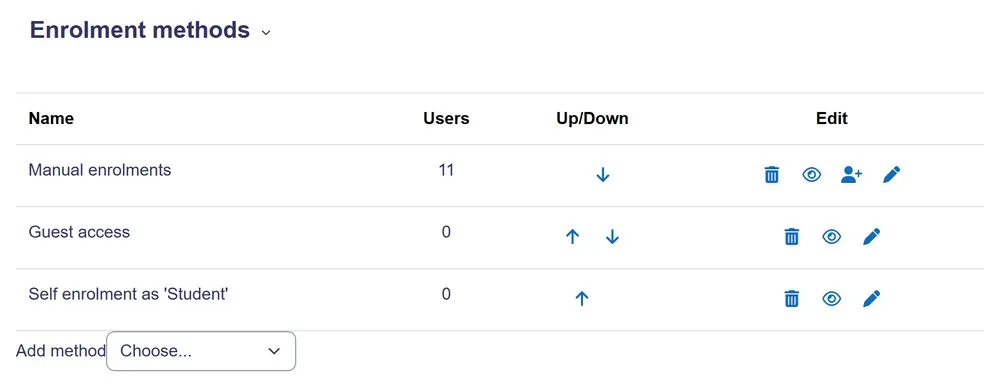 The Enrolment methods page for a course
Self-Enrolment with Enrolment Keys
The Self-enrolment (Student) method is Moodle’s most common and adaptable tool for controlled access. It allows users to enrol themselves into a course by entering a specific enrolment key. This key can function much like a coupon code, granting access to anyone who possesses it. You can configure a unique key for each course or even for different groups within a course. To use self-enrolment as an access code mechanism:
- Create a Unique Key: Generate a strong, alphanumeric key that is not easily guessable.
- Distribute the Key: Share this key only with the users who are authorized to access the exam.
- Set Enrolment Duration: Define how long the enrolment key grants access, which can be useful for time-limited promotions.
- Limit Uses: While Moodle’s core self-enrolment doesn’t have a direct “single-use” option, you can manage this manually or via custom development by changing the key after a certain number of uses.
This method is straightforward for simple scenarios but requires manual key management and does not inherently support discounted pricing or advanced coupon features. It is ideal for free access or bypassing a standard enrolment process.
Manual Enrolment After External Voucher Verification
Manual enrolment does not create or redeem coupon codes. Instead, it allows an administrator or authorized course manager to enrol a specific user directly into a Moodle course.
This approach can be useful when access is approved outside Moodle. For example:
- A learner purchases an exam voucher through another system
- Staff verify the voucher or payment
- An administrator manually enrols the learner into the exam course
- The learner receives access with the appropriate Moodle role
Best for: Small-volume or exception-based workflows where staff already verify access manually.
Limitation: Manual enrolment becomes inefficient when many learners redeem vouchers because every enrolment requires staff action.
Cohort Enrolment for Group Access
When Moodle exam coupons are intended for a predefined group of users, Cohort enrolment provides an efficient solution. Cohorts are site-wide or category-wide groups of users. By enrolling a cohort into a course, all members of that cohort automatically gain access. This can be adapted for scenarios where a “group coupon” grants access to all members of a specific pre-defined cohort. Using cohort enrolment:
- Pre-define Cohorts: Create cohorts based on criteria like department, program, or a specific promotional group.
- Enrol Cohort in Course: Once a cohort is enrolled, its members automatically get access to the course and its exams.
- Manage Cohort Membership: Add or remove users from the cohort to control who has access.
This method is excellent for managing access for organizational groups but does not allow for individual coupon redemption. It works best when the “coupon” is for a collective entity rather than individual learners.
Implementing Coupon-Like Functionality with Enrolment Keys

For most Moodle administrators seeking to implement coupon-like functionality without extensive custom development or third-party integrations, adapting the self-enrolment method with enrolment keys is the most practical approach. This section outlines the step-by-step process to set up and manage these access codes effectively for your Moodle exams.
Step-by-Step: Configuring Self-Enrolment for Exam Access
This procedure details how to set up a course with an enrolment key that acts as a coupon. This key will grant access to the course containing your Moodle exam.
- Navigate to Course Settings: Access the desired course where the exam is located. In the navigation drawer, click on Participants > Enrolment methods.
- Add Self-Enrolment Method: If “Self enrolment (Student)” is not already listed, click the Add method dropdown and select Self enrolment (Student).
- Configure Self-Enrolment Settings:
- Custom name: Provide a descriptive name like “Exam Access Code” or “Coupon Redemption”.
- Allow new enrolments: Ensure this is set to Yes.
- Enrolment key: Enter a unique, strong alphanumeric code (e.g.,
EXAMACCESS2024). This is your “coupon”. - Use group enrolment keys: Set to No unless you are managing group-specific keys.
- Default assigned role: Select Student (or a custom role if specific permissions are needed for the exam).
- Enrolment duration: Optionally set a time limit (e.g., “7 days”) after which the user’s enrolment will expire.
- Unenrol inactive after: Set an appropriate period for automatic unenrolment due to inactivity.
- Send welcome message: Decide if users should receive a welcome message upon enrolment.
- Start date / End date: Optionally define a window during which the enrolment key is valid.
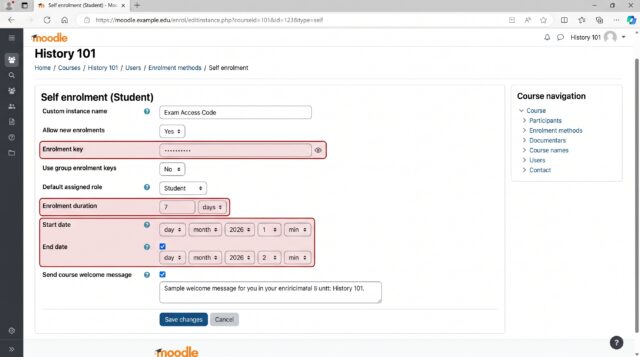
- Save Changes: Click Add method or Save changes to apply the configuration.
Once configured, users can navigate to the course and enter the enrolment key to gain access. This key acts as their Moodle exam coupon, granting them immediate entry.
Generating Unique Moodle Coupon Codes
A standard Moodle enrolment key is best for a shared access code. It does not provide a full coupon-management system for generating and tracking large numbers of unique voucher codes.
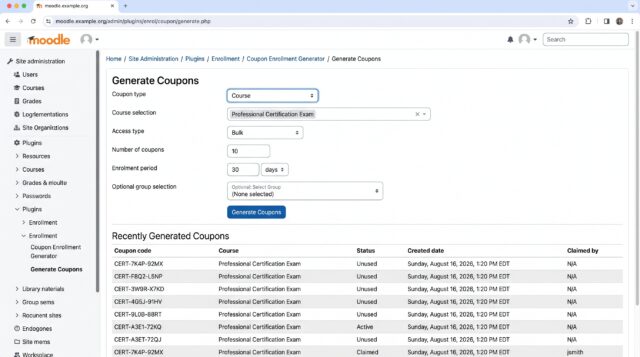
For unique or bulk Moodle coupons, a dedicated plugin such as the Sebsoft Coupon plugin provides a more appropriate workflow.
With a coupon plugin, administrators can generate:
- Course coupons that enrol users into selected courses
- Cohort coupons that add users to selected cohorts
- Bulk coupons for distributing multiple access codes
- Personalized coupons associated with individual users
When a valid course coupon is redeemed, the learner can be enrolled into the courses attached to that coupon.
Use a shared Moodle enrolment key when:
A group of learners can use the same access code.
Use a coupon plugin when:
You need unique codes, bulk generation, individual tracking, or a more formal voucher workflow.
This distinction keeps simple Moodle access codes separate from full coupon or voucher management.
Managing Key Expiry and Usage Limits
Controlling when and how often the tool are used is critical for promotional campaigns and security. Moodle’s self-enrolment method provides some options for expiry, but granular control often requires external tools or custom solutions. Key management considerations include:
- Enrolment Duration: Set a specific duration (e.g., 7 days) for the enrolment key’s validity within the self-enrolment settings. After this period, users will be unenrolled.
- Start and End Dates: Configure a specific window during which the enrolment key is active. Outside these dates, the key will not grant access.
- Manual Key Rotation: For single-use or limited-use scenarios, manually change the enrolment key after a certain number of redemptions or after a promotional period ends. This requires active monitoring.
- External Tracking: If using unique, externally generated codes, track their usage in a separate system (e.g., a spreadsheet or CRM) and update Moodle access accordingly.
While these methods offer a degree of control, they highlight the limitations of Moodle’s core features for comprehensive coupon management. For advanced scenarios, consider the integrations discussed in the next section.
Enhancing Access Control with External Integrations and Verification

For organizations requiring robust coupon management, including discounted pricing, bulk code generation, and detailed reporting, integrating Moodle with external e-commerce platforms or dedicated voucher plugins is often the most effective solution. These integrations extend Moodle’s capabilities significantly.
Integrating with E-commerce Platforms for Advanced Coupons
E-commerce platforms like WooCommerce (for WordPress sites) or custom e-commerce solutions offer sophisticated coupon functionality that Moodle lacks natively. These platforms can generate unique discount codes, manage expiry dates, set usage limits, and apply percentage or fixed-amount discounts. When integrated with Moodle, these coupons can control access to exams. Here’s a typical workflow for e-commerce integration:
- Set Up E-commerce Store: Configure a product in your e-commerce store representing the Moodle exam.
- Create Coupons: Generate various types of coupons (e.g., 20% off, free access, single-use) within your e-commerce platform.
- Link E-commerce to Moodle: Use a Moodle integration plugin (e.g., a WooCommerce Moodle integration plugin) to connect the purchase event in the e-commerce store with enrolment in Moodle. When a user buys the exam product using a coupon, the integration automatically enrols them into the corresponding Moodle course.
- Automated Enrolment: The integration ensures that after a successful purchase (with or without a coupon), the user is automatically enrolled in the Moodle course containing the exam.
This method provides powerful coupon capabilities and automates the enrolment process, reducing administrative burden. The e-commerce platform handles all financial transactions and coupon validations, while Moodle focuses on delivering the exam content.
Verification and Troubleshooting Access Codes
After implementing the tool or access codes, thorough verification is essential to ensure they function as intended. Without proper testing, users may encounter access issues, leading to frustration and support requests. Follow these steps for verification:
- Test with a Sample User Account: Create a test user account with no prior enrolment in the target course. Attempt to enrol using a valid access code.
- Verify Enrolment: After entering the code, confirm that the test user is enrolled in the course and can access the exam activity. Check their role assignment within the course.
- Test Invalid Codes: Attempt to enrol with an incorrect, expired, or already-used code. Ensure Moodle displays an appropriate error message and denies access.
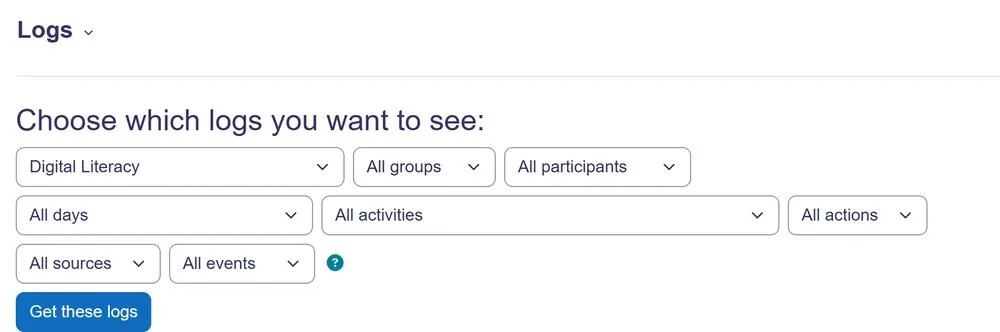
- Review Enrolment Logs: As an administrator, navigate to Site administration > Reports > Logs. Filter by the course and enrolment event to see successful and failed enrolment attempts. This helps diagnose issues.
Common pitfalls include:
- Incorrect Enrolment Key: Double-check the key entered in Moodle’s settings matches the one distributed.
- Expired Enrolment: Verify that the enrolment duration or start/end dates have not prematurely expired.
- Plugin Conflicts: If using third-party plugins, ensure they are compatible with your Moodle version and do not conflict with other enrolment methods.
- Course Visibility: Ensure the course itself is visible to students (Course settings > Course visibility).
Systematic testing and log review can quickly identify and resolve most access code issues.
Optimizing Your Moodle Exam Access Strategy with Expert Support

Implementing and managing sophisticated access control mechanisms, such as the tool, can introduce considerable complexity, especially when dealing with large user bases, diverse promotional campaigns, or strict regulatory requirements. While Moodle provides robust core features, adapting them for advanced coupon functionality often requires a deeper technical understanding or custom development. Mindfield Consulting’s Moodle specialists possess the expertise to design and implement tailored solutions that align with your specific needs. Our team can assist with everything from selecting the right plugins and configuring complex enrolment scenarios to integrating Moodle with external e-commerce platforms for seamless coupon management. We ensure that your exam access strategy is secure, scalable, and provides a smooth experience for both administrators and learners. Engaging with experts ensures that your Moodle exam coupon system functions flawlessly, allowing you to focus on delivering quality assessments without the burden of technical challenges.
