

To effectively protect external Moodle content is a crucial task for any administrator aiming to maintain the integrity and security of their learning environment. While Moodle excels at hosting internal files, many courses rely on external videos, articles, and interactive resources. This reliance, however, introduces potential vulnerabilities, from unauthorized access and content manipulation to compliance risks.
Therefore, understanding how to mitigate these risks is essential for delivering a secure and reliable educational experience. In this article, we’ll explore practical strategies and configurations to safeguard external content linked within your Moodle platform.
I recently migrated my site to Mindfield from another host, and the experience couldn’t have been better. Mindfield kept working until they were certain that my site was operating as well as it was before, and they even helped clean up a few issues to improve my site’s performance – issues my prior host never mentioned. I also found Mindfield’s communication to be excellent. Before the migration, they prepared me for what to expect, and during the migration they kept me well-informed.
Jim Benedek
review Source: Google Reviews
Outline
- Understanding the Risks of External Content in Moodle
- Implementing Moodle’s Built-in Access Controls
- Leveraging Web Server and Third-Party Protections
- Monitoring, Auditing, and Verification for External Content
- Enhancing External Content Security with Mindfield Experts
- Frequently Asked Questions (FAQs)
Understanding the Risks of External Content in Moodle

Integrating external resources enriches learning experiences, offering dynamic and current information beyond Moodle’s native capabilities. However, this convenience introduces specific security challenges that administrators must address head-on. Without proper safeguards, external content can compromise user data, platform integrity, and institutional reputation.
Common Vulnerabilities with External Content
When you link to or embed external content, you essentially extend your Moodle environment’s trust boundary to another server. This creates several points of potential weakness. For instance, an externally hosted video might be swapped with malicious content.
Alternatively, a linked article could redirect users to phishing sites. Additionally, if not properly configured, external content can lead to data leakage, where user activity on your Moodle site is tracked by third-party services without explicit consent.
Specific vulnerabilities include:
- Unauthorized Access: Direct links to sensitive external documents or videos can be shared outside your intended audience, bypassing Moodle’s authentication. This is particularly concerning for proprietary or licensed materials.
- Content Manipulation: If the external host is compromised, the content itself could be altered. Learners might then view incorrect, outdated, or even harmful information, impacting educational outcomes.
- Hotlinking and Bandwidth Theft: Direct embedding of images or videos from an external server without permission can consume the external host’s bandwidth. While not a direct Moodle security risk, it can lead to content being pulled offline or replaced with undesirable material if the external host detects and retaliates against hotlinking.
- Compliance Breaches: Linking to external sites, especially those that collect user data (e.g., analytics, advertising), can violate privacy regulations like GDPR or HIPAA if proper data processing agreements are not in place. This is a significant concern for educational institutions handling sensitive student information.
- Cross-Site Scripting (XSS) via Iframes: While Moodle typically sanitizes embedded content, poorly secured external sites embedded via
iframecan potentially execute malicious scripts within the user’s browser context if not properly sandboxed.
Prerequisites for Enhanced Security Measures to Protect External Moodle Content
Before implementing any security measures, ensuring you have the necessary access and information is critical. Proper preparation streamlines the process and minimizes potential disruptions. Understanding your Moodle version, server environment, and administrative capabilities forms a solid foundation.
Key prerequisites include:
- Administrative Access: You must have a Moodle user account with the Site administrator role. This level of access is required to modify site-wide security settings, manage plugins, and configure filters.
- Moodle Version: Ensure your Moodle instance is running a currently supported Long-Term Support (LTS) version. Older Moodle versions may lack critical security patches and advanced content protection features, increasing your risk exposure. You can verify your version on the Site administration > Notifications page.
- Server Access: For advanced protections like hotlinking prevention or custom header configurations, you will need shell access (SSH) to your Moodle server. This allows you to modify web server configuration files (e.g., Apache’s
.htaccessor Nginx’s configuration files) and potentially PHP settings. - Backup Strategy: Always perform a full system backup of your Moodle instance and its database before making significant configuration changes. This provides a rollback point if any adjustments cause unintended issues.
- Content Inventory: Maintain an up-to-date inventory of all external content linked or embedded across your Moodle courses. This includes URLs, content types (video, article, interactive), and their respective hosts. Knowing what external content you have is the first step to securing it.
Implementing Moodle’s Built-in Access Controls

Moodle offers several native features that can significantly enhance the security of external content. These tools allow administrators to control how external resources are displayed, restrict access, and manage the integrity of embedded elements. Leveraging these built-in capabilities is the first line of defense for protecting your Moodle content.
Limit Who Can Add Trusted External Content
The strongest Moodle-side control is deciding who is allowed to add external links, embeds, and trusted HTML in the first place.
Administrators should:
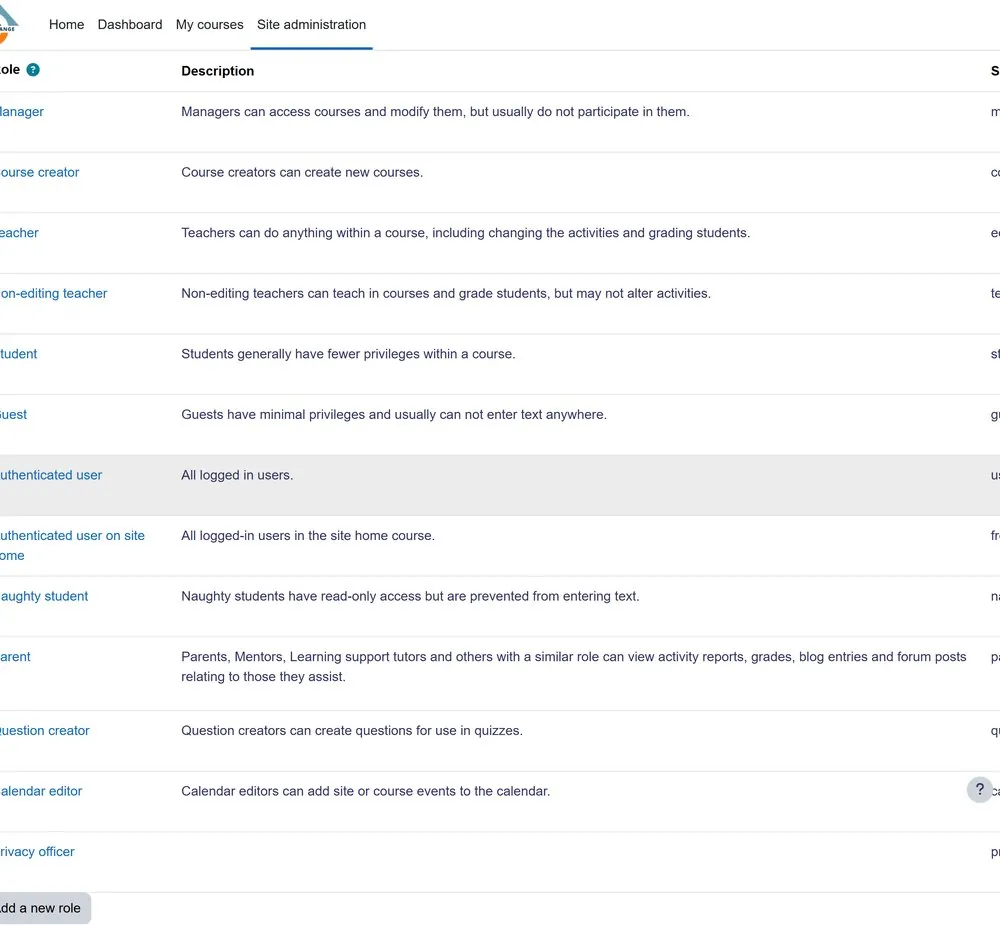
- Limit course editing to trusted roles
- Avoid enabling trusted-content capabilities more broadly than necessary
- Review unfamiliar iframe or embed sources
- Prefer HTTPS sources from established providers
- Remove abandoned or untrusted external resources
Moodle cleans user-submitted content as part of its security model, while trusted-content permissions should be reserved for users who genuinely need to add richer embedded content.
This reduces the risk of untrusted HTML or external resources being introduced into courses.
Controlling Embedded Content and Iframes
Embedding external content, particularly via iframe tags, can be a security concern if the source is untrusted or compromised. Moodle provides settings to control which domains are allowed to be embedded. This helps restrict content injection from unknown or malicious sources. The Site administration > Security > HTTP security section is where these critical settings reside.
To whitelist trusted external domains for embedded content:
- Go to Site administration > Security > HTTP security.
- Locate the Allow EMBED and OBJECT tags setting. Ensure this is enabled if you need to embed content, but proceed with caution.
- Find the Allowed iframe domains setting. This is where you specify a comma-separated list of domains that Moodle will permit to be embedded.
- Enter the fully qualified domain names (e.g.,
youtube.com, vimeo.com, docs.google.com) for all trusted external content providers. - Avoid using wildcard entries (e.g.,
*.example.com) unless absolutely necessary and you fully understand the implications. - Click Save changes.
This setting acts as a crucial gatekeeper, preventing unauthorized content from being displayed within your Moodle courses. Consequently, it significantly reduces the risk of cross-site scripting (XSS) attacks stemming from malicious iframes.
Conditional Activities and Access Restrictions
Moodle’s Restrict access feature can limit when learners see an external resource based on conditions such as completion, dates, grades, or groups. This is useful for controlling learner access, but it does not secure the external website itself or prevent malicious external content from entering Moodle.
Treat it as an additional course-access control rather than a primary external-content security measure.
This method adds a layer of access control within Moodle, ensuring that even if an external link is discovered, it is not accessible to users who haven’t met the course prerequisites. It’s an effective way to protect external Moodle content by limiting its visibility to the intended audience.
Leveraging Web Server and Third-Party Protections

Beyond Moodle’s internal settings, web server configurations and external services play a vital role in securing external content. These methods offer deeper control over how content is served and accessed, providing robust protection against common web threats. Implementing these advanced measures can significantly enhance the overall security posture of your Moodle platform.
Preventing Hotlinking
Hotlink protection is useful when your organization owns media hosted outside Moodle and wants to prevent other websites from directly embedding those files.
At a high level, the hosting environment can be configured to:
- Allow requests from approved domains
- Reject unauthorized embedding
- Restrict direct access to selected media
- Monitor unusual referrers or traffic
Hotlink protection is primarily a content-distribution and copyright protection measure, rather than protection against unsafe external content entering Moodle.
For organizations protecting proprietary course media, this topic is better addressed as part of a broader content-protection strategy.
Implementing Token-Based Access for Premium Video Hosting
For proprietary or paid video, a hosting platform that supports signed URLs or temporary access tokens provides stronger protection than a permanent public video link.
The basic model is:
- The learner authenticates through Moodle
- Moodle or an integration confirms the learner is authorized
- The video platform provides temporary viewing access
- The access link expires instead of remaining permanently shareable
This approach is useful for premium, licensed, or sensitive video libraries where direct link sharing needs to be limited.
Implementation normally requires coordination between Moodle and the video-hosting platform, so the technical configuration should be handled by the Moodle or hosting team.
Utilizing Content Delivery Networks (CDNs) with Security Features
A Content Delivery Network (CDN) can add another security layer when your organization controls the server or storage where learning content is hosted.
Depending on the platform, a CDN can provide:
- Access controls to restrict how content is requested
- Signed or expiring URLs for temporary file access
- Rate limiting to reduce automated scraping or excessive downloading
- Web application firewall protection for public-facing infrastructure
- Traffic analytics to identify unusual access patterns
CDNs are most relevant for organizations hosting their own proprietary media or files. They do not make third-party content such as public YouTube videos inherently safer.
For copyrighted course material, CDN protection works best as one part of a broader access-control and content-hosting strategy.
Monitoring, Auditing, and Verification for External Content

Implementing security measures is only half the battle; continuous monitoring and regular auditing are essential to ensure these protections remain effective. The threat landscape evolves, and external content sources can change unexpectedly. A proactive approach to verification helps identify vulnerabilities before they are exploited and ensures ongoing compliance.
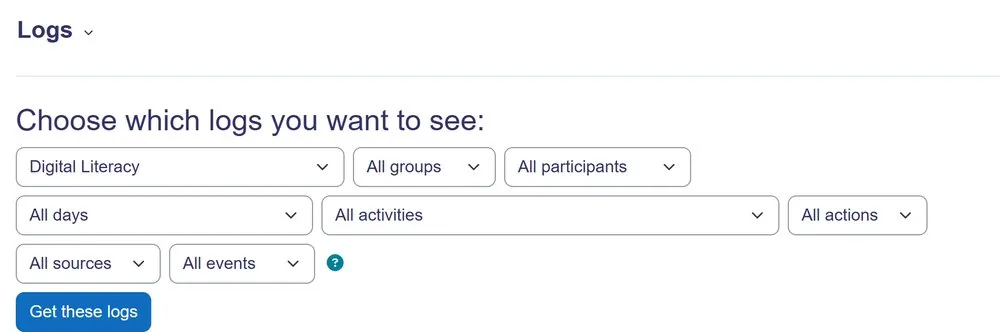
Using Moodle Logs to Review External Content Activity
Moodle logs can help administrators understand how learners interact with external resources before or while the interaction occurs inside Moodle.
They can help identify:
- Who opened an external resource
- When the activity was accessed
- Repeated or unusual access patterns
- Course or activity-level usage
- Whether access restrictions are being used as expected
However, Moodle cannot provide a complete record of what happens after a learner leaves Moodle for an external website.
For a complete picture, combine Moodle reporting with:
- Content-host analytics
- Web server or CDN logs
- Video-platform analytics
- Security monitoring tools
Think of Moodle logs as the LMS side audit trail, while the external platform provides evidence about what happened to the content after the learner reached it.
Integrating External Monitoring Tools and Analytics
For a more comprehensive view of external content security and usage, integrating Moodle with external monitoring tools is highly beneficial. Web server logs, third-party analytics platforms, and security information and event management (SIEM) systems can provide insights that Moodle’s internal logs cannot. These tools track actual access to the external content itself, offering a full picture of who, when, and how your external resources are being consumed.
Consider the following external monitoring strategies:
- Web Server Logs: Review your web server’s access logs (e.g., Apache
access_log, Nginxaccess.log) for any direct requests to your Moodle-hosted media files or custom external content servers. Look for unusual traffic spikes, requests from suspicious referrers (indicating hotlinking), or unexpected IP addresses. - Content Host Analytics: If using a premium video host (Vimeo Pro, Brightcove), leverage their built-in analytics. These platforms often provide detailed reports on viewership, geographic distribution, and potential security alerts related to your content.
- Website Analytics (e.g., Google Analytics): If your Moodle site is integrated with analytics, you can track clicks on external links. Configure event tracking to specifically monitor interactions with URL resources. This helps understand user behavior and identify if external links are being accessed in unexpected ways.
- Security Information and Event Management (SIEM): For large-scale deployments, a SIEM system can aggregate logs from Moodle, your web server, firewalls, and content hosts. This provides a centralized view for detecting complex attack patterns and security incidents involving both internal and external resources.
Combining Moodle’s internal reports with external monitoring tools creates a robust verification framework. This ensures that you have multiple vantage points to protect external Moodle content effectively.
Conducting Regular Security Audits and Content Reviews
Even with the best tools and configurations, the dynamic nature of online content requires periodic manual review and auditing. External links can break, content providers can change their terms or security posture, and new vulnerabilities can emerge. Regular audits help you stay ahead of these changes and maintain a secure learning environment.
Establish a routine for auditing your external content:
- Content Inventory Review: Annually or semi-annually, review your inventory of external content. Confirm that all linked resources are still active, relevant, and hosted on trusted platforms.
- Link Integrity Check: Use automated link checkers to identify broken links to external resources. Broken links can frustrate users and indicate that a content source may have disappeared or been compromised.
- Security Setting Verification: Periodically re-verify Moodle’s security settings (e.g., Allowed iframe domains, URL filter configurations) to ensure they align with your current security policies and Moodle version updates.
- Permission Audits: Review the roles and permissions related to adding or managing external content. Ensure only authorized users can introduce new external links or embeds into courses.
- Third-Party Compliance Review: For external content providers, regularly check their privacy policies and terms of service. Ensure they continue to meet your institutional compliance requirements (e.g., GDPR, FERPA, HIPAA).
- Penetration Testing: For critical external content, consider engaging security professionals to conduct penetration testing. This involves simulating attacks to identify weaknesses in your external content protection strategies.
Consistent auditing and review cycles are crucial for long-term security. They provide ongoing assurance that your efforts to protect external Moodle content are robust and adaptable to new challenges.
Enhancing External Content Security with Mindfield Experts

Securing external content within a Moodle environment involves navigating complex technical configurations, understanding evolving threat vectors, and ensuring compliance with various regulations. For many organizations, the internal resources or specialized expertise required to implement and maintain these robust security measures can be a significant challenge. The implications of a breach or compliance failure can be severe, impacting institutional reputation and user trust.
Mindfield Consulting offers specialized Moodle expertise to help you fortify your platform’s external content security. Our consultants possess deep knowledge of Moodle’s architecture, web server configurations, and third-party integrations, ensuring a comprehensive approach to protecting your valuable learning materials. We can assist with everything from initial security audits and policy development to advanced token-based integrations and ongoing monitoring strategies, providing peace of mind and a truly secure Moodle experience.
