


When users encounter inconsistent behavior or visual glitches on their learning platform, such as a broken layout for some but not all, it often points to underlying Moodle cache issues rather than a fundamental flaw in the theme or platform code. These seemingly minor inconsistencies can disrupt the learner experience. Furthermore, they signal deeper operational challenges.
Understanding the various caching layers and their strategic implications is essential for maintaining a stable and performant Moodle environment.
I recently migrated my site to Mindfield from another host, and the experience couldn’t have been better. Mindfield kept working until they were certain that my site was operating as well as it was before, and they even helped clean up a few issues to improve my site’s performance – issues my prior host never mentioned. I also found Mindfield’s communication to be excellent. Before the migration, they prepared me for what to expect, and during the migration they kept me well-informed.
Jim Benedek
review Source: Google Reviews
Outline
- The Misleading Symptoms of a Stale Cache
- Decoding Moodle’s Multi-Layered Caching Architecture
- Cache Issues as Change Management Indicators
- What Cache Issues Reveal About Your Hosting and Infrastructure
- Establishing Robust Cache Governance and Operations
- Strategic Moodle Cache Management with Mindfield Consulting
- Frequently Asked Questions (FAQs)
The Misleading Symptoms of a Stale Cache

When Moodle users report visual discrepancies or functional oddities, the initial reaction is often to suspect a broken theme or a core platform bug. However, the true nature of the problem frequently lies in stale cached data.
The Illusion of a Broken Theme and Moodle Cache Issues
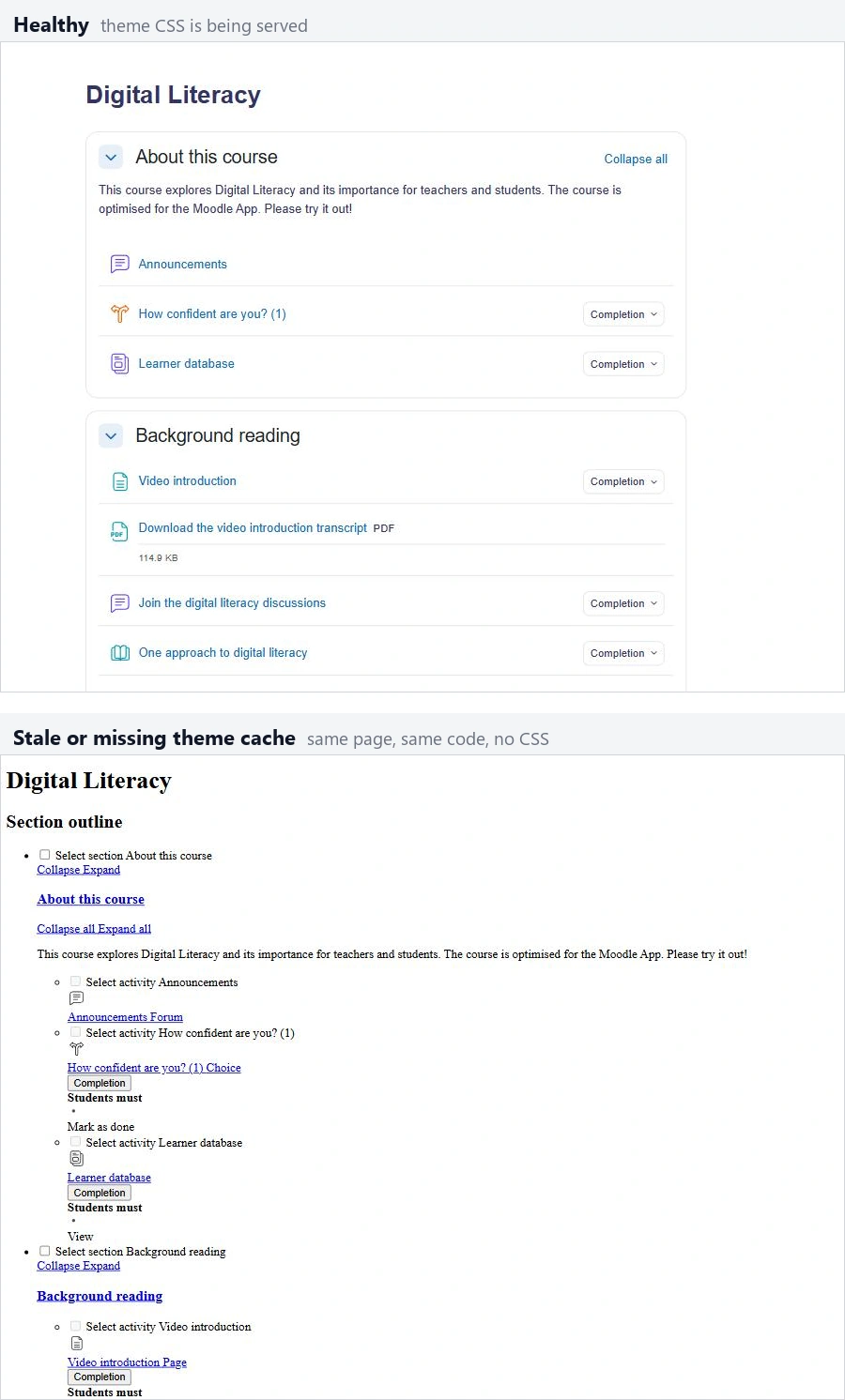
A genuinely broken Moodle theme typically manifests as a consistent failure across all users and devices. For instance, a critical CSS file might be missing, causing layout collapse for everyone, every time. By contrast, Moodle cache issues present a more deceptive picture, leading to inconsistent experiences.
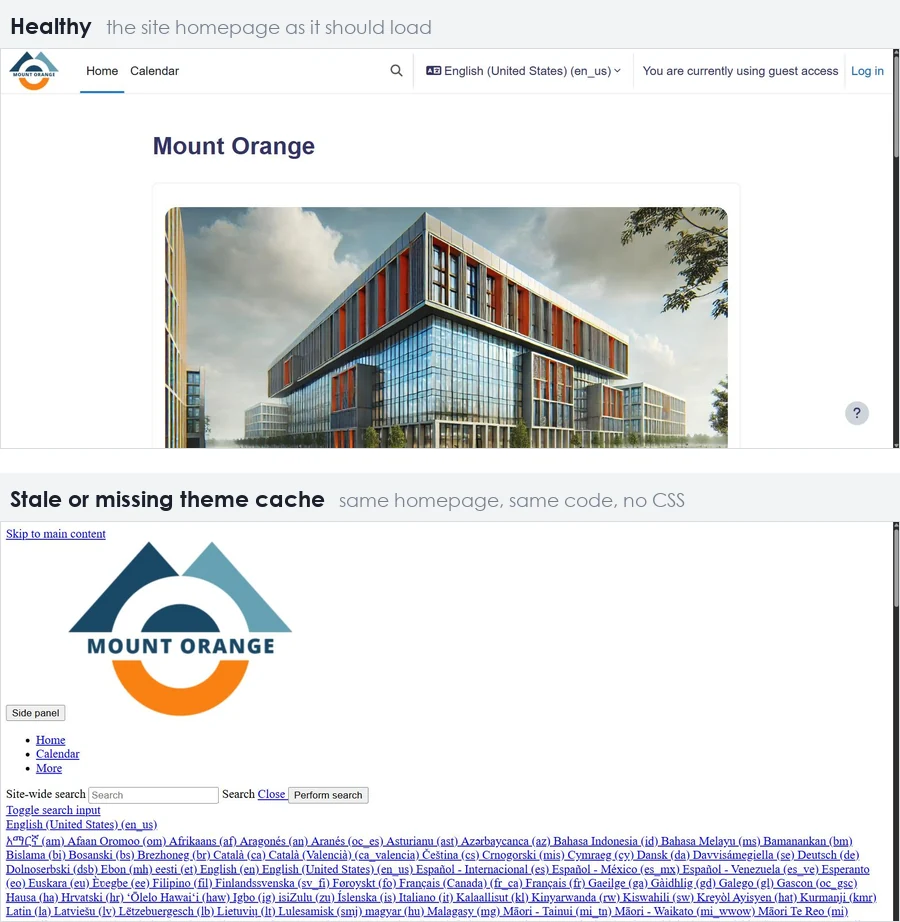
One user might see a perfectly rendered page, while another, perhaps in a different location or using a different browser, observes misplaced elements or outdated content. Therefore, the issue isn’t with the underlying code, but with how that code (or its compiled assets) is being served.
Inconsistency as a Diagnostic Clue
The most telling symptom of a cache problem is its selective nature. Imagine an instructor reporting that their course page looks fine, but a student sees an older version of the course menu. Furthermore, a simple browser refresh often resolves the problem for the affected user.
The refresh is not magic; it means the browser or an upstream caching layer has finally requested and received the updated content. Therefore, when troubleshooting, the first question should always be about the consistency of the reported problem across different users, times, and devices. If the issue is intermittent or user-specific, cache is the prime suspect.
Decoding Moodle’s Multi-Layered Caching Architecture

The instruction “clear the cache” is often unhelpful because it fails to specify which of the many caching layers needs attention. A Moodle deployment typically involves at least four distinct caching mechanisms, each with its own purpose, scope, and control.
Server-Side PHP Bytecode Caching (OPcache)
At the deepest level, PHP applications like Moodle benefit from OPcache, a server-side mechanism that stores pre-compiled PHP script bytecode in shared memory. Subsequent requests for the same script then execute directly from memory, bypassing the compilation step and significantly improving performance.
However, if the compiled code for a Moodle component or plugin is updated (e.g., during an upgrade), but OPcache is not cleared or configured correctly, the server might continue serving the old bytecode. The OPcache is typically managed at the server level, often by hosting providers or system administrators.
Moodle’s Internal Application and Theme Caches
Moodle itself maintains several internal caches to store frequently accessed data and compiled assets, reducing database load and processing time. These include:
- Application Cache: Stores database query results, configuration settings, language strings, and other dynamic data. This speeds up page generation by avoiding redundant database lookups.
- Theme Cache: Moodle compiles theme SCSS (Sassy CSS) files into standard CSS. This compiled CSS is then cached to serve quickly to browsers. If a theme’s SCSS is modified or updated, but this cache isn’t purged, Moodle might continue serving outdated styling, leading to layout issues.
- JavaScript Cache: Bundles and minifies JavaScript files for faster delivery.
These caches are cleared from Moodle’s own administrative interface, so they sit with whoever holds administrator rights on the site rather than with your hosting provider. That makes them the one layer here your own team controls.
Edge Caching (CDN/WAF)
Many Moodle sites, particularly those with a global user base or high traffic, employ a Content Delivery Network (CDN) or a Web Application Firewall (WAF). These services act as an “edge cache,” sitting in front of the Moodle server. They store static assets (CSS, JavaScript, images, sometimes even entire HTML pages) at geographically distributed points of presence.
When a user requests content, it’s served from the nearest edge location. However, if content on the Moodle server changes, but the CDN’s cache isn’t explicitly invalidated, users might continue receiving stale content from the edge nodes. This explains why two users in different regions might see different versions of the same page.
The control over these caches usually lies with the CDN/WAF provider or the infrastructure team.
End-User Browser Caches
Finally, every end-user’s web browser maintains its own cache. When a browser requests a Moodle page, it stores copies of static assets like CSS, JavaScript, and images. On the next visit it serves those local copies instead of re-downloading them, which is why a refresh sometimes clears the problem and sometimes does not.
An outdated browser cache can lead to persistent display issues for an individual user, even if all server-side caches have been cleared. This cache is entirely beyond the control of the Moodle administrator or hosting provider, relying solely on the user’s browser settings.
Cache Issues as Change Management Indicators

The timing of Moodle cache issues is rarely a coincidence. Rather, it often directly correlates with recent changes to the Moodle environment. Recognizing this timeline is a powerful diagnostic tool, transforming a seemingly random bug into a clear indicator of a change management gap.
The Upgrade Trigger
Moodle upgrade issues are prime candidates for introducing cache-related problems. A major Moodle version update or even a minor point release can introduce significant changes to how Moodle compiles assets, stores data, or renders themes. If the caching layers are not properly purged or invalidated post-upgrade, older versions of compiled code or theme assets can persist.
Consequently, this can lead to display anomalies, broken functionalities, or unexpected errors for users.
Plugin and Theme Updates
Beyond core Moodle upgrades, changes to plugins and themes are frequent culprits. Installing a new plugin, updating an existing one, or making modifications to a custom theme can all introduce new files or alter existing ones. Moodle’s theme cache, for instance, stores compiled CSS.
If a theme’s SCSS is updated but the cache is not cleared, users may still see the old styling, which is one reason managing custom Moodle themes is treated as a release activity rather than a design one. Similarly, a plugin update might change its JavaScript files. If these are cached at the CDN or browser level, this could cause script errors.
The Missing Timeline in Support Tickets
A common challenge in diagnosing cache problems is the lack of contextual information in initial support reports. A ticket stating “the layout is broken” without mentioning a recent upgrade, plugin installation, or theme modification forces the investigation to start from scratch.
The change window itself provides the most valuable diagnostic information, allowing administrators to narrow down which caching layers might be affected and what specific content might be stale.
What Cache Issues Reveal About Your Hosting and Infrastructure

While often perceived as minor cosmetic glitches, persistent Moodle cache issues can be early warning signs of deeper problems within your hosting environment.
Resource Constraints and Performance Degradation
Caching mechanisms like PHP OPcache rely on dedicated memory allocations. If the server’s memory is undersized or poorly configured, the OPcache can fill up quickly. Once full, it starts evicting older, less frequently accessed bytecode to make room for new content.
This constant eviction and recompilation cycle negates the performance benefits of OPcache, leading to slower page loads and increased CPU utilization. A Moodle instance experiencing frequent cache-related slowdowns, especially after periods of high activity or recent updates, might be signaling that its server resources are strained.
Therefore, it should prompt a review of the server’s memory, CPU, and disk I/O.
Shared Hosting Limitations
Organizations running Moodle on shared hosting environments often face limitations beyond their control. Shared hosts typically impose strict memory limits and may have OPcache configurations optimized for a wide range of applications, not specifically for a resource-intensive platform like Moodle.
For example, if another tenant’s application frequently flushes the shared OPcache, your Moodle site might suffer from repeated bytecode recompilations. The same contention is what makes multi-tenant Moodle become slow on otherwise healthy hardware.
Proactive Capacity Planning
The cosmetic bugs caused by cache problems are, in essence, cheap early warnings for potential outages. If an undersized OPcache or an overwhelmed Moodle application cache consistently serves stale content, it indicates a system struggling to keep up with demand or change. Ignoring these signals can lead to more severe performance degradation, database lockups, or even full system crashes during peak usage times, costing valuable teaching days.
Reading these cache issues as capacity signals rather than inconveniences should trigger a review of your hosting provider’s service level agreements, resource allocation, and the overall scalability of your Moodle infrastructure. Regular monitoring of memory, CPU load and disk I/O is how organizations detect and anticipate Moodle performance issues before they reach a learner.
Establishing Robust Cache Governance and Operations
Preventing recurring Moodle cache issues requires more than just reactive troubleshooting; it demands a strategic approach to governance and operational processes. By implementing clear protocols and leveraging appropriate environments, organizations can significantly reduce the frequency and impact of cache-related disruptions.
Staging Environments for Change Validation
Before any upgrade, plugin installation, or theme modification goes live on the production site, it should first be deployed and thoroughly tested in a staging environment. Pairing that environment with automated testing strategies for Moodle upgrades allows administrators to:
- Identify Cache Conflicts: Detect how new code interacts with existing caching layers without impacting live users.
- Validate Cache Flushing Procedures: Practice and refine the specific cache invalidation steps required for the change.
- Ensure Visual and Functional Integrity: Confirm that all visual elements and functionalities are working as expected after cache purges.
Controlled Cache Management Protocols
Clear protocols for cache management are essential, especially in environments with multiple administrators or developers. A short, named list of individuals authorized to purge caches on the production environment should be established. Furthermore, specific guidelines should dictate when and how cache purges are performed:
- Post-Upgrade Purges: Mandatory full cache purges after any Moodle core or major plugin/theme update.
- Granular Cache Clearing: Instructions on clearing specific cache types (e.g., theme cache only) when making targeted changes.
- Documentation: Maintaining a log of all cache-related actions, including who performed them and why.
Strategic Change Scheduling
The timing of Moodle changes significantly impacts the risk of cache-related disruptions. A change calendar that schedules upgrades, plugin updates and theme modifications belongs inside a documented Moodle maintenance strategy rather than in one administrator’s head. Key considerations include:
- Avoid Peak Periods: Never schedule major changes during the first week of a term, critical assessment periods, or other high-traffic times.
- Maintenance Windows: Utilize designated maintenance windows when user activity is minimal to perform updates and subsequent cache purges.
- Communication: Clearly communicate upcoming changes and potential brief disruptions to users, managing expectations proactively.
Strategic Moodle Cache Management with Mindfield Consulting

Navigating the complexities of Moodle’s multi-layered caching system and implementing effective governance strategies can be a significant undertaking for any organization. These systems are intricate, and a misstep in one layer can cascade into widespread Moodle course flow and user experience problems. Mindfield Consulting’s Moodle specialists possess deep expertise in diagnosing, resolving, and preventing persistent cache problems, offering end-to-end support from infrastructure assessment to strategic operational planning, including the change management protocols that keep these problems from recurring.
Frequently Asked Questions (FAQs)
This article may contain conceptual illustrations to help support the article content.
