


When students report that they cannot see discussions or forums in Moodle, it often signals a deeper configuration issue rather than a simple visibility toggle.
This becomes even more critical when Moodle is used for compliance training, continuing education, or structured learning programs where forum participation is required. Missing forums can disrupt engagement, prevent completion tracking, and create confusion for both learners and administrators.
The good news is that this issue is usually caused by a small number of common settings. Once identified, it can be resolved quickly.
I am Director of Rahab Ministry (a program of Youth Unlimited). We are impressed with Mindfield’s IT specialists in helping us redesign a website (Rahab.yugta.ca) and their ongoing support. They were responsive and helped us think ahead instead of waiting for us to tell them what needed to be done. We will continue to look forward to their support.
Joanna Yee
Director, Rahab Ministry.
review Source: Google Reviews
Outline
What This Issue Looks Like in Real Life

In real environments, this issue presents itself in several recognizable patterns:
- Students cannot see the forum at all
The activity is completely missing from their course page, even though instructors can clearly see it. - Forum appears greyed out with a restriction message
Students may see a message such as “Not available unless…” indicating unmet conditions. - Only some students are affected
This is a key indicator that the issue is related to groups, cohorts, or permissions rather than a global setting. - Forum is visible but cannot be accessed
Clicking the forum may result in an access restriction or empty discussion view. - Different tenants or companies see different results
In IOMAD or multi tenant setups, visibility may vary depending on company level configurations.
Recognizing these patterns helps narrow down the root cause quickly.
The Most Common Causes and How to Fix Them

1. Restrict Access Conditions Are Blocking Visibility
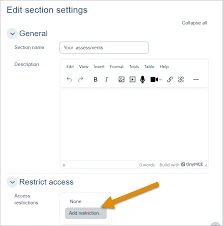
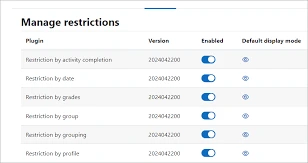
Restrict access is one of the most powerful features in Moodle, but also one of the most common sources of confusion.
When enabled, it allows activities to be shown or hidden based on specific conditions. If these conditions are not met, Moodle may either hide the activity completely or display it as unavailable.
What typically goes wrong:
- Multiple conditions are stacked together (AND logic), making it difficult for students to meet all requirements
- A prerequisite activity was never completed due to misconfiguration
- Date conditions are unintentionally set in the future
- Grade conditions are too strict or incorrectly linked
What to check in detail:
- Whether conditions are set to “must” or “must not”
- Whether conditions are combined using AND instead of OR
- Whether the option “Hide activity entirely” is enabled
Fix strategy:
- Simplify access rules wherever possible
- Temporarily remove restrictions to confirm the root cause
- Use “Show activity greyed out” during testing to improve visibility
2. Activity Completion Dependencies Are Misconfigured
Completion tracking is often tightly connected to forum visibility, especially in structured courses.
If a forum depends on another activity being completed, and that activity is misconfigured, students may never meet the condition.
Common misconfigurations include:
- Completion tracking not enabled at the course level
- Activity set to “manual completion” but students are unaware they must mark it
- Requirement set to “receive a grade” when no grading method exists
- SCORM or H5P activities not reporting completion properly
Deep diagnostic approach:
- Check Course settings → Completion tracking is enabled
- Open the prerequisite activity and review its completion rules
- Verify student progress using the Activity completion report
Fix strategy:
- Align completion conditions with actual learner behavior
- Use “Student must view” for simpler flows when appropriate
- Avoid overly complex completion chains unless necessary
3. Group or Grouping Restrictions Limit Visibility
Groups and groupings are often used to personalize learning, but they can unintentionally restrict access.
If a forum is assigned to a grouping, only students within that grouping will see it.
Typical issues:
- Students are not assigned to any group
- Students are assigned to the wrong group
- Grouping is applied unnecessarily
- Group mode conflicts with activity settings
What to check:
- Course → Participants → Groups
- Verify group membership for affected users
- Check if the forum is linked to a specific grouping
Fix strategy:
- Reassign students to the correct groups
- Remove grouping restrictions if not required
- Use visible groups instead of separate groups when appropriate
4. Role Permissions Are Incorrect
Permissions issues are less common but can be harder to diagnose.
If roles have been customized, certain capabilities related to forums may be disabled.
Key capabilities to review:
mod/forum:viewdiscussionmod/forum:viewsubscribersmod/forum:startdiscussion
Typical scenarios:
- A custom “Student” role was created with limited permissions
- Permissions were overridden at the course or activity level
- Roles differ across tenants in multi tenant environments
Fix strategy:
- Compare custom roles against default Moodle roles
- Reset permissions where possible
- Avoid unnecessary overrides at lower levels
5. Forum Is Hidden or Section Is Collapsed
This is the simplest cause, but it is surprisingly common.
Even experienced administrators can overlook a hidden activity or collapsed section.
What to check:
- Whether the forum has the “hidden” (eye icon closed) status
- Whether the section itself is hidden
- Whether course format settings are collapsing sections
Fix strategy:
- Enable visibility at both activity and section level
- Expand all sections when testing
- Confirm using “Switch role to Student”
6. Cohort or Enrollment Issues (IOMAD and Multi Tenant Setups)
In multi tenant environments, visibility issues are often tied to enrollment logic rather than activity settings.
If a student is not properly enrolled, Moodle will not display course content.
Common causes:
- Cohort sync not applied correctly
- Company assignment mismatch
- Close sharing between tenants causing confusion
- Enrollment method removed or expired
What to check:
- Course → Participants → Enrollment methods
- Verify cohort sync status
- Confirm company assignment in IOMAD
Fix strategy:
- Re sync cohorts manually
- Re enroll affected users
- Audit company and catalogue configurations
7. Availability Dates Are Restricting Access
Availability settings can quietly block access without obvious indicators.
If a forum has a future start date, it will remain hidden until that time.
Common mistakes:
- Incorrect timezone settings
- Dates copied from another course without adjustment
- End dates unintentionally restricting access
Fix strategy:
- Review and adjust all date fields
- Remove unnecessary date restrictions
- Test using a student account
Tools and Strategies to Diagnose the Issue

Use “Switch Role to Student”
This is the fastest way to replicate the student experience.
It allows you to immediately confirm whether the issue is related to visibility, permissions, or configuration.

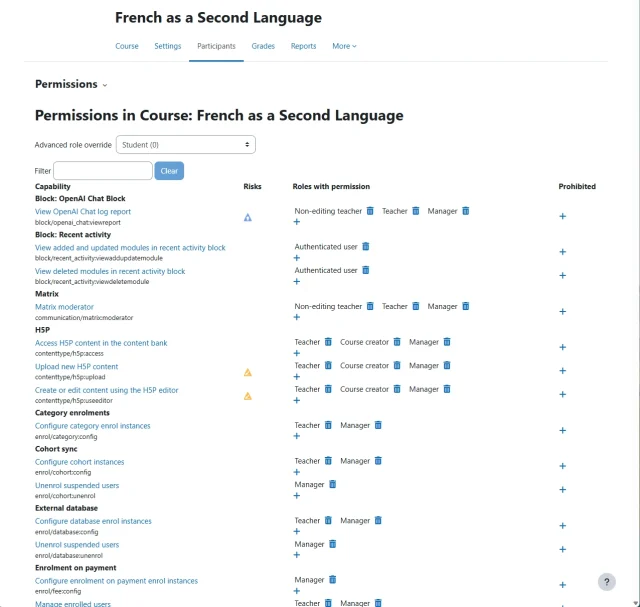
Use the “Check Permissions” Tool
This tool provides a detailed breakdown of what a specific user can and cannot do.
It is especially useful when dealing with complex role overrides.
Review Restriction Summaries
Moodle displays restriction summaries directly under activities.
These messages often reveal exactly why an activity is hidden or inaccessible.
Test with Real User Accounts
Switching roles is helpful, but testing with an actual student account provides the most accurate results, especially in multi tenant environments.
Preventing This Issue in the Future

Preventing visibility issues requires a balance between flexibility and simplicity.
Best practices include:
- Design courses with clear and minimal access rules
- Avoid chaining too many dependencies together
- Standardize role configurations across the platform
- Regularly audit cohort and enrollment structures
- Test courses before publishing
Consistency is more important than complexity when it comes to reliable course delivery.
Why This Matters for Learner Experience

Forum visibility is directly tied to engagement and course effectiveness.
When forums are hidden or inaccessible:
- Students miss collaborative learning opportunities
- Required activities may be skipped unintentionally
- Completion tracking may fail
- Frustration increases, leading to support requests
A smooth and predictable experience is essential for maintaining learner confidence.
Benefits of Hiring Moodle Expert Developers for Moodle Support

Moodle forum visibility issues are often not caused by a single setting, but by the interaction between multiple layers such as restrict access rules, completion tracking, group logic, and enrollment structures. In complex environments, especially multi tenant setups like IOMAD, these layers can overlap in ways that are difficult to diagnose without a deep understanding of how Moodle evaluates access conditions. A Moodle expert can quickly trace these dependencies, identify hidden conflicts, and resolve issues without relying on trial and error.
Beyond fixing the immediate problem, a Moodle expert helps establish a more reliable and scalable course design framework. This includes simplifying access logic, standardizing role permissions, and ensuring consistent behavior across courses and tenants. The result is fewer support tickets, improved learner experience, and a platform that behaves predictably as your organization grows.
