

In today’s fast changing professional landscape, learning doesn’t stop at graduation. From healthcare providers maintaining licensure through Continuing Medical Education (CME), to accountants fulfilling Continuing Professional Education (CPE) requirements, to employees completing general Continuing Education (CE) programs, organizations must ensure ongoing skill development and regulatory compliance. Managing these programs effectively means more than offering courses, it requires precise credit tracking, transparent reporting, and streamlined certification. Moodle, with the right strategies and enhancements, provides a flexible foundation for building robust CE management systems.
Working with Minefield is a life changing experience. From Product knowledge to technical expertise the team has gone above and beyond the call of duty more times then I can count.
Greg Shorland
Funeral Learning Hub
Outline
-
-
Why Continuing Education Management Matters
-
Disadvantages of Tracking CE/CME/CPE Using Spreadsheets or Paper
-
Benefits of Tracking CE/CME/CPD in Moodle
-
How Continuing Education Is Typically Tracked
-
Enabling Continuing Education Management in Moodle
-
Custom Features and Plugins Often Needed
-
Bridging CE Requirements and Moodle Capabilities
-
Frequently Asked Questions(FAQs)
-
Why Continuing Education Management Matters

Before diving into technical strategies, it’s important to understand why CE management has become such a critical part of professional development. Regardless of industry, the terms CME, CE, and CPE all describe the same principle: ongoing education to maintain professional standing.
-
Continuing Medical Education (CME): Healthcare providers earn credits to maintain licensure, renew board certifications, and stay current with clinical advances.
-
Continuing Education (CE): A broad category covering courses for adult learners, corporate training programs, and certifications that help employees advance or retrain.
-
Continuing Professional Education (CPE): Often mandated in fields like accounting, law, or finance, where professionals must prove they’ve completed specific hours each year in compliance with regulatory bodies.
Although the terminology varies, the common thread is accountability. Organizations need systems that can reliably track completions, record hours, and generate documentation for audits. Without a structured approach, CE programs risk becoming fragmented, error prone, and frustrating for learners and administrators alike. Moodle provides a way to centralize this process.
Disadvantages of Tracking CE/CME/CPE Using Spreadsheets or Paper

Before implementing Moodle, many organizations still rely on Excel files or paper sign-in sheets. While easy at first, they create significant long term problems.
- Lack of accuracy and version control: Multiple admins editing different spreadsheets leads to inconsistent totals, overwritten data, and human error.
- No automated completion tracking: Paper lists and spreadsheets cannot confirm whether a learner watched a lecture, passed a quiz, or completed a reflection form.
- Difficult audit preparation: Regulators increasingly expect detailed and timestamped evidence. Paper and Excel require manual compilation and can easily fail an audit.
- No learner self service: Learners cannot check their progress, download certificates, or view required hours without emailing admins.
- No data security: Paper files can be lost. Spreadsheets can be emailed to the wrong people. Neither meets modern data governance or privacy standards.
- No integration with enterprise systems: CE/CME organizations often use iMIS, Salesforce, Dynamics 365, or HRIS platforms. Spreadsheets cannot sync with these systems.
Benefits of Tracking CE/CME/CPD in Moodle

Tracking CE, CME, and CPD inside Moodle transforms a manual, error-prone process into an organized and automated workflow. It centralizes credits, improves accuracy, and gives both administrators and learners clear, real time visibility into progress and compliance.
- Centralized, automated tracking: All CE hours are stored within each learner profile automatically.
- Accurate, timestamped audit trails: Every completion includes logs, timestamps, activity names, and attempts.
- Real time learner dashboards: Learners see:
-
-
CE progress
-
Category totals
-
Certificates
-
Annual requirements
-
Time remaining before renewal
-
- Enterprise integrations: Moodle connects with iMIS, Salesforce, HRIS, and credentialing software.
- Reduced administrative workload: Certificates, transcripts, and exports are all automated.
- Strong data security & governance: Role based access, audit logs, configurable privacy settings.
- Scalability: Supports thousands of learners, annual reporting cycles, and multi-tenant CE structures (via Iomad).
How Continuing Education is Typically Tracked

To support CE, CME, and CPE programs, Moodle must replicate the same structured approach used by licensing boards and professional associations. In traditional CE systems, credits are assigned to courses, learners complete required tasks, and administrators generate transcripts that can be submitted to regulators. Moodle mirrors this workflow through custom fields, completion tracking, and reporting tools.
Assigning CE Hours in a Course
Each course is assigned a CE value using a custom course field such as “CE Hours.” Administrators enter the number of hours directly into the course settings (e.g., 3 hours, 5 hours, or 1.5 hours). This value becomes part of the user’s transcript once the course is completed.
Completion Requirements
CE hours are only awarded when learners complete all required components of the course—for example:
-
Watching a video or attending a live session
-
Passing an assessment
-
Completing an evaluation form
-
Acknowledging required policies
Moodle’s built-in completion tracking and conditional activities ensure credits are only released after all steps are finished.
CE Certificates and Transcripts
Once requirements are met, Moodle can automatically:
-
Generate CE certificates (via the Custom Certificate plugin)
-
Record CE hours in the learner’s profile
-
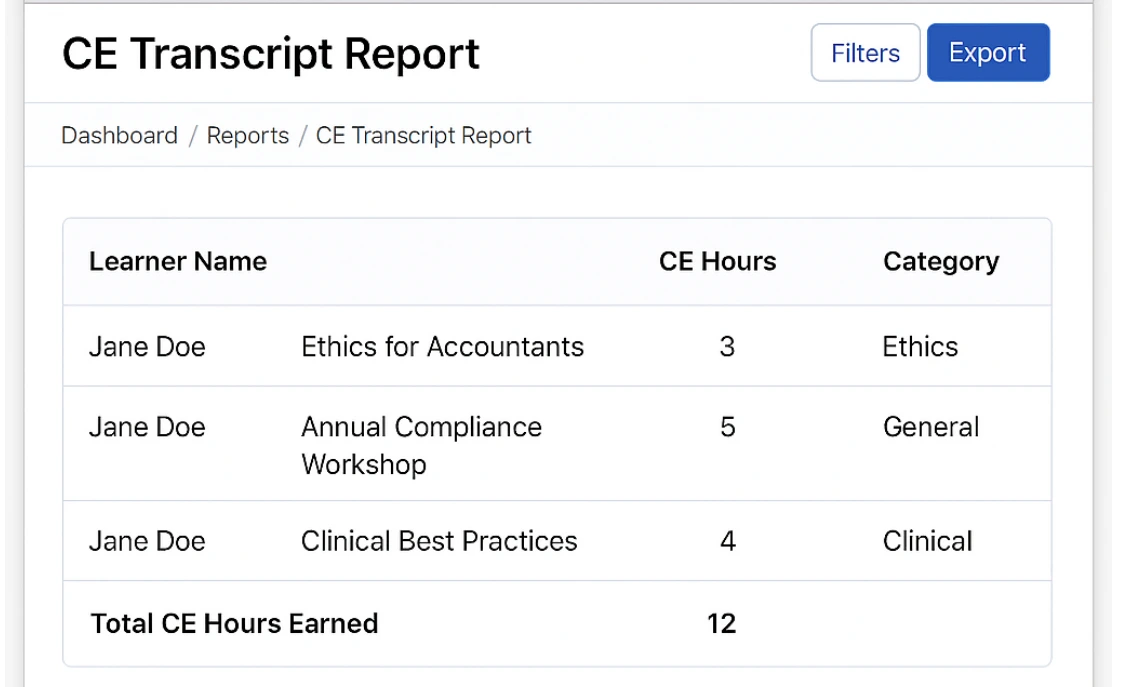
Produce transcript reports showing credit totals and category breakdowns
Enabling Continuing Education Management in Moodle
Moodle’s flexibility makes it well suited for CE programs, but out of the box it requires careful configuration. The following strategies illustrate how CE workflows can be supported.
1. Course Credit Assignment
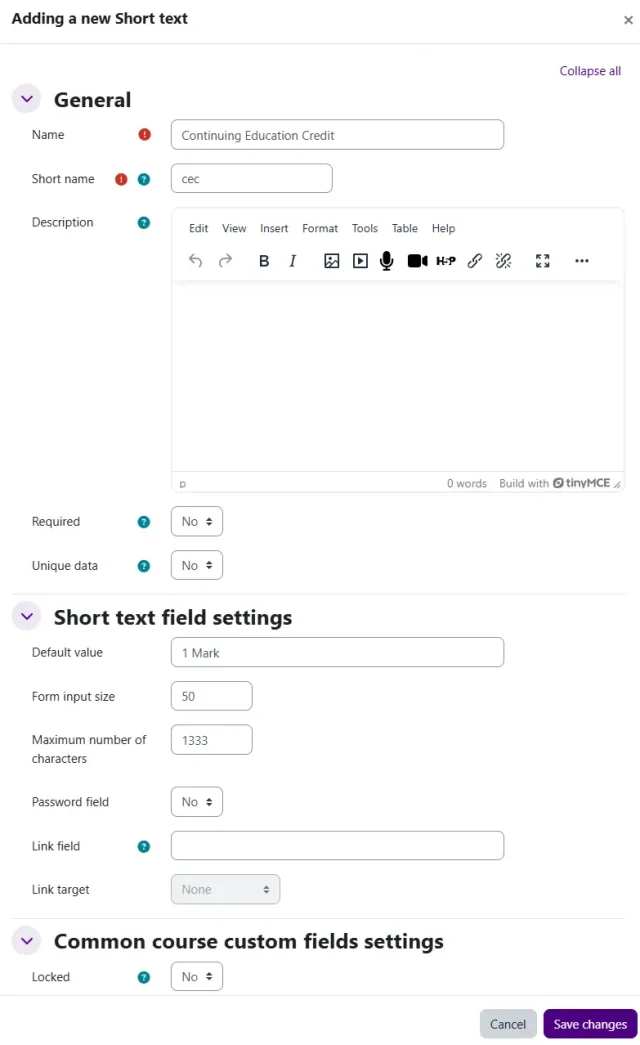
To mirror industry practices, each course or activity needs a credit value. Moodle can manage this through custom course fields. For instance, an online module could be assigned “1 CME credit” and this value would feed into a learner’s transcript once completed. Proper setup ensures administrators don’t need to manually calculate totals.
2. Completion Tracking and Conditional Activities
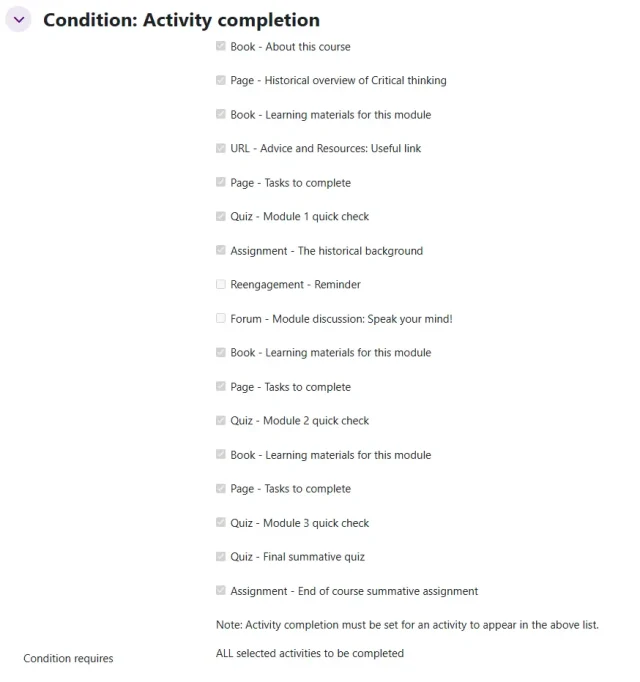
CE requires learners to do more than just click through a course. Moodle’s built in completion tracking enforces prerequisites, for example, watching a lecture, passing a quiz, and submitting an evaluation form before credits are released. By using conditional activities, administrators can ensure that credits are only awarded when every step is properly completed.
3. Certificates and Badges
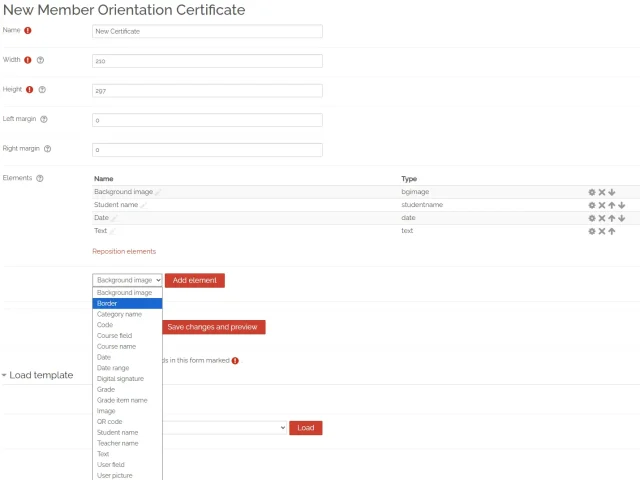
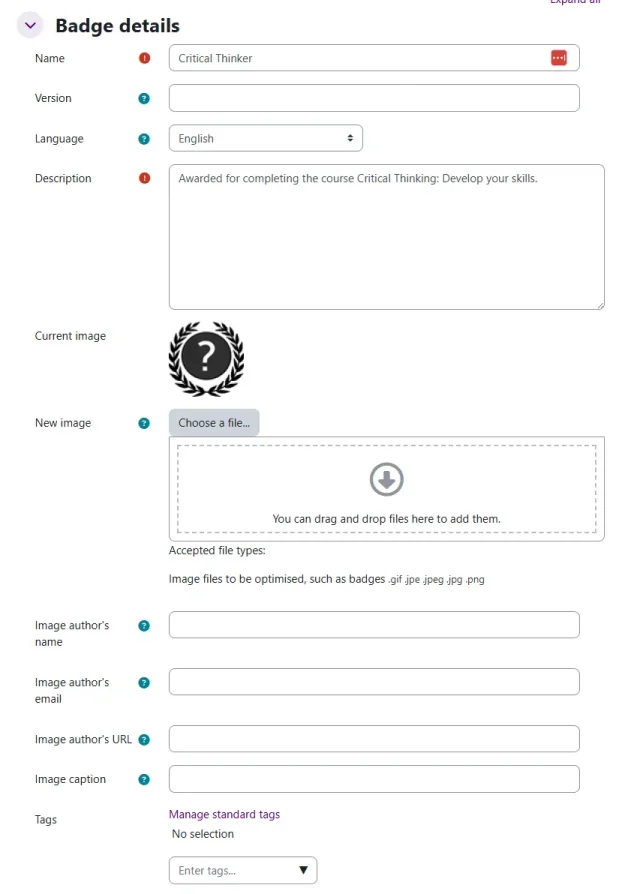
Learners need documentation they can present to regulators or employers. Moodle supports this with plugins like Custom Certificate, which can automatically generate personalized PDFs containing course details, CE hours, and official signatures. For more flexible recognition, badges can be used to provide digital proof of accomplishments, ideal for professional networking platforms.
4. Credit Transcripts & Reports
Tracking individual completions is not enough, administrators must compile full transcripts. Moodle’s core reporting tools, combined with plugins like Configurable Reports or LearnerScript, allow organizations to generate detailed credit reports. These can show total hours earned, progress toward yearly requirements, and breakdowns by category. With the right configuration, Moodle can replicate the transcript functions of commercial CE systems.
5. Integrations with External Systems
CE programs rarely operate alone. Most CE/CME/CPD organizations use enterprise platforms such as iMIS, Salesforce, or Dynamics 365 to store membership data, licensing records, and long term CE histories. Moodle integrates with these systems through APIs, SSO, and automated reporting workflows, ensuring CE completions, certificates, and credit totals flow smoothly into external databases without manual work.
Common integration patterns include syncing user profiles, pushing CE completions to licensing records, updating category totals (e.g., ethics or clinical hours), and triggering renewal workflows.
Related integration articles:
-
Integrating Moodle with Salesforce Strategies and Insights — Comprehensive overview of connecting Moodle with Salesforce to align learning outcomes with business performance.
-
How to Migrate Thinkific to Iomad — step-by-step breakdown of transitioning courses and users from Thinkific into a multitenant Moodle setup
-
How to Migrate from Moodle to Iomad — how to convert an existing single Moodle instance into a multitenant structure with tenant isolation
-
Moodle Multi Tenancy Plugin Overview — deep dive into multi tenancy plugins, their features, and best practices
-
How to Migrate from Docebo to Moodle — migrating content, users, and assessments from Docebo into Moodle
-
SharePoint to Moodle Migration Strategies — tactics for moving documents, collaboration content, and user workflows from SharePoint into Moodle
Custom Features and Plugins Often Needed

While Moodle offers strong core tools, CE programs often need customization or third-party plugins, such as:
-
Custom Certificate – for personalized CE documentation.
-
Learning Plans / Competencies – to track by category or specialization.
-
Report Builder or LearnerScript – for advanced CE credit reports.
-
Custom CE Credit Tracker – a plugin designed to handle specialized compliance and reporting requirements.
-
Multitenancy (Iomad) – when multiple organizations need isolated CE management in one platform.
Bridging CE Requirements and Moodle Capabilities

Implementing Continuing Education (CME, CE, or CPE) in Moodle goes beyond installing a few plugins. It requires a deep understanding of credit frameworks, compliance rules, and learner experience design. A Moodle expert ensures your system is not only configured correctly but also optimized for long-term sustainability. From setting up custom credit trackers and certificates to building advanced reports and integrating with HR or licensing systems, Moodle experts bring practical solutions that save time and reduce compliance risk.
By working with a partner, organizations gain access to specialized knowledge, custom development, and ongoing support. Instead of struggling with trial-and-error configurations, you can launch a system that meets industry standards from day one. This translates into better learner satisfaction, streamlined administrative processes, and peace of mind knowing your CE program is audit-ready and future-proof.
